Transparent mail redirection through iptables
The header can be continued: ... or smooth transfer of mail to another server .
Recently, there was a task - to realize the possibility of using a mail server that does not have direct access to the Internet. And it should work instead of the old one, which works naturally under a different IP address.
The principal moment - mail was initially stored on the gateway. We will configure iptables on the gateway, iptables on the mail server do not need to be configured.
Initial data:
server - CentOS 5
192.168.0.3 - mail server ah-pi
192.168.0.1 - internal ah-pi address of the former mail server / gateway
199.199.199.199 - ip address of the former mail server / gateway
eth0 - local interface on the gateway
eth1 - external interface on the gateway
')
Setting up the network interface on the mail server:
ip address: 192.168.0.3
mask: 255.255.255.0
Gateway: 192.168.0.1
We will redirect IMAP (port 143), SMTP (port 25).
Let's proceed directly to the implementation:
1. Receive mail
1.1.1
# All that came to the internal interface for mail ports - we redirect
1.1.2
# All that came to the external interface via mail ports - we redirect
1.2
# Change the source IP address of the client to the IP address of the gateway.
# It is very important to do SNAT only for computers on the local network, otherwise RBL checks will not work when receiving mail,
# since everything will be received from one IP address. This is also bad because you can’t impose a limit on the number of
# connections from a single IP address.
1.3
# Enable port forwarding after port forwarding on the gateway
2. Sending mail
2.1
# Allow sending mail from mail server
2.2
# We send packets to the Internet, of course, only from one IP address
Do not forget about the prerequisite
/etc/sysctl.conf:
net.ipv4.ip_forward = 1
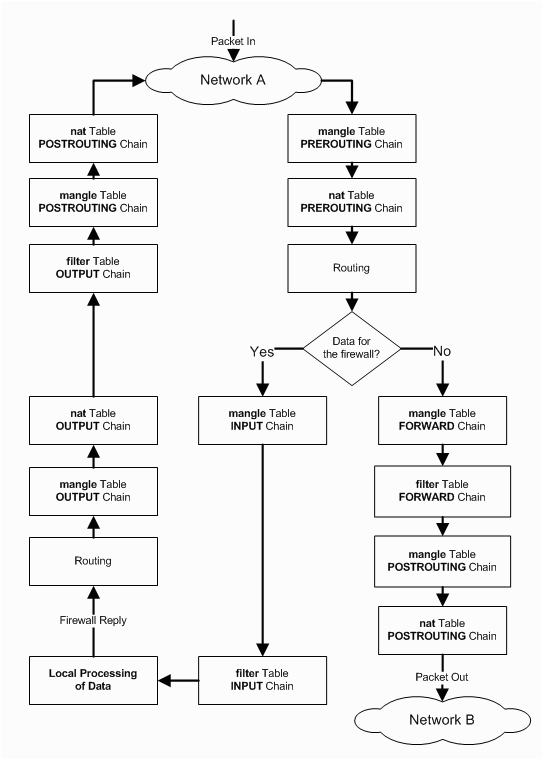
Finally, a detailed iptables operation scheme.
Addition.
Natural desire is the unification of domain names to configure mail clients.
So that the setting of the mail client outside the office does not differ from the setting inside the office.
Moreover, the new version of Thunderbird (which we mainly use) has a wizard for automatic detection of SMTP, POP, IMAP servers for a custom account.
We will focus on common names:
imap.mydomain.ru
smtp.mydomain.ru
mx record for domain
We need to set up records for the domain 2 times - for the domain itself in the admin of the domain name and in the DNS on the local network.
Consider setting up records on a DNS server on the local network.
Add to named.conf:
Create master / mydomain.ru:
Check with nslookup. Everything!
Recently, there was a task - to realize the possibility of using a mail server that does not have direct access to the Internet. And it should work instead of the old one, which works naturally under a different IP address.
The principal moment - mail was initially stored on the gateway. We will configure iptables on the gateway, iptables on the mail server do not need to be configured.
Initial data:
server - CentOS 5
192.168.0.3 - mail server ah-pi
192.168.0.1 - internal ah-pi address of the former mail server / gateway
199.199.199.199 - ip address of the former mail server / gateway
eth0 - local interface on the gateway
eth1 - external interface on the gateway
')
Setting up the network interface on the mail server:
ip address: 192.168.0.3
mask: 255.255.255.0
Gateway: 192.168.0.1
We will redirect IMAP (port 143), SMTP (port 25).
Let's proceed directly to the implementation:
1. Receive mail
1.1.1
# All that came to the internal interface for mail ports - we redirect
iptables -t nat -A PREROUTING -i eth0 -p tcp -d 192.168.0.3 --dport 25 -j DNAT --to-destination 192.168.0.3:25 iptables -t nat -A PREROUTING -i eth0 -p tcp -d 192.168.0.3 --dport 143 -j DNAT --to-destination 192.168.0.3:143 1.1.2
# All that came to the external interface via mail ports - we redirect
iptables -t nat -A PREROUTING -i eth1 -p tcp -d 199.199.199.199 --dport 143 -j DNAT --to-destination 192.168.0.3:143 iptables -t nat -A PREROUTING -i eth1 -p tcp -d 199.199.199.199 --dport 25 -j DNAT --to-destination 192.168.0.3:25 1.2
# Change the source IP address of the client to the IP address of the gateway.
# It is very important to do SNAT only for computers on the local network, otherwise RBL checks will not work when receiving mail,
# since everything will be received from one IP address. This is also bad because you can’t impose a limit on the number of
# connections from a single IP address.
iptables -t nat -A POSTROUTING -o eth0 -p tcp -s 192.168.0.0/24 -d 192.168.0.3 --dport 25 -j SNAT --to-source 192.168.0.1 iptables -t nat -A POSTROUTING -o eth0 -p tcp -s 192.168.0.0/24 -d 192.168.0.3 --dport 143 -j SNAT --to-source 192.168.0.1 1.3
# Enable port forwarding after port forwarding on the gateway
iptables -A FORWARD -p tcp -d 192.168.0.3 --dport 143 -j ACCEPT iptables -A FORWARD -p tcp -d 192.168.0.3 --dport 25 -j ACCEPT 2. Sending mail
2.1
# Allow sending mail from mail server
iptables -A FORWARD -s 192.168.0.3 -j ACCEPT 2.2
# We send packets to the Internet, of course, only from one IP address
iptables -t nat -A POSTROUTING -o eth1 -j SNAT --to-source 199.199.199.199 Do not forget about the prerequisite
/etc/sysctl.conf:
net.ipv4.ip_forward = 1
Finally, a detailed iptables operation scheme.
Addition.
Natural desire is the unification of domain names to configure mail clients.
So that the setting of the mail client outside the office does not differ from the setting inside the office.
Moreover, the new version of Thunderbird (which we mainly use) has a wizard for automatic detection of SMTP, POP, IMAP servers for a custom account.
We will focus on common names:
imap.mydomain.ru
smtp.mydomain.ru
mx record for domain
We need to set up records for the domain 2 times - for the domain itself in the admin of the domain name and in the DNS on the local network.
Consider setting up records on a DNS server on the local network.
Add to named.conf:
view "internal" { match-clients { localnets; }; match-destinations { localnets; }; .... zone "mydomain.ru" IN { type master; file "master/mydomain.ru"; allow-update { 127.0.0.1; 192.168.0.1; }; }; }; Create master / mydomain.ru:
$ORIGIN . $TTL 259200 ; 3 days mydomain.ru IN SOA ns.mydomain.ru. root.mydomain.ru. ( 23840 ; serial 10800 ; refresh (3 hours) 900 ; retry (15 minutes) 604800 ; expire (1 week) 86400 ; minimum (1 day) ) NS ns.mydomain.ru. $ORIGIN mydomain.ru. @ IN MX 10 mail.mydomain.ru. ns A 192.168.0.1 mail A 192.168.0.3 imap CNAME mail smtp CNAME mail Check with nslookup. Everything!
Source: https://habr.com/ru/post/99898/
All Articles