The first experience of using the device for reading electronic books Qumo Libro
Hello! For quite a long time, e-book readers based on e-ink displays, which allow you to always have a collection of favorite literature that does not collect dust and a high-tech gadget, from which we are all here, are always in my view. In addition, such devices do not spoil (and without that red) eyes with their hellish glow and cherish (ha-ha) our precious nature. The fact is that I cannot read books categorically from the LCD screens of computers: something constantly distracts, interferes with multitasking, so is it ... In addition, IMHO, the ideal posture for reading is lying, and without a two-kilogram warming bandura on the belly.

In general, it was decided: sooner or later, to take a book! But first of all, I was confused by the assortment in our local stores (endless Chinese-plastic poket- and lbuki at exorbitant prices), and secondly, the reviews that technical literature (pdf, djvu) on such devices cannot be read by any means, and only because of the small size of the screen, but also low power devices.
Not so long ago, at a reasonable price, Iriver Story appeared, which I very much liked outwardly, however, after reading terrible reviews about it, I decided to wait. And, as it turned out, did the right thing. When Qumo Libro appeared, there was a burning desire to take a chance and try it, the benefit was an excuse. By the way, I did not hold e-books in my hands before my purchase.
')
Libro is a compact 6-inch e-book with a Qwerty keyboard. We now sell for about 8500 rubles. There is no touchscreen or wireless modules, they are in the E-ink reader and to nothing. This is an ODM device developed by Sibrary . The Chinese, in turn, drew inspiration from the Amazon Kindle, the right side of the Libro (buttons and joystick) is virtually identical to it.
An amusing situation is connected with the purchase: the book already paid for in the store turned out to be the last copy with a small scratch on the back wall in the vicinity of the opening button, so they gave a small, Kyumovskaya flash drive as a gift. Of course, not a bit upset, plus one boot flash drive in the house has not disturbed anyone yet!
Now about the device. Immediately after extraction, a complete case rushed to sniff (a known problem) - it really smells of natural China, but the smell quickly disappears and is no longer felt at a distance at which the book is read. Then I updated the firmware to 1.1 without any problems (they are amused by the “flashers” who bought the e-book, but they don’t know how to read the instructions before the firmware). On weekends, I read it in nature, holding the book in the case, but at home I tried to read without it, the tactile sensations from the perfectly assembled, almost monolithic, case are just awesome, I am delighted! It was not possible to test the screen for color fading under direct sunlight, but everything reads perfectly on the street. At first, the remnants of the previous pages were a little confused with a partial update, but when you read them you quickly stop noticing.
The case, indeed, in the good sense of the word, is striking: all the buttons are pressed perfectly, no squeaks, no backlash, there’s no need for anything better.
Immediately I tried to upload freshly downloaded books to fb2 and PDF documentation. With fb2, everything works fine, at least to my unpretentious look. 4 fonts are preset, 3 more can be added. The font size when reading varies within ample limits, it is possible to rotate the text 90 degrees. In addition, there is a G-sensor that turns the text in an arbitrary direction, it is very sensitive, so I turned it off. Using the qwerty-keyboard, you can search by text and go to the desired page. Transports in the text are placed, but so far footnotes do not work in fb2.
On the profile forum , people swear at the impossibility of setting up the line spacing. I do not know, maybe I still have too little experience in reading, but I was completely satisfied with the standard intervals.
Finally, what bothered most was reading the PDF. Immediately, he was morally prepared for the fact that it would be necessary to read strictly in landscape orientation and stationary (that is, without any shaking or movement). I tried to read two files. One is typically a poorly scanned book (with crooked pages, divorces, etc.) and the second is a “correct” PDF with real text. I did what I missed when choosing a reader - I took a picture of the screen with open files and next to it I put a familiar device for reference, so that it was clear what size the letters were. Specially posted photos, suddenly someone will be useful.
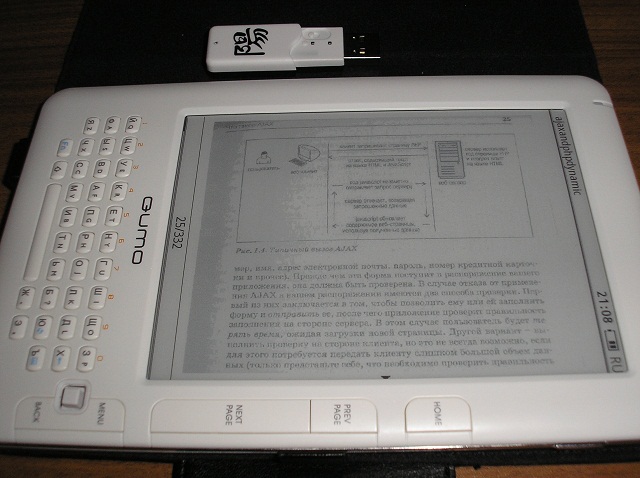
Bad scan book. It looks, at first glance, terrible. However, it is quite suitable for reading (he was surprised). The only thing that some schemes and drawings are incomprehensible, we have to increase. By the way, the file you see in the photo weighs 38 megabytes, the book opens it in 5-6 seconds. Opened and larger, the time is not very different. That is, about any tens of seconds to open / scroll pages of speech is not, I do not know whether the credit for the hardware of the Libro, or just those who wrote about electronic books deliberately exaggerated their slowness.
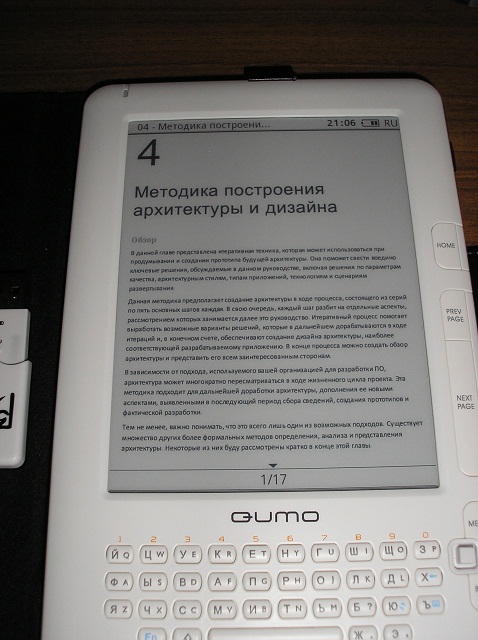
PDF with text. Here the text looks great, in principle, you can even read in portrait orientation, but I am so uncomfortable. In the landscape everything is fine. The only problem is when you increase the font with reformatting, hyphenation does not work. That is, this mode can not be used, but the increase in the entire page "like a picture" is functioning properly.

That's why the device cannot be used for sure - these are PDF scans of magazines. That is, of course, pictures and headlines can be glanced, but it’s a pleasure to increase the text to readability and then scroll back and forth - the pleasure is below average. Perhaps it would be more convenient if you could select a fragment of the page and increase it to the full screen, but still it is better to use a computer for such purposes. Or a paper magazine.
As a summary of the reading of the "picture" formats, we can say that the devil is not so bad as he is painted. Those who want to read technical scans in PDF will do it. There are no minute freezes when turning over, the only thing to try is to find scans with the highest quality possible. Bold minus can be put for the lack of support for djvu, but the manufacturer claims it is in future versions of the firmware. If the reading options are the same as the PDF, it will be great.
We can mention the multimedia capabilities of the book. It is certainly understandable that the player and the radio device for reading are like a dead poultice, but since there is a possibility, why not pour a few albums of relaxing music, which is perfectly readable, or a couple of podcasts, for a rest from reading. I do not accept the sound of the built-in speakers of mobile devices, but then Libro was pleasantly surprised. Not only is the stereo, so also the sound at the level of budget laptops, for the voice certainly fit.
I don’t listen to FM radio, but I launched it for interest. I didn’t figure out how to switch from headphones to built-in speakers (headphones play the role of an antenna), it’s strange if there is no such function.
In general, software books on the subject of audio still damp. For example, I did not manage to switch from the menu or the book reader application to the player playing in the background.
In the current firmware version there are no applications (except text / folder search) that would use a qwerty keyboard. Due to the origin of the device, it is hard for me to believe that Chinese developers will build Russian dictionaries here, but it would be nice to have at least a small application for writing notes, this could be useful.
The device has no available internal memory, books and other files are thrown onto a memory card (MicroSD, 2GB in the set). For books, the Documents folder is reserved, the further structure of the library is on the user's conscience. The names of books and other files are shown "as is". When working with the file system, one basic operation is supported - files can be deleted.
Summing up, we can say one thing: I definitely liked the Qumo Libro device! For my modest reading needs for fb2 and, at times, pdf, it is quite enough. Tactile sensations when used are simply wonderful, the Thing is felt. A word for the developers, we will wait for new versions of the software, with a large number of settings, with support for new formats and applications, even though they use the keyboard. Let's hope that Qumo will not abandon support for its product.
In general, for myself, I realized that the devices on E-ink are quite suitable for use and, moreover, very convenient. The experiment with the purchase without launching and testing a completely unfamiliar device was justified, and if you like to read, but you have to spoil the eyes of the monitor, then you should probably pay close attention to E-ink.
Flour choice
In general, it was decided: sooner or later, to take a book! But first of all, I was confused by the assortment in our local stores (endless Chinese-plastic poket- and lbuki at exorbitant prices), and secondly, the reviews that technical literature (pdf, djvu) on such devices cannot be read by any means, and only because of the small size of the screen, but also low power devices.
Not so long ago, at a reasonable price, Iriver Story appeared, which I very much liked outwardly, however, after reading terrible reviews about it, I decided to wait. And, as it turned out, did the right thing. When Qumo Libro appeared, there was a burning desire to take a chance and try it, the benefit was an excuse. By the way, I did not hold e-books in my hands before my purchase.
')
Libro is a compact 6-inch e-book with a Qwerty keyboard. We now sell for about 8500 rubles. There is no touchscreen or wireless modules, they are in the E-ink reader and to nothing. This is an ODM device developed by Sibrary . The Chinese, in turn, drew inspiration from the Amazon Kindle, the right side of the Libro (buttons and joystick) is virtually identical to it.
An amusing situation is connected with the purchase: the book already paid for in the store turned out to be the last copy with a small scratch on the back wall in the vicinity of the opening button, so they gave a small, Kyumovskaya flash drive as a gift. Of course, not a bit upset, plus one boot flash drive in the house has not disturbed anyone yet!
First sensations
Now about the device. Immediately after extraction, a complete case rushed to sniff (a known problem) - it really smells of natural China, but the smell quickly disappears and is no longer felt at a distance at which the book is read. Then I updated the firmware to 1.1 without any problems (they are amused by the “flashers” who bought the e-book, but they don’t know how to read the instructions before the firmware). On weekends, I read it in nature, holding the book in the case, but at home I tried to read without it, the tactile sensations from the perfectly assembled, almost monolithic, case are just awesome, I am delighted! It was not possible to test the screen for color fading under direct sunlight, but everything reads perfectly on the street. At first, the remnants of the previous pages were a little confused with a partial update, but when you read them you quickly stop noticing.
The case, indeed, in the good sense of the word, is striking: all the buttons are pressed perfectly, no squeaks, no backlash, there’s no need for anything better.
User Expierence
Immediately I tried to upload freshly downloaded books to fb2 and PDF documentation. With fb2, everything works fine, at least to my unpretentious look. 4 fonts are preset, 3 more can be added. The font size when reading varies within ample limits, it is possible to rotate the text 90 degrees. In addition, there is a G-sensor that turns the text in an arbitrary direction, it is very sensitive, so I turned it off. Using the qwerty-keyboard, you can search by text and go to the desired page. Transports in the text are placed, but so far footnotes do not work in fb2.
On the profile forum , people swear at the impossibility of setting up the line spacing. I do not know, maybe I still have too little experience in reading, but I was completely satisfied with the standard intervals.
Finally, what bothered most was reading the PDF. Immediately, he was morally prepared for the fact that it would be necessary to read strictly in landscape orientation and stationary (that is, without any shaking or movement). I tried to read two files. One is typically a poorly scanned book (with crooked pages, divorces, etc.) and the second is a “correct” PDF with real text. I did what I missed when choosing a reader - I took a picture of the screen with open files and next to it I put a familiar device for reference, so that it was clear what size the letters were. Specially posted photos, suddenly someone will be useful.
Bad scan book. It looks, at first glance, terrible. However, it is quite suitable for reading (he was surprised). The only thing that some schemes and drawings are incomprehensible, we have to increase. By the way, the file you see in the photo weighs 38 megabytes, the book opens it in 5-6 seconds. Opened and larger, the time is not very different. That is, about any tens of seconds to open / scroll pages of speech is not, I do not know whether the credit for the hardware of the Libro, or just those who wrote about electronic books deliberately exaggerated their slowness.
PDF with text. Here the text looks great, in principle, you can even read in portrait orientation, but I am so uncomfortable. In the landscape everything is fine. The only problem is when you increase the font with reformatting, hyphenation does not work. That is, this mode can not be used, but the increase in the entire page "like a picture" is functioning properly.
That's why the device cannot be used for sure - these are PDF scans of magazines. That is, of course, pictures and headlines can be glanced, but it’s a pleasure to increase the text to readability and then scroll back and forth - the pleasure is below average. Perhaps it would be more convenient if you could select a fragment of the page and increase it to the full screen, but still it is better to use a computer for such purposes. Or a paper magazine.
As a summary of the reading of the "picture" formats, we can say that the devil is not so bad as he is painted. Those who want to read technical scans in PDF will do it. There are no minute freezes when turning over, the only thing to try is to find scans with the highest quality possible. Bold minus can be put for the lack of support for djvu, but the manufacturer claims it is in future versions of the firmware. If the reading options are the same as the PDF, it will be great.
Multimedia
We can mention the multimedia capabilities of the book. It is certainly understandable that the player and the radio device for reading are like a dead poultice, but since there is a possibility, why not pour a few albums of relaxing music, which is perfectly readable, or a couple of podcasts, for a rest from reading. I do not accept the sound of the built-in speakers of mobile devices, but then Libro was pleasantly surprised. Not only is the stereo, so also the sound at the level of budget laptops, for the voice certainly fit.
I don’t listen to FM radio, but I launched it for interest. I didn’t figure out how to switch from headphones to built-in speakers (headphones play the role of an antenna), it’s strange if there is no such function.
In general, software books on the subject of audio still damp. For example, I did not manage to switch from the menu or the book reader application to the player playing in the background.
System software
In the current firmware version there are no applications (except text / folder search) that would use a qwerty keyboard. Due to the origin of the device, it is hard for me to believe that Chinese developers will build Russian dictionaries here, but it would be nice to have at least a small application for writing notes, this could be useful.
The device has no available internal memory, books and other files are thrown onto a memory card (MicroSD, 2GB in the set). For books, the Documents folder is reserved, the further structure of the library is on the user's conscience. The names of books and other files are shown "as is". When working with the file system, one basic operation is supported - files can be deleted.
Total
Summing up, we can say one thing: I definitely liked the Qumo Libro device! For my modest reading needs for fb2 and, at times, pdf, it is quite enough. Tactile sensations when used are simply wonderful, the Thing is felt. A word for the developers, we will wait for new versions of the software, with a large number of settings, with support for new formats and applications, even though they use the keyboard. Let's hope that Qumo will not abandon support for its product.
In general, for myself, I realized that the devices on E-ink are quite suitable for use and, moreover, very convenient. The experiment with the purchase without launching and testing a completely unfamiliar device was justified, and if you like to read, but you have to spoil the eyes of the monitor, then you should probably pay close attention to E-ink.
Source: https://habr.com/ru/post/99830/
All Articles