QUMO Libro e-book - 10 days of use
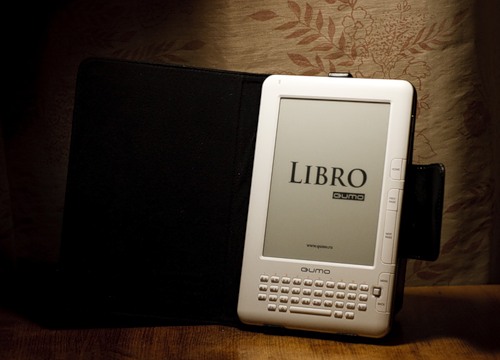
For a long time I was walking around and around e-books, but somehow I didn’t decide to buy myself any price, I wasn’t satisfied with the price, or the lack of confidence that I would use this type of device. However (quite by accident) I came across a QUMO device in the store — the Libro e-book. The combination looked quite tempting - a 6 "screen at a price of less than $ 300 (and lower than competitive devices from PocketBook or Sony). After reading and studying the TTX a little, it was decided to purchase the device. Yes, I know that there is no SDK for it for PocketBooks, and the installation and development of additional software is currently impossible. Maybe something will change in the future, but I expected to use the device only for its intended purpose - for everything else there is a smartphone (more compact) and a laptop (more productive and functional).
')
When you take Libro in your hands, you don’t want to give it back - a thin and neat body, a beautiful metal back cover and a very decent build quality. The first impression is completed by a good, high-quality packaging in the form of a black box with magnetic locks and a layer of foam rubber inside, on which the logo of the manufacturing company is carved. The standard package includes the device itself, a charger with a USB connector, a USB cable itself, a cover with a magnetic lock, a 2 Gb memory card (the device supports cards up to 32 Gb), headphones and various paper documentation.
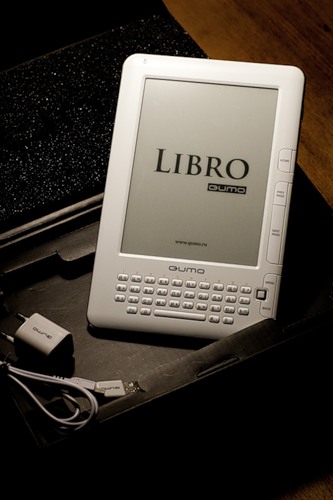
Partly because of the form, partly because of the white color, but for some reason I was reminded of the charger and cable about the products of one fruit company. The cover smells like leather and fixes the device quite well, but at the same time you can get the book very quickly due to the method of attachment to the brackets. I was quite pleased with the purchased device, and it was postponed until the next day - until the day of departure for rest.
I took the book the next day and copied my small library onto a memory card and decided to try Libro in action. Literally after several pages, I noticed something was wrong - on the third or fourth press of the Next Page button, double-flipping occurred. I began to check on other books, other formats - the effect was repeated. The most annoying thing in this situation was that it was about five hours before the train, and there was catastrophically little time fighting a device that had just been bought. With the help of search engines, forums and the official QUMO website, the device was flashed twice - first with firmware dated 05/17/2010, and only then with the latest from 06/22/2010. Twice because the latest firmware was not originally set to be installed. After killing everything for about an hour, I still went on vacation with peace of mind - the device worked, the pages were scrolled as it should. However, this glitch did not go away to the end - very rarely it manifests itself to this day, but the gravity sensor has started working, and there have been some improvements in the menu.
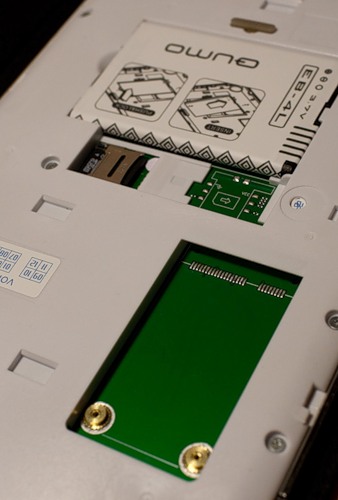
Having read on the Internet and having heard plenty of sellers about the modularity and extensibility of the Libro, I was a little upset with what I saw under the hood. Yes, there is a place for a Wi-Fi module and a 3G SIM card, but that's bad luck - the connectors are not soldered.
The device creates three directories on the memory card — Documents for books, Music for audio files, and Pictures for images. Further, on the desktop device there are shortcuts for quick access to these directories. However, there is also a simple explorer for navigating through the directories of a memory card with the support for search by name.
What is the most important thing in devices of this type - of course, this is a screen, and since it is almost the same for everyone, I will not focus on it, but I will say the following - with no other type of screens and devices (monitors, phones, tablets and PDA) I can not comfortably read for three to four hours. Here I am 100% satisfied, but this is not the credit of Libro. And yet - in direct sunlight, the screen starts to lead in a strange way - artifacts appear in dark areas.
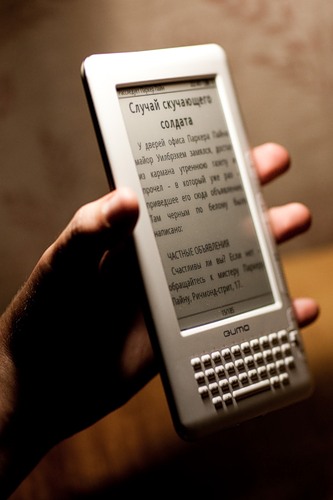
The device has 4 fonts preinstalled - Droid Sans Fallback, FreeSans, FreeMono and FreeSerif. The first font looks best (it is also the default), but with one strange problem — there are not some characters in it, such as Christmas tree quotes — squares with the character code appear instead. The last font, as the name implies, with serifs, but the quality of rendering does not allow me to use it. FreeSans normally displays all characters, and is acceptable by drawing. For the fonts, I would put the top three, because for the reader it is a very important parameter, and the manufacturer could provide a mechanism that allows the user to install their own fonts.
I mostly read books in fb2 format, because most of the described will relate to this format, although the pdf device understands and reads it is quite possible, but, in my opinion, it is still not very convenient. So, the main disadvantage is that it is impossible to use the table of contents, this functionality is simply not implemented. You can not walk on footnotes and links. In fact, only text and illustrations remained from fb2. Yes, we remember the position in the text, you can do a search, bookmark it (which helps a full keyboard), store a list of recent books for quick access. Another very convenient feature is that the navigation joystick changes the font size on the fly, which is very convenient when several people with different eyesight use the device at the same time. RTF is normally displayed and readable - no problem. Until now, I can not understand the logic of the page counter at the bottom of the screen - it changes by one only to the second or third flipping - i.e. it is possible to estimate the position in the text approximately, but it is impossible to go directly to any page. Most likely, the number of pages is calculated somewhere inside and does not depend on the font size.

It is very pleasant to supplement reading by listening to various musical works. Libro has an on-board audio player (with ogg support, by the way) and FM radio (only with headphones), a headphone jack and even two speakers. The quality of playback, the volume is quite acceptable, there are various modes (with repetition, without repetition), search for tracks. The FM radio is rather weak - I got a good reception in less than half the time, so you shouldn’t expect much of a tuner. And now another drawback is the background work of the player. It is, only here, unlike the instructions, I have not managed to find a la “show player” in any menu. Those. the music is playing, but in order to turn it off you have to go back to the audio directory and select a track, and when the player window appears, turn it off. I take it to the firmware glitch, but the flaw is serious. Yes, I didn’t use standard headphones.
In general, the device justified its purchase - for 10 days of vacation about 10 medium-sized books were read by me, my wife and child, and this sharing turned out to be quite convenient thanks to the history features and fast font changing. Well, about the difference in weight, I will not say that for the holiday season is important enough. But I would like to note that the software stuffing of the device is still very weak, little functional and contains errors. In my opinion, still opening the firmware (as for PocketBook) or at least the release of the SDK could solve a lot of problems and increase the attractiveness of the device for consumers, especially since everything is very good with the hardware and appearance.
')
First impressions and packaging
When you take Libro in your hands, you don’t want to give it back - a thin and neat body, a beautiful metal back cover and a very decent build quality. The first impression is completed by a good, high-quality packaging in the form of a black box with magnetic locks and a layer of foam rubber inside, on which the logo of the manufacturing company is carved. The standard package includes the device itself, a charger with a USB connector, a USB cable itself, a cover with a magnetic lock, a 2 Gb memory card (the device supports cards up to 32 Gb), headphones and various paper documentation.
Partly because of the form, partly because of the white color, but for some reason I was reminded of the charger and cable about the products of one fruit company. The cover smells like leather and fixes the device quite well, but at the same time you can get the book very quickly due to the method of attachment to the brackets. I was quite pleased with the purchased device, and it was postponed until the next day - until the day of departure for rest.
Flashing
I took the book the next day and copied my small library onto a memory card and decided to try Libro in action. Literally after several pages, I noticed something was wrong - on the third or fourth press of the Next Page button, double-flipping occurred. I began to check on other books, other formats - the effect was repeated. The most annoying thing in this situation was that it was about five hours before the train, and there was catastrophically little time fighting a device that had just been bought. With the help of search engines, forums and the official QUMO website, the device was flashed twice - first with firmware dated 05/17/2010, and only then with the latest from 06/22/2010. Twice because the latest firmware was not originally set to be installed. After killing everything for about an hour, I still went on vacation with peace of mind - the device worked, the pages were scrolled as it should. However, this glitch did not go away to the end - very rarely it manifests itself to this day, but the gravity sensor has started working, and there have been some improvements in the menu.
Expansion and Modularity
Having read on the Internet and having heard plenty of sellers about the modularity and extensibility of the Libro, I was a little upset with what I saw under the hood. Yes, there is a place for a Wi-Fi module and a 3G SIM card, but that's bad luck - the connectors are not soldered.
Using
The device creates three directories on the memory card — Documents for books, Music for audio files, and Pictures for images. Further, on the desktop device there are shortcuts for quick access to these directories. However, there is also a simple explorer for navigating through the directories of a memory card with the support for search by name.
What is the most important thing in devices of this type - of course, this is a screen, and since it is almost the same for everyone, I will not focus on it, but I will say the following - with no other type of screens and devices (monitors, phones, tablets and PDA) I can not comfortably read for three to four hours. Here I am 100% satisfied, but this is not the credit of Libro. And yet - in direct sunlight, the screen starts to lead in a strange way - artifacts appear in dark areas.
The device has 4 fonts preinstalled - Droid Sans Fallback, FreeSans, FreeMono and FreeSerif. The first font looks best (it is also the default), but with one strange problem — there are not some characters in it, such as Christmas tree quotes — squares with the character code appear instead. The last font, as the name implies, with serifs, but the quality of rendering does not allow me to use it. FreeSans normally displays all characters, and is acceptable by drawing. For the fonts, I would put the top three, because for the reader it is a very important parameter, and the manufacturer could provide a mechanism that allows the user to install their own fonts.
I mostly read books in fb2 format, because most of the described will relate to this format, although the pdf device understands and reads it is quite possible, but, in my opinion, it is still not very convenient. So, the main disadvantage is that it is impossible to use the table of contents, this functionality is simply not implemented. You can not walk on footnotes and links. In fact, only text and illustrations remained from fb2. Yes, we remember the position in the text, you can do a search, bookmark it (which helps a full keyboard), store a list of recent books for quick access. Another very convenient feature is that the navigation joystick changes the font size on the fly, which is very convenient when several people with different eyesight use the device at the same time. RTF is normally displayed and readable - no problem. Until now, I can not understand the logic of the page counter at the bottom of the screen - it changes by one only to the second or third flipping - i.e. it is possible to estimate the position in the text approximately, but it is impossible to go directly to any page. Most likely, the number of pages is calculated somewhere inside and does not depend on the font size.
It is very pleasant to supplement reading by listening to various musical works. Libro has an on-board audio player (with ogg support, by the way) and FM radio (only with headphones), a headphone jack and even two speakers. The quality of playback, the volume is quite acceptable, there are various modes (with repetition, without repetition), search for tracks. The FM radio is rather weak - I got a good reception in less than half the time, so you shouldn’t expect much of a tuner. And now another drawback is the background work of the player. It is, only here, unlike the instructions, I have not managed to find a la “show player” in any menu. Those. the music is playing, but in order to turn it off you have to go back to the audio directory and select a track, and when the player window appears, turn it off. I take it to the firmware glitch, but the flaw is serious. Yes, I didn’t use standard headphones.
Total
In general, the device justified its purchase - for 10 days of vacation about 10 medium-sized books were read by me, my wife and child, and this sharing turned out to be quite convenient thanks to the history features and fast font changing. Well, about the difference in weight, I will not say that for the holiday season is important enough. But I would like to note that the software stuffing of the device is still very weak, little functional and contains errors. In my opinion, still opening the firmware (as for PocketBook) or at least the release of the SDK could solve a lot of problems and increase the attractiveness of the device for consumers, especially since everything is very good with the hardware and appearance.
Source: https://habr.com/ru/post/99828/
All Articles