Online monitoring of transport with their own hands
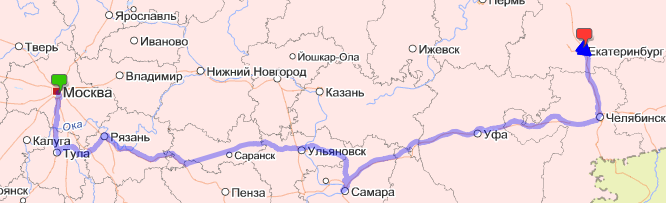
Always liked the idea of online monitoring of anything on the map. And now the opportunity to do something similar.
I want to share the process and the result of the development with the community.
A little background
The fact is that the guys from our project gathered in a motor rally around major cities in Russia, and in this connection, an idea came to my mind: it would be great if the site could always see the current location of the expedition.Began the search for this topic, the analysis of existing solutions.
I came to the following scheme: you need a device that after a certain period of time will send information about the current location via GPRS to the Internet somewhere, and later on our website will show a line (track) from all points on the map.
Device selection
The search for suitable devices has begun. The range is quite wide: starting with small personal trackers and ending with devices that are installed directly inside the car. Basically, all the devices are Chinese, but sometimes they even met domestic ones :)Ultimately, he focused on the Astron GT-102 : compact, cheapest, and has all the necessary functions.


I will say a few words about the purchase. I found the site where this model was sold for 3999 rubles, immediately called and tried to order.
However, there was a nuisance waiting for me: the seller said that they were not in stock, and the current lot was waiting for customs clearance at the border.
As a result, I waited a whole week, calling every day, waiting for this very customs clearance.
In the meantime, I found the same model on the well-known DealExtreme site, and at the price of $ 79.96 (~ 2400 rubles). I wanted to order, but did not want to risk, because deadlines were pressed, and the parcel could go for a week, or maybe a month and a half (there was an experience of ordering at this store).
Completion and packaging of goods in the Chinese online store and from our
By the way, a little about the configuration. She was surprised by pleasant snacks: a second battery, an additional back cover (with magnets, for attachment to the body), a protective case. The only thing missing was car charger.
')
So, the device is on the table, a new SIM card with a special “Internet” tariff plan has been purchased.
Tracker setup
It included a small booklet with instructions (even in Russian). The tracker, despite the presence of USB, is configured via SMS.The algorithm is simple: we send a message with a command and password from the phone and get the result of the execution in response. And in response, you can only get a message like
<> ok , <> error or not get anything at all (which does not mean that the command has not been applied).The tracker has two modes of information: either sends information via SMS to trusted numbers, or sends via GPRS. And initially the tracker sends data on a call to the SIM card that is inserted into it, but there is also the possibility of automatically sending data after a specified period of time.
As a result, the settings for accessing the Internet via GPRS (apn, user, pass), the address and port of our server were hammered.
But how to understand what this mysterious device sends and in what format?
Receiving the information
When I started this idea, I spent a long time looking for any servers for these devices that receive signals from trackers and somehow display them.Nothing was found. No, of course there is one service that provides a free vehicle web monitoring system, and you can add your own tracker to it by pre-setting it on their server, but this option did not suit me.
Of course, in the extreme case, it would be possible to write some parser for the pages of this service, which would save all the information in our database ... But still I wanted to try to raise my server.
I opened the port that I specified in the settings on the server and started listening. After a long setup of the tracker, we managed to force him to send packages to our server.
As I suspected, the tracker sent information in plain text form.
An example of a package-ping (sent by the tracker every 20 seconds):
##,imei:572776984948029,A;In general, IMEI is contained in each packet from the tracker, so it is very convenient to filter connections: no IMEI - disconnect.
By calling the tracker, I provoked sending the following information:
imei:572776984948029,tracker,1007180132,+7926*******,F,173215.000,A,5453.2762,N,05850.6135,E,51.16,;An interesting line, is not it? But what is written in it and in what form?
The device sent information to the server, which has already pleased :)
Then the process of understanding what went on this line and in what format went on.
Naturally in the attached instructions there was not a word about it.
There was some kind of instruction for the Chinese TK-102 (our device has many synonyms :), in which there was information of interest to me.
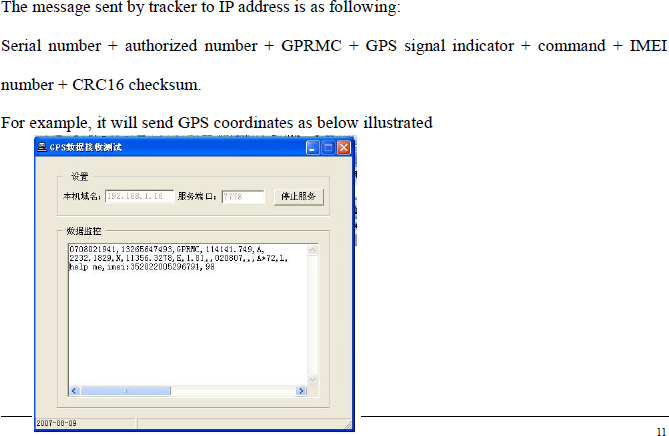
Apparently, some kind of abbreviation GPRMC is involved here. Google helped me find information, what is it .
As a result, there appeared a function of parsing the string, which pulls out the coordinates, time and speed (by the way, I did not immediately understand that it is indicated in the nodes).
An example of a parsed string:
raw: imei:572776984948029,tracker,1007180132,+7926*******,F,173215.000,A,5453.2762,N,05850.6135,E,51.16,;
gps date raw: 17:32:15.0
gps unix date: 17.07.2010 17:32
degree: 54°53.2762'N 058°50.6135'E
decimal: 54.887937 58.843558
speed: 94.74832
The server was overloaded with connection filtering (by IMEI), logging messages from the tracker, discarding extra points and something else, but the main thing was to achieve the goal: the tracker sent coordinates every 20 seconds and they were saved to our server.
Information display
The most difficult part is passed, it remains to show the route to users.Displaying points and connecting them in a line was entrusted to Yandex.Maps. Their API is well documented, so I will not provide any code or comments, I’d better show a screenshot (clickable).
The last 50 points on the map are highlighted with triangles, which show the direction of movement, and on click information about the speed at this point and time of fixation.

disadvantages
The resulting system still has flaws, in my opinion exclusively hardware: the tracker after a reboot (battery change) “forgets” that it needs to send information to the server every N seconds, sometimes it hangs strangely (it’s impossible to turn off without removing the batteries).Probably affects the fact that this is the cheapest tracker of those that I found on sale in Moscow.
What forgot to mention
- this tracker still has a monitoring function: you can call it and hear what is happening around the device;- one battery lasts about 20 hours;
- consumes very little traffic during use;
- in the process of searching for examples of the implementation of displaying tracks on a map, I found almost a single article in which the problem is considered in some detail using the example of Google Maps;
- the system came out quite budget: 4,000 rubles for a device + 300-400 for a new SIM card with the required tariff;
Source: https://habr.com/ru/post/99508/
All Articles