MP3 player interface and touch control
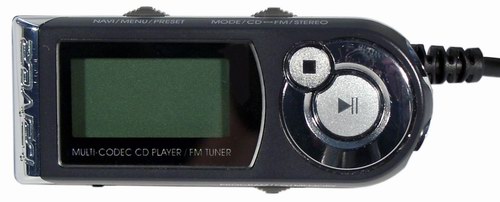
Caution: this topic is full of old-time grumbling.
While the gadget market is increasingly evolving towards touchscreens, and the interfaces are being simplified to the point of impossibility, I continue to remember with nostalgia the good old buttons. I’m especially killed by the interfaces of mp3-players, including those combined with cellular ones. Modern devices seem to be aimed at making it easy for a simple operation like switching a track to get a gadget out of my pocket, run my hand along its smooth lines, admire the look and gently poke on the touch screen, enjoying every click. The player control was reduced to five buttons: track back, play / pause, track forward, volume up, volume down. Now you already think of happiness, if at least these operations can be done, for a second you put your hand in your pocket. Not all devices, even these buttons are easy to touch, or are constantly pressed involuntarily, because of which you always have to turn on / off the Hold mode, which sometimes you are too tired to shoot. Something a little less trivial requires manipulation of menus and touchscreen, which can take up to 10 seconds. Especially fun to do in a crowded bus.
Take a look at the iRiver iMP-550 CD / MP3 remote control (2003), which is shown in front of the article. I had this player. Unfortunately, he was a CD, and because of this he was destined to become obsolete. But in terms of the interface, it was beautiful. All control was carried out with a remote control containing 11 buttons and a Hold switch that switched instantly. The buttons are grouped into three in one element, which can be pressed down, left and right. Having groped the remote in his pocket, the user immediately restored its spatial orientation (some asymmetry, protruding from one corner of the wire and a large playback button, helped), and all the buttons found themselves in familiar places, so that they were not confused. Here are some operations that could be done without getting the remote control out of your pocket and without looking at the screen:
- Standard: play, pause, track back, track forward, rewind inside track, volume
- Switching the playback mode by loop Normal-> Repeat All-> Repeat One-> Shuffle-> Shuffle Repeat All-> Shuffle Repeat One. If you never use any of these modes (for example, I do not use Shuffle without Repeat), you can throw them out of the loop in advance in order not to interfere.
- Go to the previous / next playlist directory in one click (optionally these buttons could have been used to hang another action: go forward / back to 10 tracks)
- My favorite: in two clicks you could tell the player the following instruction: “when the current song ends, repeat it again, and then continue to play in the usual order” (a similar, but more powerful function in Winamp is achieved through Alt + click in the playlist).
- Simple manipulations were used to achieve a more complex version of the previous action, say, “play the current song, and then jump three songs forward on the current playlist”.
')
Source: https://habr.com/ru/post/99452/
All Articles