New look at remote computer management - five hundred kilometers and not a single error
Two days ago I reinstalled the system on a computer that is 500 kilometers away from me. It is he himself, and not according to the well-known scheme “now click“ OK ”, yes, with the mouse, with the left button. No, he did not break, he reboots. " It is clear that business could not do without technological magic.

The question of how to organize remote computer management is acute for all who need it. Selection options, in fact, only two - remote control with the help of special software and hardware control of the computer.
')
This review will focus on the second method, its advantages and differences from the software version.
First, the advantages of hardware control of a remote computer:
• Remote control of a computer with access at the BIOS level (which, literally, gives the user unlimited possibilities - even reinstalling the operating system).
• Independence from the installed operating system.
• Emulation of virtually any USB peripherals connected on the remote user side.
• Work through RealVNC, which guarantees not only the transmission of high-quality images (up to 1280x1024), but also allows you not to worry about the connection security.
Now about the devices themselves.
The class of equipment that provides remote computer control is called IP KVM (from English Keyboard, Video monitor, Mouse) extenders. In fact, using these devices, the user creates a remote workstation equipped with a keyboard, mouse and monitor, connecting to the managed machine via IP. Why and who needs it? I will give an example from life: the company has two branches - in Yekaterinburg and St. Petersburg, the system administrator is one. A server crashes in Yekaterinburg, a KVM over IP extender is connected to it at the administrator's command, everything is up and running in half an hour. Now imagine how much the Petersburg-Yekaterinburg-Petersburg tickets would cost or the content of another system administrator.
I was in the hands of a representative of KVM extenders from the British company Adder. AdderLink iPEPS DA (which means Dual Access, but more on that later), this is a two-monitor version of another Adder model - AdderLink iPEPS. The iPEPS name is from English “IP Engine per Server” (IP systems for servers).
The device is interesting, first of all, because it makes it possible to manage computers both locally and remotely, via IP, hence Dual Access (dual access) in the model name.

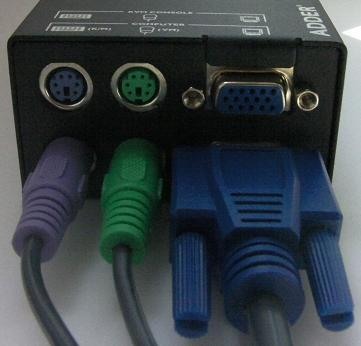
The back panel of the device is equipped with six ports. Three of them (two PS / 2 and VGA for connecting to a video card) are inputs required for connecting to a computer and receiving power (via a PS / 2 connection); three more ports (two PS / 2 for connecting a mouse and a keyboard and VGA for connecting a monitor) - a local control console is connected.
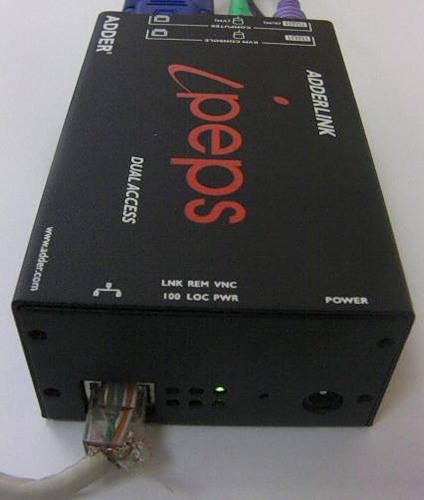
A remote user connects via IP, for which the device is equipped with an Ethernet port with an RJ-45 connector on the front panel. Next to the connector - six LEDs - the presence of Ethernet 10/100, user activity (local and remote), this light flashes if one of the users types or moves the mouse, VNC and power.
The AdderLink iPEPS DA KVM IP Extender is a plug-n-play device, so it starts working as soon as you have made all the necessary connections (the installation disk does not even come with the installation disk). Setup of the device is made through the local console.

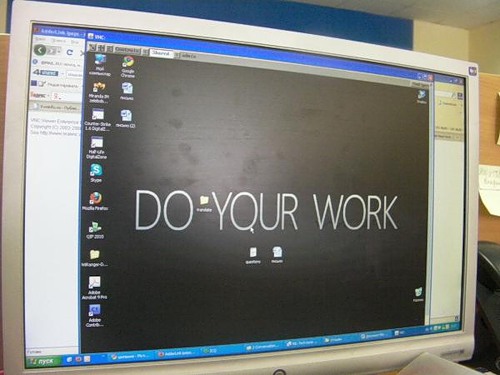
After easy setup, the system is fully operational. All you have to do is enter the IP address of the device in the browser’s address bar, select the “Connect via the built-in Java RealVNC Viewer” mode and enjoy the work.

Maximum optimization of the data flow allows you to work at a speed of 128 kilobits / s, however, the most comfortable work will be at a speed of one megabit per second (the maximum speed supported by the device is 5 megabits / s).
Virtual Media support creates a virtual USB port on the computer through which any device is connected (I managed to boot a remote computer from a LiveCD that was plugged into the drive of the management console, the operation went smoothly and without failures).
As mentioned above, any USB device connected to the control console was successfully emulated to a managed computer, data transfer from the USB flash drive was limited to five megabytes per second.
Technical characteristics of AdderLink iPEPS DA :
Dimensions: 120x42x75 millimeters (16 devices are mounted in 2U server rack).
Weight: 460 grams.
Compatibility with OS: Work with computers running any OS, including Windows, DOS, Linux, Unix, BSD, Sun, Solaris, Mac OS and so on.
Power: Due to the PS / 2 or USB interface (there is a possibility to connect an additional power source).
Additionally, it should be said that the computer can be remotely controlled from any device for which the RealVNC client exists. For example, I personally observed how a computer located several thousand kilometers away was operated from an Apple iPad (a colleague forgot to print documents while on a business trip). A description of remote server management via iPhone is also available online ( HWP article).
I hope that this review, as well as the whole topic, will be of interest to the habrasoobschestvu. If the interest is high enough, I promise to regularly talk about various KVM and AV solutions from different manufacturers, which will be interesting not only for system administrators, advertising and medical workers, but also for simple users who want to make working with a computer as convenient as possible.
The question of how to organize remote computer management is acute for all who need it. Selection options, in fact, only two - remote control with the help of special software and hardware control of the computer.
')
This review will focus on the second method, its advantages and differences from the software version.
First, the advantages of hardware control of a remote computer:
• Remote control of a computer with access at the BIOS level (which, literally, gives the user unlimited possibilities - even reinstalling the operating system).
• Independence from the installed operating system.
• Emulation of virtually any USB peripherals connected on the remote user side.
• Work through RealVNC, which guarantees not only the transmission of high-quality images (up to 1280x1024), but also allows you not to worry about the connection security.
Now about the devices themselves.
The class of equipment that provides remote computer control is called IP KVM (from English Keyboard, Video monitor, Mouse) extenders. In fact, using these devices, the user creates a remote workstation equipped with a keyboard, mouse and monitor, connecting to the managed machine via IP. Why and who needs it? I will give an example from life: the company has two branches - in Yekaterinburg and St. Petersburg, the system administrator is one. A server crashes in Yekaterinburg, a KVM over IP extender is connected to it at the administrator's command, everything is up and running in half an hour. Now imagine how much the Petersburg-Yekaterinburg-Petersburg tickets would cost or the content of another system administrator.
I was in the hands of a representative of KVM extenders from the British company Adder. AdderLink iPEPS DA (which means Dual Access, but more on that later), this is a two-monitor version of another Adder model - AdderLink iPEPS. The iPEPS name is from English “IP Engine per Server” (IP systems for servers).
The device is interesting, first of all, because it makes it possible to manage computers both locally and remotely, via IP, hence Dual Access (dual access) in the model name.
The back panel of the device is equipped with six ports. Three of them (two PS / 2 and VGA for connecting to a video card) are inputs required for connecting to a computer and receiving power (via a PS / 2 connection); three more ports (two PS / 2 for connecting a mouse and a keyboard and VGA for connecting a monitor) - a local control console is connected.
A remote user connects via IP, for which the device is equipped with an Ethernet port with an RJ-45 connector on the front panel. Next to the connector - six LEDs - the presence of Ethernet 10/100, user activity (local and remote), this light flashes if one of the users types or moves the mouse, VNC and power.
The AdderLink iPEPS DA KVM IP Extender is a plug-n-play device, so it starts working as soon as you have made all the necessary connections (the installation disk does not even come with the installation disk). Setup of the device is made through the local console.
After easy setup, the system is fully operational. All you have to do is enter the IP address of the device in the browser’s address bar, select the “Connect via the built-in Java RealVNC Viewer” mode and enjoy the work.
Maximum optimization of the data flow allows you to work at a speed of 128 kilobits / s, however, the most comfortable work will be at a speed of one megabit per second (the maximum speed supported by the device is 5 megabits / s).
Virtual Media support creates a virtual USB port on the computer through which any device is connected (I managed to boot a remote computer from a LiveCD that was plugged into the drive of the management console, the operation went smoothly and without failures).
As mentioned above, any USB device connected to the control console was successfully emulated to a managed computer, data transfer from the USB flash drive was limited to five megabytes per second.
Technical characteristics of AdderLink iPEPS DA :
Dimensions: 120x42x75 millimeters (16 devices are mounted in 2U server rack).
Weight: 460 grams.
Compatibility with OS: Work with computers running any OS, including Windows, DOS, Linux, Unix, BSD, Sun, Solaris, Mac OS and so on.
Power: Due to the PS / 2 or USB interface (there is a possibility to connect an additional power source).
Additionally, it should be said that the computer can be remotely controlled from any device for which the RealVNC client exists. For example, I personally observed how a computer located several thousand kilometers away was operated from an Apple iPad (a colleague forgot to print documents while on a business trip). A description of remote server management via iPhone is also available online ( HWP article).
I hope that this review, as well as the whole topic, will be of interest to the habrasoobschestvu. If the interest is high enough, I promise to regularly talk about various KVM and AV solutions from different manufacturers, which will be interesting not only for system administrators, advertising and medical workers, but also for simple users who want to make working with a computer as convenient as possible.
Source: https://habr.com/ru/post/99445/
All Articles