Laptop Lenovo W701 or Why do I need a steam locomotive at home
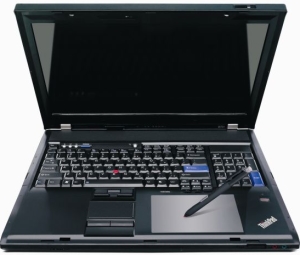 Laptop Lenovo W701 - very large. And heavy. And dear. This is where its serious flaws end and only virtues remain.
To the entry of Intel Core i3 / i5 / i7 processors, Lenovo has run in two new series - Edge and W. Edge is a purely consumer lineup, so to speak Lenovo’s entry into the consumer goods market. IBM has always positioned its laptops as purely corporate - hence the overpriced price and strict design, and a completely destructive standard warranty, which other manufacturers have not one hundred dollars extra. Accordingly, the Thinkpad Edge series was needed to turn to the mainstream customer. Because in the IdeaPad series, the mass buyer doesn’t really believe something.
From the very beginning, the W series was not entirely clear, because there were also the A series (replacement for the desktop) and the R series, which differed little from the T series (in the sense that about 70% of the components were interchangeable). However, with the release of the W701, everything fell into place - almost no series even closely matches the specifications. Simply put - it is as if a horse in some 19th century (which could pull about the same load - some a little more, some a little less) someone would have put up a steam locomotive with a dozen freight cars.
So, let's figure it out - why do I need a locomotive in the house?
')
The system I assembled for myself (4323-CTO) still boasts the following:
- Intel Core i7 Q820 1.73GHz
- 8GB 1067MHz RAM expandable up to 16 GB 1333MHz
- 320 GB 7200 rpm Seagate disk, a slot for a second HDD (there is now a Hitachi 7K200-100 200GB disk) and an optical DVD-RAM drive
- 17 inch screen 1920x1200 with LED-backlit (WUXGA RGB-LED-BL) and NVIDIA Quadro FX 2800M graphics card with 1 GB of memory
- Pantone hueyPro calibrator
- built-in webcam (Ricoh)
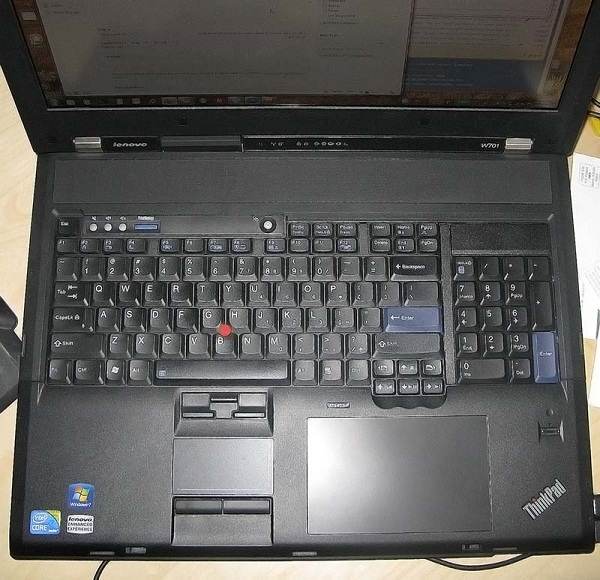
- trackpad ( aka red pimp) and touchpad (which I do not use), as well as an additional block of the numeric keypad
- Wacom Style Tablet
- card readers for CompactFlash and SD cards
- 5 USB slots and one FireWire slot
- VGA, DVI and DisplayPort video outputs
- Fingerprint's scanner
- bulky netbook-sized power supply
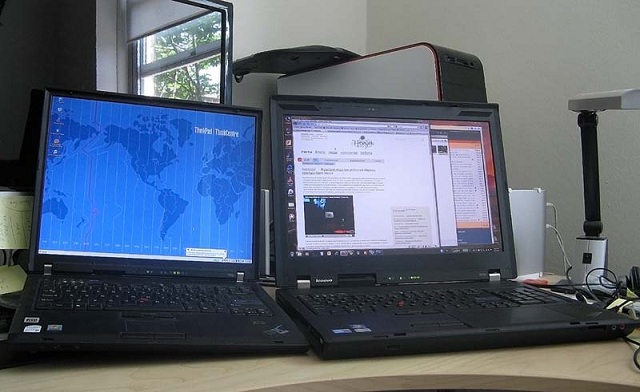
For the past 6 years, I have used the T series, so it was a bit unusual to realize that the size of a working computer has changed a lot. Now it’s quite problematic to take it with you “in field conditions” - and it’s hard, and the battery doesn’t pull for more than an hour and a half with more or less intensive use, and W701 does not fit into any of my backpacks. However, I recently became completely splintered and didn’t work for hours at Starbucks. Regarding the battery, I consider it necessary to add that in the W701 the battery is inserted into the case under the keyboard (as it was in the T23 model, if anyone remembers), which automatically means that it is impossible to have batteries of different capacities. As I understand it, it is necessary to give stability to the whole system with a high and heavy 17-inch screen. Nevertheless, the lack of flexibility in this regard is somewhat disappointing - there is simply nowhere to put a larger battery.
The keyboard on the W701 is one of the best Lenovo keyboards I've ever seen. Most recently, I touched the keyboard a bit on the new T400 and was already disappointed in quality. However, the W701 quickly regained the lost calm. To my great surprise, the additional numeric keypad on the right not only does not interfere, but also turns out to be very useful.
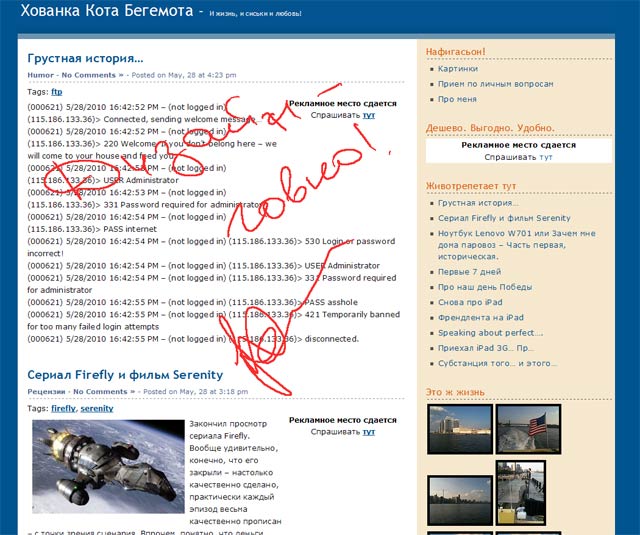
With the tablet also turned out a funny story. At first, I thought he would just take up space. Since I don’t know how to draw at all, I couldn’t get a laptop with hueyPro, but without a tablet it wasn’t possible - I just accepted its presence. However, literally a couple of days after the arrival of the laptop, I urgently needed to send some signed papers by fax. I have not had a fax for ten years now, so we bargained on sending pictures by e-mail. Previously, the process looked like this - we print documents on paper, sign it with a pen, scan it, send it, throw it out. With the presence of the style and the tablet - just signed with the style on the tablet in the right place - and you're done. Progress and undoubted paper savings. Here is another example of using the intended style of a blog:
Continuing the conversation about the geometry of the laptop - the power connector and all video outputs are displayed on the back wall. This arrangement has its drawbacks, but on the other hand it does not make the laptop even more cumbersome, as it was with the T60, which had a VGA connector on the side panel. Although with such a high-quality 17-inch screen, the need for a second monitor is rather doubtful, but for programmers and designers (who actually need such a powerful set) this would not be superfluous. There are VGA, DVI and DisplayPort outputs, but the NVIDIA Quadro FX 2800M graphics card with a gigabyte of memory onboard supports only two displays, so you can connect only one external monitor if you leave the laptop screen running or two if you turn off the laptop screen.
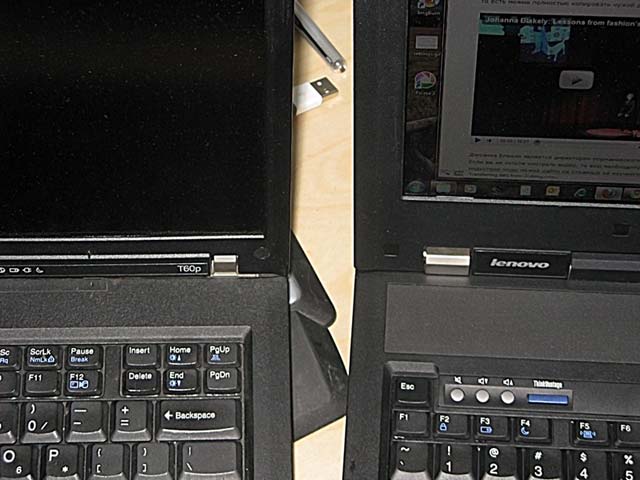
After the T series, it is very unusual to see a wide frame around the screen. Technologically, this may be justified, but it is not very pleasant to look at it. For comparison - here is a photo with frames T60p and W701 nearby:
And the last about geometry - about the power supply. With the power supply - another story about how the power of the previous blocks is not enough and how unhappy Lenovo is forced to release new ones. Which are not compatible with the old. However, judging by the size of the block itself - just in this case it looks like the truth. Here it is - in comparison with the iPhone (the iPhone is slightly wider than the standard 90-watt unit from the T60).
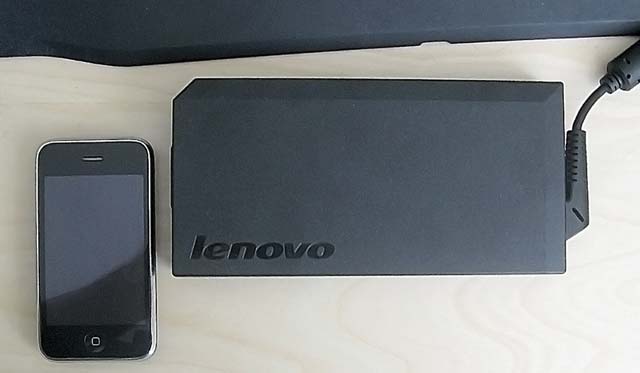
It is clear that in some Las Vegas this monster with you will not take, we must take something easier and simpler. On the other hand, if, for example, you go on a business trip, where you have to work, then you won't drag the desktop with you in any situation, and you won't get rid of the small X61s.
Speaking of trips. My frequent (if not permanent) problem was the lack of an optical drive in laptops with which I usually travel - for example, to watch highly artistic films. The standard Lenovo DVD-ROM / RAM was immediately replaced with an insert with a second hard disk for working data. There is no such problem with the W701 - it immediately provides two sockets for 2.5-inch SATA drives - this is in addition to the DVD-RAM drive. Which, if pressed, can also be pulled out and replaced with a third disk. However, apparently, then the battery will be enough for an hour and a half from strength, and this is with careful handling, but here it is either check or go.
Now the main thing - about the screen on the W701. 1920 to 1200, the 16: 9 ratio is not the most common combination after the T60p and its 1600x1200 and 4: 3 aspect ratio. I really do not see anything convenient in reducing the height of the display - I always have the main scroll vertically - but judging by the multiple rumors, while the matrix manufacturers manage to bend laptop makers, and not vice versa. However, the image quality does not suffer from this. In this situation, it makes no sense to bring any photos or screenshots, but I will say that the quality is almost IPS, only calibrated. Editing photos on it received aesthetic pleasure - just like playing a high-quality and well-tuned instrument.
I’ll not talk about performance - almost all the tests I've seen do not reflect my own work scenarios. I personally have always had a strange look at comparing the results of spherical horse races in a vacuum and scoring in spherical parrots. I do not archive gigabytes of data archiver WinRAR. I very rarely recode video from one format to another. And I almost never apply the same action to stop the same image to the same picture in Photoshop. I can have a dozen or two dozen applications open - MS Outlook 2010, Chrome, Firefox (these three are constantly, with a bunch of tabs in both browsers), two DropBoxes, Skype, Trillian Astra, Word, Photoshop, FileZilla, UltraEdit, Visual Studio 2010, SQL Server Management Studio 2008, a couple of RDP connections, some VLC player or iTunes, or WinAmp, one or two virtual machines. All I want is to keep things from sticking, not hanging, not slowing down, tasks switching quickly, music or videos not slowing down. So, the W701 in this configuration responds to my requests for 99%. The only complaint is slow, compared to SSD, launch of applications. Yes, Adobe Photoshop CS5 does not fly, but it works smoothly and without delays - all you need to do is plug in the Seagate Momentus Hybrid (full name: Seagate Momentus XT ST95005620AS 500GB 7200 RPM 32MB Cache 2.5 "SATA 3.0Gb / s with NCQ Solid State Hybrid Drive) instead of a simple system Seagate. In general, smooth operation is pleasant - regardless of the number of open applications, you don’t shut up anywhere, and if there’s something else that swaps, it’s very unnoticeable. Even when playing on the second monitor (I’ve additionally connected another monitor 1920x1200) full-screen video still does not slow down.
Actually, here it is - the answer to the question “Why do I need a steam locomotive at home” - so that nothing slows down. For comfortable and convenient work. In my opinion, the Lenovo W701 is the right choice.
PS From local realities - Lenovo's technical support is quite sane, and there is never a problem with a guarantee. The next working day after a call to tech support under my door, either there is a box for sending a laptop for repair, or a new part to replace the defective one.
Source: https://habr.com/ru/post/99437/
All Articles