Overview of the GPS navigator NEC GPS 434B
Car Navigation NEC GPS 434B
Good day habra people. I am writing my first review of the first navigator, and perhaps you will find it “indignant” from the category, but I will just try to mention all the pros and cons of this device. I also immediately apologize for the pictures, there is no device with me at the moment, therefore I can not take a picture. Well, let's start!
How was it
As a true geek, I am drawn to all sorts of interesting things, and navigators are no exception. It was decided to purchase a car navigator. And the reason is quite simple: you can use a car as in a car, and in pedestrian mode, but the “usual”, tourist in transport, when you are driving, to put it mildly, is uncomfortable. After reading a few Internet went shopping. Asking for all-sorts of sellers stopped on an inexpensive device NEC GPS 434B . Once again I asked if I could use this device without problems in pedestrian mode, without additional power. The seller replied that everything is OK, and it will work for about an hour and a half. Well, this still suited me wherever it was (given the price - about $ 125)
')
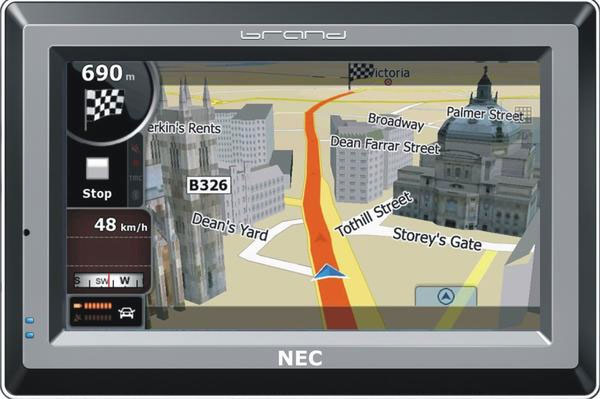
Specifications
| Dimensions, LxHxW: | 12 x 8.4 x 1.4 cm |
| Display Size: | 10.5 cm |
| Display Resolution: | 480 x 272 |
| Display Type: | color anti-glare QVGA TFT |
| Battery Type: | replaceable lithium ion battery |
| Battery life: | 4 h |
Memory and cards, processor
| Base Card: | Yes |
| Uploaded maps: | Ukraine |
| Ability to install maps: | Yes |
| Type of memory cards: | Flash ROM NAND flash (2GB), RAM 128 MB SDRAM |
| CPU frequency: | 500 MHz |
Functional features
| MP3 player: | Yes |
| Headphone Out: | Yes |
Other:
| equipment: | network charger, car charger (12V), USB cable, suction pad |
What you like
First, probably talk about the good, it is a pity that it is so little.
- First is the price. Yes, indeed, $ 125 is not so expensive for such a device.
- The second is the display. This is my first device with a touchscreen display (also big enough! 480 x 272), so for a long time I could not get enough of it.
- The presence of bluetooth. Sometimes it is vital, because the navigator can be used in the car as a mobile. It is worth noting that it has a fairly good microphone and a built-in speaker.
- Already installed satellite GPS navigation program. In this case - IGO. A bit outdated version, but with a map installed. By the way, it is updated completely without problems.
- Reasonably accurate navigation.
- If you torture the navigator a little, you can turn it into a smartphone with WIN CE5 installed
- With installed games there is 1 funny.
- The ability to play video. If you convert to the appropriate extension, you can easily watch movies, which pleases.
- Works activesync. We connect via usb to laptop and Google Earth shows our location
What NOT like
- Battery life without recharging. In TX indicated:
Battery life: 4h
But the floor actually works! hours Thought maybe what I was doing wrong? I looked at the reviews ... All so. Quite annoying such a deal. - "Cold start". For too long, it happens and 5 minutes looking for satellites.
- Bad player. Actually, he is kind of weird. Music may or may not play (and the same). The problem with Cyrillic encoding is also present.
- Hang Sometimes when overloaded it may hang. You have to reboot with the “magic button”, which is located in the “hole”, into which only the branded stylus will crawl through (:
- The inability to read books. Strange, too, the book seems to be opening, but the text is not displayed on the screen. incomprehensible glitch.
- Mount on the windshield. When riding a Lada 6-ke, 2 times fell off: / (possibly due to direct sunlight getting on the Velcro).
- I also do not really like the menu design. It is not clear why, but it reminds me of a cheap Chinese toy. At the end of the review I will post a photo taken once on a mobile. Sorry for the quality
- There is also FM radio, but I never managed to make it speak.
About the unlock, or see the desktop WIN CE5
- Everything is simple enough, and I think anyone would have guessed this to himself. But still show your method:
- Go to the Bluetooth menu
- Choose Explorer
- Register instead of the file: // URL
- We see the file system navigator. Go to Windows / Programs and launch the Windows Explorer shortcut.
- When you see the taskbar, you can select “Start” -> “My Device” and launch your applications recorded on the memory card.
Personally, I installed two very useful programs for myself - AlReader2 (for reading books) and SAS4WinCE - Satellite images on the navigator
As promised 2 very not high-quality photos:
“Cheap” menu interface:

Settings will be more attractive:

I hope my post will help someone when choosing a navigator.
Source: https://habr.com/ru/post/99430/
All Articles