Computer life on the balcony
Below is described my personal experience of more than one-year operation on a balcony of a computer specially assembled for difficult conditions.
Whenever possible, I try to describe both the real resulting system, with the obligatory description of each case of virtual rake colliding with the real forehead, and ways to bypass the rake, which, alas, it is often too late to bypass with a ready-made solution.
Computer, he, reptile - noise!
You can buy solid radiators for all components, install only one or two low-speed fans, and pack a hard disk into something like Scythe Quiet Drive - and get a very quiet car. With one hard drive. With two - it becomes difficult to quench the vibrations of hard drives. A computer that has on board three or more hard drives - inevitably begins to resonate. Everything can resonate - radiators on the motherboard, parts of the case, stand, often even a laminated floor under a computer.
Of course, you can relieve any computer, but each new measure to reduce noise flies a pretty penny and further complicates the cooling. However, there is a radical option.
If the computer is taken out of the wall - it makes noise there, but not here
In general, there are only two difficulties. First, we need to stretch the wires behind the wall. A lot of wires. Secondly, behind the wall should be suitable for computer space. The first difficulty is solved either by a perforator or by installing a “home server” - a separate machine in which we place our hard disk drive. The second problem is solved by installing a computer in the corridor, hallway, kitchen, or balcony. And the balcony, unlike the previous versions, is usually almost all the time locked up tightly, so for sound insulation this is the most effective option, albeit with a lot of pitfalls.
By virtue of my own beardiness, I, of course, without hesitation choose the balcony and perforator option.
Wires
Wires to the balcony can be delivered:
a) Before laying the cable channel under the sill when installing windows
b) Taking a perforator and a big auger, and breaking a wall somewhere.
In my case, the perforator method was used - I think you understood that I just love this tool. It turned out pretty sloppy hole, but the screen on the battery completely hides it. The easiest way to tie the wires to any stick, and with a stick to pass into the hole - all as in the case of thread and needle.
')
In ideal conditions, we need to carry out: 1 USB cable, 1 cable to the monitor, power cable, 1 cable of twisted pair or optics.
In reality, I had to pull 1 USB cable (4m to the hub), three cables to monitors (DVI, D-sub, HDMI), one coaxial cable (audio), one optical cable (also audio), one shielded cable to the microphone, one cable with twisted pair, one cable to the computer off button. All cables barely fit into the cable channel on the balcony.
Perhaps my problem was that instead of purchasing an external sound card, I decided to use the internal X-Fi Titanium. The result was three extra cables. Positive aspects in the decision could not be found.
The button for turning off the computer, on the contrary, turned out to be extremely useful, especially if there is a desire to restart the computer that was frozen in experiments with overclocking, when it was thirty degrees below zero.
The construction - was it worth it to cast a case?
This is not the first computer case assembled by me from scratch. And in fact, it was he who was not made from scratch. As a basis, I took the case 3Q T001 - this is a set of pieces of hardware that can be assembled into a computer case from a thin, rumbling tin, or you can take the motherboard mount and the back wall and get the opportunity to safely and firmly fasten in PCI and PCI-E slots without special the cost of time and money: the case at that time cost about 500 rubles. Probably other similar sets are being released today, but I have not been looking for them since.

I used construction foam from Leroy Merlin as a sound absorber layer, as well as a body base: it is strong enough to be screwed together, and at the same time easily cut with a knife. Alas, in fact, its sound-absorbing properties turned out to be pretty bad, and yet he brought his benefit, primarily as a heat insulator. Foiled foam insulation was used as the inner layer of the sound absorber - what tourists call “foam”, and some builders call it “isolon”. I used this foam many times, and I can assure you that it is noticeably more efficient than the materials from the computer soundproofing kits, except that it is still more difficult to fix it due to the lack of an adhesive layer. The outer layer - furniture panels all from the same lerua merlen, collected on steel corners. Corners are removed under a layer of noise insulation and do not spoil the view, but it is unlikely to fasten them with shkantov or eccentric screeds.
A chamfer was cut from the corners with a hand mill, then everything was covered with acrylic lacquer, so as not to have problems with cleaning the case, or the wood can cool off dirt.

Having a motherboard and power supply, I could only buy three baskets for hard drives with a mount for a 120mm fan. Alas, I did not find such on sale, and I had to cut a partition for the installation of three fans and cut corners for installing hard drives on them. Winchesters freely lie on the corners, they were not screwed as unnecessary - the case is as stationary as a twenty-kilogram desktop can be.
The lid is also free - there was a thought to put it on the hinges, but the thought was suppressed, and rightly so - the lid on the hinges would haunt the grim ghost of a bruise above her head, and you can just put it aside.
In general, I consider the work to create the hull justified - the air flow is optimized quite well, there are no unnecessary side holes that the hull manufacturers love, and which greatly interfere with proper unidirectional air pumping.
On the balcony as in the desert: it is very cold and very hot
The most serious problem of a computer on the street is not cold or heat, and even temperature drops, but direct sunlight. I will tell about them below, at first having lit the general questions of cooling.
Generally speaking, computer components are designed for fairly frequent and large temperature drops. 11-12 degrees the difference between night and day do not make special weather. The seasonal fluctuations are much more interesting, which can be 70 degrees Celsius here. Fans that cope well with the summer heat can make it impossible to start a computer in the winter. Unfortunately, all the fans I bought (I have a decent supply all the time when replacement is necessary) turned out to be three-contact, and the motherboard can only slow down and speed up four-contact fans. At first it was decided that I would have to install a reobas (I had one), but looking at the temperatures (it was summer), I decided to wait with its installation. I never installed Reobas - as it turned out, it’s much easier two or three times a year to look into the computer under the cover and turn off or turn on the necessary fans.
Frost protection
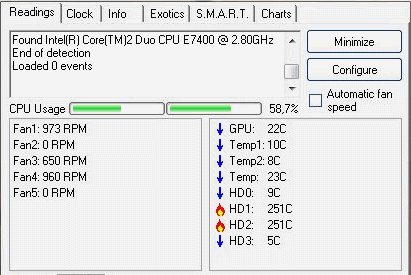
Frosts survived without any problems. After turning off all the fans, except for one in the power supply, and one on the video card, the temperature came to a completely normal rate, and on the hard drives, for which I was most worried, the average temperature remained in the region of 30-35 degrees. However, it should be borne in mind that in a typical computer case a much more significant proportion of cooling goes through the walls of the case, and in the cold the computer would have to be warmed.
Protection from direct sunlight and high temperature
The summer heat is also very disgusting. I don’t know how Boomburum feels right now, and my computer doesn’t feel very good on the balcony if I close the windows and lift the curtains. In fact, in this case, the air temperature on the balcony is about fifty degrees Celsius. It is very hot. In addition, even if I remember to open the windows, there remain direct sunlight, which, for example, forced the ASUS WL-530 router lying on the balcony to flow like a forgotten chocolate in my pocket (the funny thing is that it continued working without paying attention to the melting body ). I do not like to lower the curtains on the balcony - it becomes dark in the room. A computer with a multi-layered “fur coat” as a case is also fully affected by such mockery as direct sunlight, but the single-unit server on the balcony to set up quickly announced that such joys were not for him. In general, protection from direct sunlight is required . With the rest, in principle, can handle the usual cooling system.
Water protection
Yes, since in the summer you have to open the windows, then rain can be poured onto the balcony. A couple of times the balcony was flooded very seriously. Nothing wrong with the computer did not happen, but only because of the grids on the "face" of the body, which any falling drops forced to flow down. Beware of water - it may fall from the sky!
Was the game worth the candle, or where was the noise?
You know, it turns out all monitors are very buzzing without grounding.

Source: https://habr.com/ru/post/99336/
All Articles