Watch movies with subtitles in two languages at once
Having just seen this blog post on Habrahabr, I thought, is it possible to do this in Linux? It turned out - you can. Moreover, the method does not depend on the video player, as long as the program supports the subtitles in the ASS format.
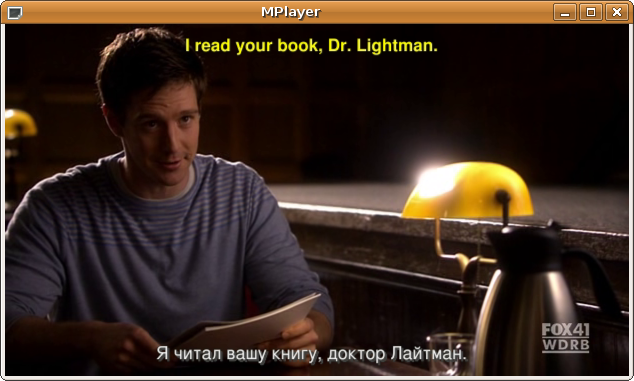
')
[MPlayer-users] two subtitles at one time (script)
I made changes in the script in two lines by adding the -subcp utf-8 option to the command to convert SRT files.
The script dependencies are mplayer (in case your subtitle files need to be converted to srt) and gnu utils (there’s something to tell me about the presence of gnu utils on the computer).
Save the script merge2ass.sh to your computer (link above).
Now open the console and move to the directory in which the script is located.
For example:
cd scripts / (being in the home directory)
Or so:
cd ~ / scripts / (being somewhere else)
Install the script execution rights (done once):
chmod + x merge2ass.sh
Now let's see what arguments the script takes.
1. Movie file
2. Subtitles Alone
2. Second subtitles
4. Optional argument, can be “-pm” or “--play-movie” for instant transition to watching a movie
So, download Russian and English subtitles.
Russian subtitles are most likely encoded with CP1251. Change the encoding to UTF-8.
iconv -f cp1251 -t utf-8 movies / lie_to_me-s02e11-russian.srt> movies / lie_to_me-s02e11-russian-utf-8.srt
And run the script.
./merge2ass.sh movies / lie_to_me-s02e11.avi movies / lie_to_me-s02e11-english.srt movies / lie_to_me-s02e11-russian-utf-8.srt
The script creates the lie_to_me-s02e11-bilingual.ass file. It remains to run a movie.
mplayer -noautosub -ass movies / lie_to_me-s02e11.avi -sub movies / lie_to_me-s02e11-bilingual.ass -subcp utf-8
Happy viewing and, of course, learning languages!
if anyone needs this, i created a bash script allowing you to
show with two subtitles shown at the same time. you
may use this
in your mother language
instance.
If someone needs it, I created a script in bash that allows you to watch / convert movies so that two subtitle tracks are shown simultaneously. You can use it if, say, a friend from another country comes to visit you, and you both would like to watch a movie with subtitles in your own language.
')
[MPlayer-users] two subtitles at one time (script)
I made changes in the script in two lines by adding the -subcp utf-8 option to the command to convert SRT files.
The script dependencies are mplayer (in case your subtitle files need to be converted to srt) and gnu utils (there’s something to tell me about the presence of gnu utils on the computer).
Save the script merge2ass.sh to your computer (link above).
Now open the console and move to the directory in which the script is located.
For example:
cd scripts / (being in the home directory)
Or so:
cd ~ / scripts / (being somewhere else)
Install the script execution rights (done once):
chmod + x merge2ass.sh
Now let's see what arguments the script takes.
1. Movie file
2. Subtitles Alone
2. Second subtitles
4. Optional argument, can be “-pm” or “--play-movie” for instant transition to watching a movie
So, download Russian and English subtitles.
Russian subtitles are most likely encoded with CP1251. Change the encoding to UTF-8.
iconv -f cp1251 -t utf-8 movies / lie_to_me-s02e11-russian.srt> movies / lie_to_me-s02e11-russian-utf-8.srt
And run the script.
./merge2ass.sh movies / lie_to_me-s02e11.avi movies / lie_to_me-s02e11-english.srt movies / lie_to_me-s02e11-russian-utf-8.srt
The script creates the lie_to_me-s02e11-bilingual.ass file. It remains to run a movie.
mplayer -noautosub -ass movies / lie_to_me-s02e11.avi -sub movies / lie_to_me-s02e11-bilingual.ass -subcp utf-8
Happy viewing and, of course, learning languages!
Source: https://habr.com/ru/post/99266/
All Articles