GZip and nginx: performance impact
 Good day. Recently, I was interested in the ngx_http_gzip_static_module module, and I decided to drive my home server with slightly different nginx compression settings to make sure that modern processors are so fast that you can set compression to 9-weave and not steam. The merged main page lenta.ru - 170kb acted as an experimental file. During testing, an interesting feature was discovered that changed my views on the choice of the number of nginx processes.
Iron and software
The test was performed on Ubuntu Server 10.04, nginx 0.8.45, processor - Opteron 165 (2 cores, 1 meter cache, 1.8Ghz).
Tests run on the server itself. I repeated them from another computer through a gigabit network - the results are the same, the only difference is where we run into the network bandwidth.
Banal gzip on;
I turn on gzip in nginx, I start chasing tests, and accidentally stumble upon an amazing feature: when performance rests on compression speed, nginx with 2 processes works almost 2 times faster than with one process, no compression in threads ...
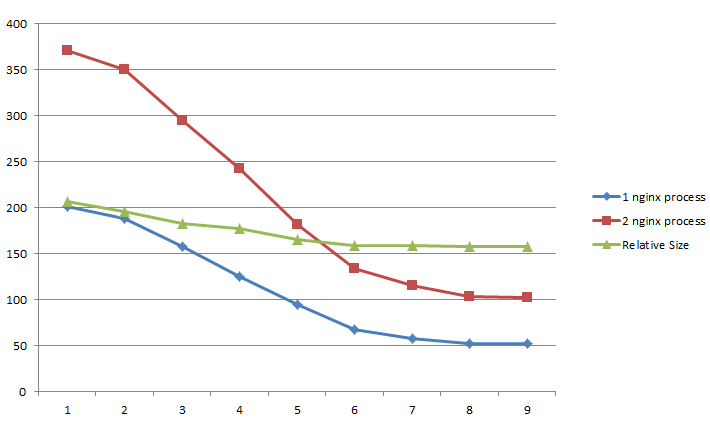
As you can see, the performance is very limited by the performance of the processor, and there is no reason to think that “processors are fast now” is not easy to set compression to 9-weave. When compressed on 9-nku, nginx surviving only under compression all 2 cores of the processor gives only 4mb / s of compressed content, and is not even able to load the 100mbit channel, not to mention gigabyte.
About choosing a compression level
If you look at the graph of the size of the compressed file (or on the table just below), you can see that after 5-rki the compression practically does not grow, but the speed drops almost 2 times if you compress by 9.
| Compression ratio | Requests per second | Compressed size (original 170kb) |
| one | 370 | 51.7 |
| 2 | 350 | 48.9 |
| 3 | 294 | 45.7 |
| four | 242 | 44.2 |
| five | 181 | 41.3 |
| 6 | 134 | 39.7 |
| 7 | 115 | 39.5 |
| eight | 103 | 39.4 |
| 9 | 102 | 39.4 |
So, IMHO, put compression above 5 is not worth it.
')
Golden Bullet: ngx_http_gzip_static_module
This module allows you to get rid of compression over and over the same files. We simply compress them as much as possible in advance, and put them in the same directory with the .gz extension, and if they exist, the compressed file will be given out very quickly:
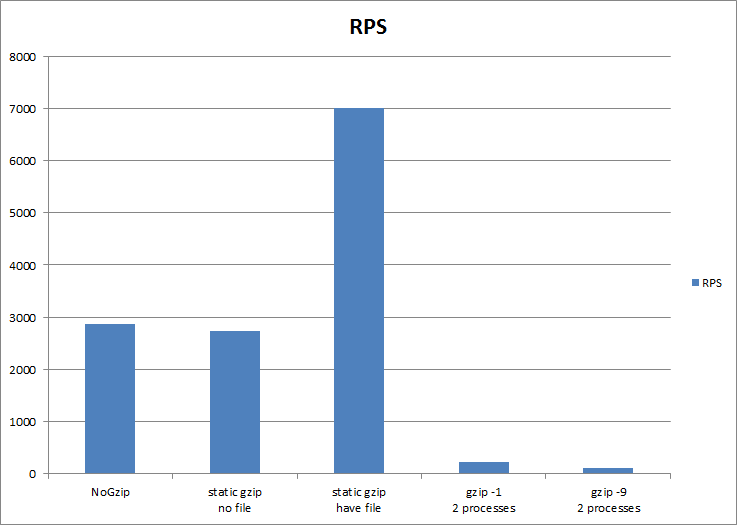
As you can see, heaven and earth. It is also worth noting that due to the additional check on the existence of the .gz file, the performance drops slightly if there is no .gz file.
Well, the bonus track: if you include both gzip_static and regular gzip with a compression level for example 1, then if a precompressed file is found, it will be given, and if there is no such file, or for example the content from Apache comes, then it will be compressed by 1, as quickly as possible.
The only problem is to keep the previously compressed files up to date — here it is more convenient for someone, either according to the crown, or deployment script. Although of course, it would be more convenient if the files were generated, saved and updated by nginx automatically ... Oh, dreams, dreams ...
Summary
- In nginx you cannot compress everything to 9, it will be a lot of processor to devour if the traffic is large. Above 5, there is no special meaning to compress; the size practically does not decrease, and the speed drops sharply.
- The number of nginx processes when working with gzip must be equal to or greater than the number of processor cores.
1 is not enough, because gzip compression then occurs only on 1 core. - gzip_static - extremely useful, and gives a huge advantage in the release of compressed statics
Source: https://habr.com/ru/post/99256/
All Articles