Programs for remote training (Live Meeting Web Access)
 Today I had the opportunity to take part in one teleconference - indirect training in the form of an online presentation with the system "question-answer". I was interested in the product on which this conference was built - Microsoft Office Live Meeting Web Access 2007. Before that, it was not mentioned in the topic “Distance Learning Programs”. Today I want to talk about the experience of using this software by the listener.
For those who have forgotten or have not read the previous topics I will remind you:
1. " Programs for remote training (webinars) " from ArMikael ;
2. " Programs for remote learning (today we are talking about Adobe Connect) " from LongeryatKO , I mean.
')
Inviting members
 It all started with the fact that I received an email with an invitation to the presentation. Nothing special, the email is generated by the sender manually with the inserted link to connect. Usually, in such cases, specialized software independently produces an email-mailing from its database, which saves the organizer's time. I, of course, as a participant, do not care how the letter was formed, but the absence of this function should clearly affect the impressions of the organizer.
Voice guidance
 Another small, but no less interesting fact: next to the link to the presentation were a phone number for Skype and a secret code. Here, then through Skype will be established voice communication with the audience. Honestly, for business use is somehow not very revealing. Although, on the other hand, I was more interested in the presentation itself, they didn’t know how to connect to it, which still have a certain "cumbersome".
Browser support
To participate in today's newsgroup, I need a browser and Skype. I click on the link and ... Chrome, slightly cursing, refused to connect, I had to use the neighboring Safari. Later, I figured out which browsers you can use to access:

At all three stages: sending invitations, sound, connection, minor inconveniences for me are clearly visible. But if I was a regular user with one browser (for example, Chrome) or without Skype, then the session would not take place for him.
Using
Enter your ID assigned by the organizer and the name under which we will be visible to other participants. We go.

The presentation begins. The sound in place, the presentation also begins to liven up. Then everything is as usual: roll call. To do this, there is a function of tracking attendees online "Attendees".
After that, the organizers asked to check the sound again by selecting the appropriate color in the menu. I have everything “ok” and I chose “Proceed” with a green square, which can be traced on the roll call of “Attendees”.
Strange, but judging by the “Voice” window, the sound via the VoIP channel is still in the Meeting, but not in our case. Maybe the organizers do not use this function because of the need to install and run the INVC Participant Console software, who knows?
Everything is in place, the sound, too, no longer waiting for anyone, let's go. The slide is changed by a slide, each of which is commented on by lecturers. Nothing military, for this very reason. Communication takes place in the “we speak and you listen” mode; at the end of the presentation, you can ask questions. Alas, they didn’t offer to do this in voice mode, instead you could write your question in the “Questions and Answers” dialog box. We write a question, raise our hand, speaker's answer via Skype. Here, this is not a tricky scheme.
Price
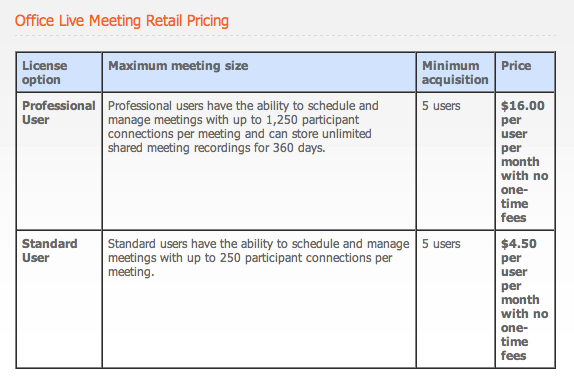
Pricing for this product is not simple, really could not determine it. All that was found here:
Afterword
I received the necessary information for me - this is a plus. But such “shoals” that I described above did not allow to receive pleasure from the process. Skype periodically fell off and I missed 2-3 sentences that I had to think out on my own.
On the one hand, it imposes the conclusion that Live Meeting Web Access in the version in which I saw it (the program) is not suitable for global tasks. On the other hand, for a professional user (see price) there is the ability to connect up to 1,250 users at the same time, and these are no longer funny decisions. This number only says about the professional use of the product. Yes, and this software is in the division of Microsoft Business. Think about why he (the product) is needed?
The topic may not be “wow”, but it’s hard to find more detailed information elsewhere, so it’s here. If someone else came across this solution from MS, please do not hesitate and unsubscribe; I will supplement the topic. For now, I found some useful stuff here .
UPD: Speedimon add-on
The fact is that the Live Meeting offered in this version is a rental offer for an already configured infrastructure from Microsoft. And it is called Office Communications Server, and it can be bought by any enterprise in Standart or Enterprise editions. The truth is still needed OCS Client CALs, here they are quite expensive. Although for big business it will be offhand at times cheaper than the proposed rental.
In addition, there is a standalone client called Live Meeting. But the most valuable thing is the tight integration of the solution with the Exchange infrastructure. This allows, for example, to schedule a conference among a number of workers directly through Outlook, or to quickly organize a conference with someone from Outlook with just two mouse clicks - you just have to install a special plugin.
Source: https://habr.com/ru/post/99220/
All Articles