Checking account balance on the example of MTS on Mac OS X
You are already faced with checking the balance in Linux ( 1 and 2 ). In order not to stand aside and conform to the mode, we will check the balance of the 3G modem under Mac OS.
Mac OS X 10.6.4 has Python version 2.6 installed by default, but the COM interface’s serial module is not included. Therefore, download the Python Serial Port Extension , unpack (double click on the archive in the Finder), install:
The script itself for checking the balance and remaining traffic on the example of MTS (I took the script found in this topic as a basis, I modified it a bit to check the remaining traffic):
Save this code in the file balance.py (UTF-8 encoding). The code is not very beautiful and concise, but it does its job. For other operators, the values of the balcode and mbcode variables (USSD request numbers) and the line in which we extract the numbers from the USSD response will change:
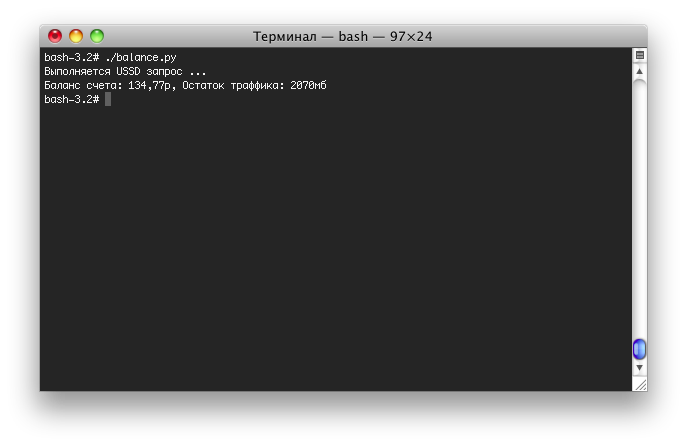
How to use the "slices" is very simply explained here . The result of the script is visible on the first screenshot. My modem does not understand USSD requests in Russian, so you have to translate translit into Russian on your own.
The test modem was used by Sierra Wireless, model MC8780. With the modem drivers, 6 COM ports were installed:
We need a port AT commands - cu.sierra05 / tty.sierra05 (any of them). You can determine which of the six you need by connecting to the port using the command screen / dev/tty.sierra05 115200 , then enter ATI5 - as a result, we should see information about our modem.
Mac OS X 10.6.4 has Python version 2.6 installed by default, but the COM interface’s serial module is not included. Therefore, download the Python Serial Port Extension , unpack (double click on the archive in the Finder), install:
bash-3.2# cd /Users/memtew/Downloads/pyserial-2.5-rc2
bash-3.2# python setup.py install
The script itself for checking the balance and remaining traffic on the example of MTS (I took the script found in this topic as a basis, I modified it a bit to check the remaining traffic):
#! / usr / bin / env python
# - * - coding: utf-8 - * -
import serial
import string
import os
USBPORT = '/dev/tty.sierra05'
USBSPEED = 9600
MAXSTRINGLENGTH = 300
#USSD balance check number
balcode = '* 100 #'
#USSD check number remainder MB
mbcode = '* 100 * 1 #'
')
print "USSD request in progress ..."
s = serial. Serial ( USBPORT, USBSPEED, timeout = 5 )
s. write ( 'ATZ \ 0 15' )
s. write ( 'AT + CUSD = 1,' + balcode + ', 15 \ 0 15' )
balans = ""
while balans [ 0 : 6 ] ! = '+ CUSD:' :
balans = s. readline ( MAXSTRINGLENGTH )
s. write ( 'AT + CUSD = 1,' + mbcode + ', 15 \ 0 15' )
mb = ""
while mb [ 0 : 6 ] ! = '+ CUSD:' :
mb = s. readline ( MAXSTRINGLENGTH )
s. close ( )
# Select from the response line + CUSD: 0, "Balans: 134.77r", 15 totaling 134.77
balans = balans [ 17 : - 8 ]
# Select from the response line + CUSD: 0, "Ostatok: 2070Mb.", 15 MB - 2070
mb = mb [ 19 : - 9 ]
result = 'Account balance:' + balans + 'p, Traffic balance:' + mb + 'mb'
print result
Save this code in the file balance.py (UTF-8 encoding). The code is not very beautiful and concise, but it does its job. For other operators, the values of the balcode and mbcode variables (USSD request numbers) and the line in which we extract the numbers from the USSD response will change:
# Select from the response line + CUSD: 0, "Balans: 134.77r", 15 totaling 134.77
balans = balans [ 17 : - 8 ]
# Select from the response line + CUSD: 0, "Ostatok: 2070Mb.", 15 MB - 2070
mb = mb [ 19 : - 9 ]
How to use the "slices" is very simply explained here . The result of the script is visible on the first screenshot. My modem does not understand USSD requests in Russian, so you have to translate translit into Russian on your own.
The test modem was used by Sierra Wireless, model MC8780. With the modem drivers, 6 COM ports were installed:
/dev/cu.sierra02
/dev/cu.sierra04
/dev/cu.sierra05
/dev/tty.sierra02
/dev/tty.sierra04
/dev/tty.sierra05
We need a port AT commands - cu.sierra05 / tty.sierra05 (any of them). You can determine which of the six you need by connecting to the port using the command screen / dev/tty.sierra05 115200 , then enter ATI5 - as a result, we should see information about our modem.
Source: https://habr.com/ru/post/99195/
All Articles