Memory on demand
Memory on demand - automatic allocation of memory to the virtual machine as needed.
I already wrote about this idea a bit earlier: Memory management of the guest machine in the cloud . Then it was a theory and some sketches with evidence that this idea would work.
Now, when this technology has found practical implementation, and the client and server parts are ready and (seemingly) debugged, you can no longer talk about the idea, but about how it works. Both from user, and from server part. At the same time, let's talk about what turned out not as perfect as we would like.
')
The essence of the technology of memory on demand is to provide the guest with the amount of memory that he needs at any given time. Changing the amount of memory occurs automatically (without the need to change something in the control panel), on the go (without rebooting) and in a very short time (about a second or less). To be precise, the amount of memory allocated by the applications and the guest OS kernel, plus a small amount to the cache, is allocated.
Technically, for the Xen Cloud Platform, this is organized very simply: we have an agent in our guest machine (self-written, because regular utilities are too voracious and inconvenient), written in C. I chose to write on it - shell, python or C. The simplicity of implementation (5 lines) spoke for the shell, for the python - the reliability and beauty of the code. But C won (about 150 lines of code) for two reasons: information about the state of the machine needs to be sent often - and it would be dishonest to “eat” someone else’s machine time and someone else’s memory on a convenient and beautiful code (instead of a not very elegant, but very fast code on C).
Against python, among other things, it was also said that it is not in the minimum installation of Debian.
The server part (in fact, deciding how much memory is needed and allocating it) is still on python - there are not so many mathematics there, but there are a lot of boring operations for C related to converting from strings to numbers, working with lists, dictionaries, etc. In addition, this machine consumes service resources and does not affect the costs of customers.
The server part receives data from the guest system and changes the memory size of the guests according to the memory management policy. The policy is determined by the user (from the control panel or via the guest API).
There are no perfect things. Memory on demand also has its own problems - and I think that it is better to talk about them in advance than to shock the client post factum.
Scripts that regulate memory do not follow requests to the OS, they only monitor indicators in the OS itself. In other words, if someone asks the OS for a couple of gigabytes of memory at a time, they can refuse it. But if he, at intervals, asks 10 times for 200, then they will give it completely. As the tests showed, in a server environment this is exactly the case - memory consumption grows as forks of daemons and load increases, moreover, it grows with quite a finite speed (so that mod-server has enough time to throw in memory until the next large request).
Another insurance against this - swap. Those who are used to working on openVZ-based VDS will probably be surprised. Those who are used to Xen or ordinary cars will not even pay attention to it. Yes, virtual machines have a swap. And it is even used! After some time of the machine operation (in real conditions, and not in laboratory idleness) several hundred megabytes of data appear in the swap.
Fortunately, Linux is very, very neat with a swap, and throws there only unused data (and you can regulate this behavior with vm.swapiness).
So, the main task of the swap in the conditions of Memory on demand is in insurance against too fast / thick requests. Such requests will be successfully processed without oom_killer, albeit at the cost of some brakes. The user has the ability to influence this behavior with the help of policies.
If aperson program in the guest system asked for a lot of memory at a time and a part of a little-used code was thrown into a swap, then mod-server (MOD = Memory On Demand) works again, which throws in memory. It is enough to clear the swap, but Linux is a lazy creature, and it is not in a hurry to unload unused data from the swap. Due to this, a large amount of memory is given to the disk cache (performance increase). If Linux needs something from a swap, then the memory is ready to accept this data.
The second drawback is more fundamental. Dynamic memory management requires ... memory. Yes, and quite a lot. For 256MB, this is about 12MB of the overhead projector, for 512 - about 20, for 2GB - about 38, for 6GB - about 60MB of the overhead projector. The overhead is “eaten up” by either the hypervisor, or the kernel of the guest system ... It does not even show up in 'free' in TotalMem.
You might think that this overhead is not very big. However, if you have a 5GB margin, and the actual consumption is 200, then you will have a 50Mb overhead (i.e. pay for + 25% of memory for the right to grow to 5GB). If to lower a ceiling to 2 Gb, then the overhead projector will decrease to 10% of memory at 256 bases.
Thus, the overhead projector is a fee for the willingness to get a lot of memory from the hypervisor. From our side (mercantile, self-serving, etc.) it is a small insurance that a person will not just reserve 64 GB of memory for himself (he will have to have an overhead of about 6 GB, which is quite expensive for a machine with a consumption of 200 MB). But to make yourself a machine with an interval of 300-2GB - the most it. The overhead is small, there is a memory reserve.
Another disadvantage is that you can change the upper memory limit only with a reboot.
Anlim (any amount of memory on first request - emphasis on the words "any") is not and never will. There are several reasons.
First, we do not physically have for you 500 GB of memory right-here-and-now for a single virtual machine. Even if you ask. So much memory levels in the server can not hold. Secondly, the technology itself requires (for the moment) the presence of a ceiling, and, preferably, not much higher than the average consumption (no more than one and a half orders of magnitude, with large numbers the overhead grows strongly, it was higher, the margin up to 500GB will consume That way you have 30 gigabytes of memory "to nowhere" - a little expensive pleasure is obtained).
They promised anlim. But did not. More precisely, it can be formally done within the cloud's host capability, but such ranges (128-48GB) are not economically viable.
Alas, the beautiful picture with the complete absence of the upper memory bar failed. But it was possible to implement the technology of payment for consumption. If you (your VM) consumes little memory, then little money is paid. And the stock on a case of "crazy habr-effect" with the swelling Apaches is.
A special conversation with the cache. We can not set the amount of virtual machine memory strictly on consumption, because the cache is still needed. Despite the fact that there are two levels of caching and dozens of gigabytes of memory with a cache (for general use) before the physical screws. Your local cache allows you to reduce the number of disk operations (and they, by the way, are paid separately).
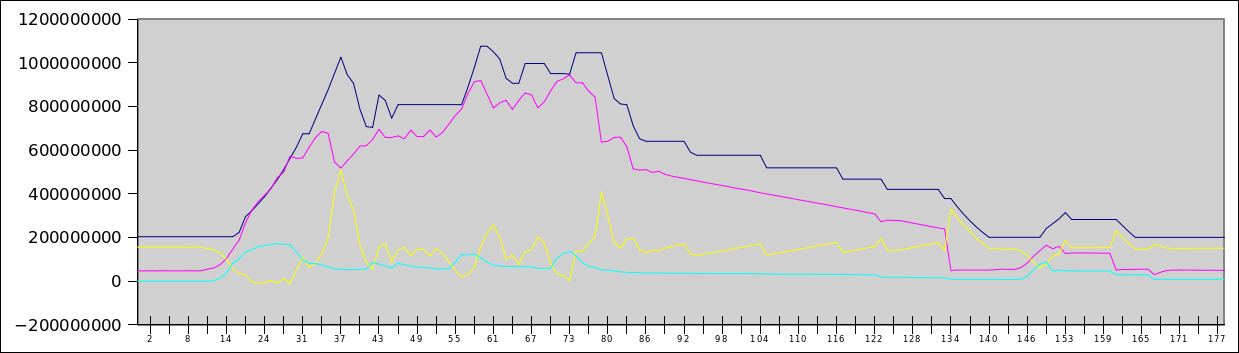
Thus, we can reserve a small amount of memory in the machine, which, on the one hand, serves requests for new memory inside the virtual machine (ie, reduces the number of operations for changing the memory quota of the machine), and on the other hand, it is used as a disk cache. Since we monitor the amount of memory in the guest, the memory for the cache is almost always, except for moments of acute peak memory consumption (on the graph it can be seen).
Will not work. Modern kernels want a lot of memory, so that even the figure of 64 MB does not suit them. As the test showed, it makes sense to talk about numbers from 96MB, or, with a small correction for the cache, from 128MB. If you try to cut the memory below this value (we do not provide this opportunity for users, but I tried it in the laboratory), it turns out very badly - the kernel starts to panic, start doing stupid things. Thus, the reasonable limit fixed in our interface is a conscious decision after tests, and not a ban on savings.
Another potential problem may be applications whose strategy is to use all available memory. In this situation, a bad recursion is enabled:
This recursion will end at the moment when the MOD server is unable to increase the amount of memory (due to the upper limit).
I know that this is how Exchange 2007 and above behaves, some versions of SQL servers. What to do in this situation?
I do not know which approach will be better, practice will show.
Well, there is no special secret.
At present, memory management is carried out according to a very clumsy algorithm with three modes (init / run / stop) and simple hysteresis, in the near future writing an algorithm with an eye to the statistics of previous requests and adjusting the level of optimism of memory allocation.
PS It was planned to add asystem to this article .. consumption graphs and memory allocation, however, making a stand, where it was not quite synthetic, turned out to be more complicated than I thought, so the graphs will be in a few days.
PPS As a teaser - a habraeffect schedule for 140 users simultaneously walking around the site. The blue line is allocated memory, the red line is occupied memory, the yellow line is free, cyan is a swap file. In Y - bytes (i.e., the top is 1.2GB), in X - seconds since the start of the test.
I already wrote about this idea a bit earlier: Memory management of the guest machine in the cloud . Then it was a theory and some sketches with evidence that this idea would work.
Now, when this technology has found practical implementation, and the client and server parts are ready and (seemingly) debugged, you can no longer talk about the idea, but about how it works. Both from user, and from server part. At the same time, let's talk about what turned out not as perfect as we would like.
')
The essence of the technology of memory on demand is to provide the guest with the amount of memory that he needs at any given time. Changing the amount of memory occurs automatically (without the need to change something in the control panel), on the go (without rebooting) and in a very short time (about a second or less). To be precise, the amount of memory allocated by the applications and the guest OS kernel, plus a small amount to the cache, is allocated.
Technically, for the Xen Cloud Platform, this is organized very simply: we have an agent in our guest machine (self-written, because regular utilities are too voracious and inconvenient), written in C. I chose to write on it - shell, python or C. The simplicity of implementation (5 lines) spoke for the shell, for the python - the reliability and beauty of the code. But C won (about 150 lines of code) for two reasons: information about the state of the machine needs to be sent often - and it would be dishonest to “eat” someone else’s machine time and someone else’s memory on a convenient and beautiful code (instead of a not very elegant, but very fast code on C).
Against python, among other things, it was also said that it is not in the minimum installation of Debian.
The server part (in fact, deciding how much memory is needed and allocating it) is still on python - there are not so many mathematics there, but there are a lot of boring operations for C related to converting from strings to numbers, working with lists, dictionaries, etc. In addition, this machine consumes service resources and does not affect the costs of customers.
The server part receives data from the guest system and changes the memory size of the guests according to the memory management policy. The policy is determined by the user (from the control panel or via the guest API).
There are no perfect things. Memory on demand also has its own problems - and I think that it is better to talk about them in advance than to shock the client post factum.
disadvantages
Asynchronous memory allocation
Scripts that regulate memory do not follow requests to the OS, they only monitor indicators in the OS itself. In other words, if someone asks the OS for a couple of gigabytes of memory at a time, they can refuse it. But if he, at intervals, asks 10 times for 200, then they will give it completely. As the tests showed, in a server environment this is exactly the case - memory consumption grows as forks of daemons and load increases, moreover, it grows with quite a finite speed (so that mod-server has enough time to throw in memory until the next large request).
Another insurance against this - swap. Those who are used to working on openVZ-based VDS will probably be surprised. Those who are used to Xen or ordinary cars will not even pay attention to it. Yes, virtual machines have a swap. And it is even used! After some time of the machine operation (in real conditions, and not in laboratory idleness) several hundred megabytes of data appear in the swap.
Fortunately, Linux is very, very neat with a swap, and throws there only unused data (and you can regulate this behavior with vm.swapiness).
So, the main task of the swap in the conditions of Memory on demand is in insurance against too fast / thick requests. Such requests will be successfully processed without oom_killer, albeit at the cost of some brakes. The user has the ability to influence this behavior with the help of policies.
If a
Overhead
The second drawback is more fundamental. Dynamic memory management requires ... memory. Yes, and quite a lot. For 256MB, this is about 12MB of the overhead projector, for 512 - about 20, for 2GB - about 38, for 6GB - about 60MB of the overhead projector. The overhead is “eaten up” by either the hypervisor, or the kernel of the guest system ... It does not even show up in 'free' in TotalMem.
You might think that this overhead is not very big. However, if you have a 5GB margin, and the actual consumption is 200, then you will have a 50Mb overhead (i.e. pay for + 25% of memory for the right to grow to 5GB). If to lower a ceiling to 2 Gb, then the overhead projector will decrease to 10% of memory at 256 bases.
Thus, the overhead projector is a fee for the willingness to get a lot of memory from the hypervisor. From our side (mercantile, self-serving, etc.) it is a small insurance that a person will not just reserve 64 GB of memory for himself (he will have to have an overhead of about 6 GB, which is quite expensive for a machine with a consumption of 200 MB). But to make yourself a machine with an interval of 300-2GB - the most it. The overhead is small, there is a memory reserve.
Another disadvantage is that you can change the upper memory limit only with a reboot.
Anlim
Anlim (any amount of memory on first request - emphasis on the words "any") is not and never will. There are several reasons.
First, we do not physically have for you 500 GB of memory right-here-and-now for a single virtual machine. Even if you ask. So much memory levels in the server can not hold. Secondly, the technology itself requires (for the moment) the presence of a ceiling, and, preferably, not much higher than the average consumption (no more than one and a half orders of magnitude, with large numbers the overhead grows strongly, it was higher, the margin up to 500GB will consume That way you have 30 gigabytes of memory "to nowhere" - a little expensive pleasure is obtained).
They promised anlim. But did not. More precisely, it can be formally done within the cloud's host capability, but such ranges (128-48GB) are not economically viable.
Alas, the beautiful picture with the complete absence of the upper memory bar failed. But it was possible to implement the technology of payment for consumption. If you (your VM) consumes little memory, then little money is paid. And the stock on a case of "crazy habr-effect" with the swelling Apaches is.
Disk cache
A special conversation with the cache. We can not set the amount of virtual machine memory strictly on consumption, because the cache is still needed. Despite the fact that there are two levels of caching and dozens of gigabytes of memory with a cache (for general use) before the physical screws. Your local cache allows you to reduce the number of disk operations (and they, by the way, are paid separately).
Thus, we can reserve a small amount of memory in the machine, which, on the one hand, serves requests for new memory inside the virtual machine (ie, reduces the number of operations for changing the memory quota of the machine), and on the other hand, it is used as a disk cache. Since we monitor the amount of memory in the guest, the memory for the cache is almost always, except for moments of acute peak memory consumption (on the graph it can be seen).
Make me a server with 8MB of RAM
Will not work. Modern kernels want a lot of memory, so that even the figure of 64 MB does not suit them. As the test showed, it makes sense to talk about numbers from 96MB, or, with a small correction for the cache, from 128MB. If you try to cut the memory below this value (we do not provide this opportunity for users, but I tried it in the laboratory), it turns out very badly - the kernel starts to panic, start doing stupid things. Thus, the reasonable limit fixed in our interface is a conscious decision after tests, and not a ban on savings.
I looked back to see if you looked back, because the stack overflow
Another potential problem may be applications whose strategy is to use all available memory. In this situation, a bad recursion is enabled:
- The program sees that 32MB is free
- The program requests from the OS 30 MB
- MOD agent informs server that OS has 2MB of free memory left
- MOD-server throws guest OS 64MB more memory
- The program sees that another 66 MB of memory is free.
- The program asks the OS for another 64MB of memory.
This recursion will end at the moment when the MOD server is unable to increase the amount of memory (due to the upper limit).
I know that this is how Exchange 2007 and above behaves, some versions of SQL servers. What to do in this situation?
- Disable the ability to allocate memory. Memory as much as put in the socket. Boring decision
- Disable automatic memory allocation, go to the API (need memory, asked). The main problem is that this approach contradicts the idea of memory on demand - automatic memory allocation.
- Change program settings (all such programs allow you to change the behavior)
- Change the memory allocation policy setting (for example, make the memory allocation memory happen at the moment the swap begins to be used).
I do not know which approach will be better, practice will show.
How is this implemented?
Well, there is no special secret.
xe vm-memory-dyniamic-range-set max=XXX min=YYY uuid=... - and that's in the bag. The very possibility of changing the memory of a virtual machine on the go is present in zena long ago. However, the existing implementation (xenballoond) was too optimistic (i.e., reserved for a virtual machine a lot more memory than necessary) and slow - it did not work out bursts and consumption peaks. In addition, she strongly relied on the swap, which is not a good idea in the conditions of paid disk operations. Not to mention the fact that the demon itself was written on the shell.Perspectives
At present, memory management is carried out according to a very clumsy algorithm with three modes (init / run / stop) and simple hysteresis, in the near future writing an algorithm with an eye to the statistics of previous requests and adjusting the level of optimism of memory allocation.
PS It was planned to add a
PPS As a teaser - a habraeffect schedule for 140 users simultaneously walking around the site. The blue line is allocated memory, the red line is occupied memory, the yellow line is free, cyan is a swap file. In Y - bytes (i.e., the top is 1.2GB), in X - seconds since the start of the test.
Source: https://habr.com/ru/post/99157/
All Articles