Image resizing at 180 per second
Programmers from Etsy.com shared their experience on how they managed to effectively solve the problem of batch resizing photos from 1.5 MB to 3 KB (after changing the design, it turned out that the old preview windows do not fit into the new page templates). The task is not as banal as it seems. The fact is that Etsy.com is a major online auction, and the number of images of various products exceeds 135 million.
For fun, they figured out how much this manual job would take in Photoshop. If you give 40 seconds to each photo, then 170 years of continuous work are released. Then they began to consider whether it is possible to give the packet to the EC2 cloud and what time it will rise. Looking at the resulting amount, the programmers decided to look for another way.
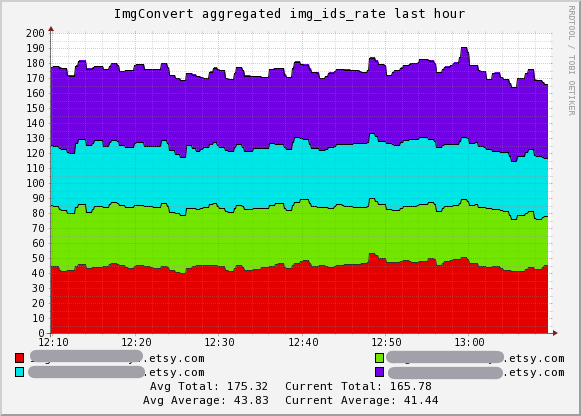
As a result, they were able to complete the processing of 135 million photos in just 9 days, using four 16-core servers. The average processing speed was 180 images per second.
They used three tools.
1. GraphicsMagick , is ImageMagick fork, which provides better performance thanks to support for multiprocessing. Flexible command line options allow fine tuning performance.
')
2. Perl. It would seem, where do without it. But this is not at all a must-have tool, because the guys did not use the GraphicsMagick-Perl library, but all the commands were written by hand, and they can be written in any other language.
3. The monitoring system Ganglia was used to build graphs to visualize the process and immediately understand which link serves as a bottleneck and slows down the work - image search, file copying, resizing, comparison with the original, copying the results back.
To set up GraphicsMagick, a test page was first generated with 200 images of varying degrees of compression, which was presented to management. They chose pictures of acceptable quality. It is very important here that the manual does not see on the page information about the compression parameters of each image, file sizes, etc. (even in the names of files it is impossible to hint at this) - then their decision will be completely impartial.
After that, comparative testing of all filters from the GraphicsMagick kit was performed in order to determine which one of them provides slightly better performance.
The resulting images should have a size of 170 x 135 pixels. In the process of testing, it was found that resizing a pre-reduced image provides better quality and higher speed than resizing directly to a full-sized original. The author of the GraphicsMagick program has confirmed this and advised using the request feature of the thumbnail image, which is supported by the JPEG format itself.
After that, the program was launched for testing on real servers and it turned out that the “bottleneck” is not the CPU at all, but the file system (NFS seek time). In fact, the CPU was loaded only 1%. I had to rewrite the script to run the processes of parallel photo search - this greatly improved performance, up to 15 images per second. But this result again cannot satisfy, because at such a speed all the work will take 104 days.
We decided to use the 16-core Nehalem server, but it turned out that GraphicsMagick distributes each task into 16 parts, and then assembles them together. That is, he does excess work for each small puzzler - as a result, the rate of resizing has decreased to 10 images per second. I had to change the settings, and the situation was corrected.
After that, we conducted another important test to determine the optimal ratio of threads in Perl (children) and GraphicsMagick (threads). The results are shown in the table.
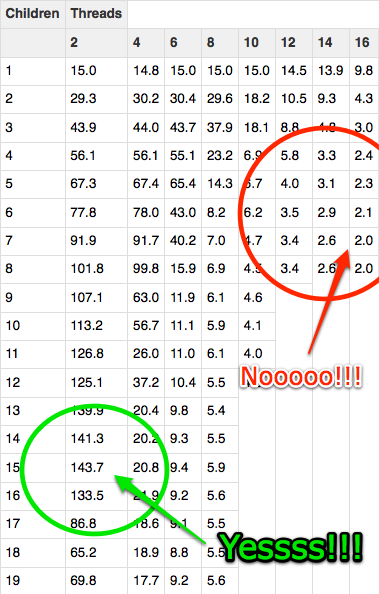
It turned out that the highest performance is achieved when using two processor cores per task. Theoretically, it is 140 images per second on one server - the estimated speed of 11 days. That was what was needed.
After that, the process was launched on four 16-core Nehalem servers. In reality, the speed was not so high - again, everything was slowed down by NFS, but in total, four servers consistently produced about 180 images per second.
For fun, they figured out how much this manual job would take in Photoshop. If you give 40 seconds to each photo, then 170 years of continuous work are released. Then they began to consider whether it is possible to give the packet to the EC2 cloud and what time it will rise. Looking at the resulting amount, the programmers decided to look for another way.
As a result, they were able to complete the processing of 135 million photos in just 9 days, using four 16-core servers. The average processing speed was 180 images per second.
They used three tools.
1. GraphicsMagick , is ImageMagick fork, which provides better performance thanks to support for multiprocessing. Flexible command line options allow fine tuning performance.
')
2. Perl. It would seem, where do without it. But this is not at all a must-have tool, because the guys did not use the GraphicsMagick-Perl library, but all the commands were written by hand, and they can be written in any other language.
3. The monitoring system Ganglia was used to build graphs to visualize the process and immediately understand which link serves as a bottleneck and slows down the work - image search, file copying, resizing, comparison with the original, copying the results back.
To set up GraphicsMagick, a test page was first generated with 200 images of varying degrees of compression, which was presented to management. They chose pictures of acceptable quality. It is very important here that the manual does not see on the page information about the compression parameters of each image, file sizes, etc. (even in the names of files it is impossible to hint at this) - then their decision will be completely impartial.
After that, comparative testing of all filters from the GraphicsMagick kit was performed in order to determine which one of them provides slightly better performance.
The resulting images should have a size of 170 x 135 pixels. In the process of testing, it was found that resizing a pre-reduced image provides better quality and higher speed than resizing directly to a full-sized original. The author of the GraphicsMagick program has confirmed this and advised using the request feature of the thumbnail image, which is supported by the JPEG format itself.
After that, the program was launched for testing on real servers and it turned out that the “bottleneck” is not the CPU at all, but the file system (NFS seek time). In fact, the CPU was loaded only 1%. I had to rewrite the script to run the processes of parallel photo search - this greatly improved performance, up to 15 images per second. But this result again cannot satisfy, because at such a speed all the work will take 104 days.
We decided to use the 16-core Nehalem server, but it turned out that GraphicsMagick distributes each task into 16 parts, and then assembles them together. That is, he does excess work for each small puzzler - as a result, the rate of resizing has decreased to 10 images per second. I had to change the settings, and the situation was corrected.
After that, we conducted another important test to determine the optimal ratio of threads in Perl (children) and GraphicsMagick (threads). The results are shown in the table.
It turned out that the highest performance is achieved when using two processor cores per task. Theoretically, it is 140 images per second on one server - the estimated speed of 11 days. That was what was needed.
After that, the process was launched on four 16-core Nehalem servers. In reality, the speed was not so high - again, everything was slowed down by NFS, but in total, four servers consistently produced about 180 images per second.
Source: https://habr.com/ru/post/99108/
All Articles