Your qTrack mail
We recently released an update that allows you to create your own qTrack mailboxes for incoming mail.
Let me remind you that qTrack is an online project and task management service distributed according to the SaaS model, which differs from traditional trackers by tight integration with mail. By the way, the basic features of qTrack are provided free of charge with no time limit.
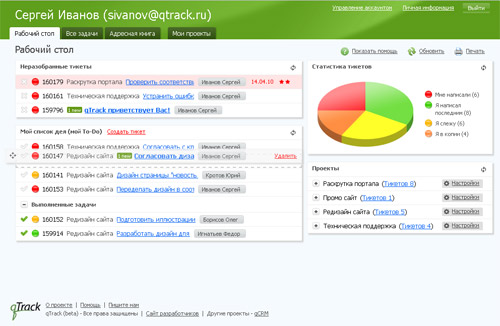
To better understand the essence of the new features, I’ll talk a little about the concept of the service and the existing possibilities for working with mail. Very often, when managing a project, a relationship with a customer (requirements management) lives a separate life (in the mail) from managing task execution (in a tracker). This leads to duplication and distortion of information, double work and simply the loss of requests from the client and questions to him. Therefore, the concept of qTrack is to unite the Customer and the Contractor. And that is why qTrack is closely integrated with the mail, allowing participants (especially the Customer) to work with the service using their regular mail, even without logging in to the qTrack interface.
Creating a task in qTrack is no different from creating a letter (subject, to whom, task text, attachment), and, just as with mail, you do not need to register a user in the system before setting a task. Simply enter his e-mail. The recipient will receive a letter (and not the qTrack as the sender, but the address of the author of the task) with the text of the task and a link to qTrack (clicking on which the user will already be authorized to qTrack, since the link contains a hash from the authorization data). But the recipient of the task does not have to enter the system - you can simply reply to the letter and the answer will join the ticket (we call the task with the discussion, by analogy with technical support systems). This forms a discussion thread to which any number of participants can be attached. Naturally, if the task (ticket) is attached to the project, all participants of the corresponding team will get access to the ticket.
')
The next opportunity is to create a ticket by letter, i.e. a user registered in the system can write to mail@qtrack.ru and a ticket will be created (for example, to make a forward sent a regular mail letter in order to continue solving the task in qTrack and with the involvement of colleagues).
But earlier there was not enough opportunity to send letters to qTrack, for example letters from clients with error messages. For this, we made it possible to create our own boxes on qTrack (of my mail@myaccount.qtrack.ru). For incoming letters to the mailbox, you can set up rules, and depending on the sender, attach a letter (created ticket) to the project and assign a responsible person. And such boxes can be created as much as necessary. Naturally, you can set up a redirect from corporate mailboxes and give clients addresses on their domain.
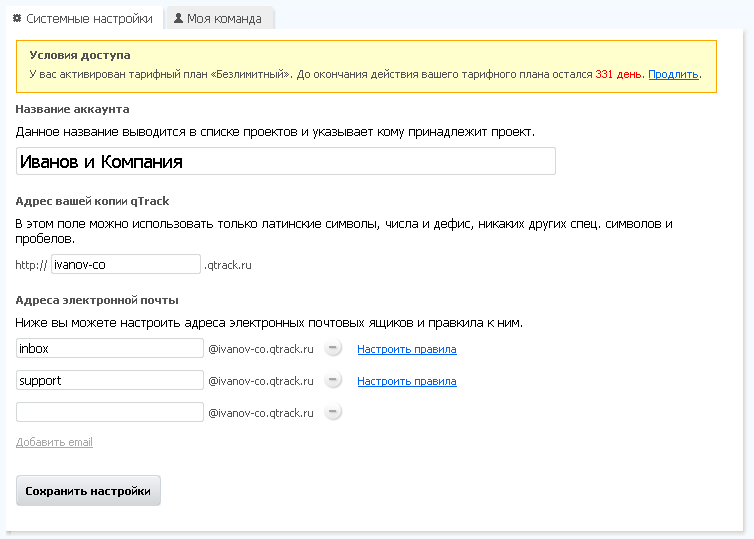
Thus, you can organize the reception and analysis of incoming company email. The most typical example is the organization of technical support. You can send all mail from the mailbox support@myoukompaniya.com (or from the form on the website) to qTrack and distribute incoming requests between specialists, and the manager will be able to track all requests received an answer, how many requests were made by each employee, etc. Or the same scheme for the sales department. And it is possible for each project manager to make a mailbox and fully correspond with qTrack.

We will welcome constructive comments and suggestions for the development of the service. I will also be happy to answer questions about our project.
Denis Mitrofanov, qTrack Project Manager
www.qtrack.ru
Let me remind you that qTrack is an online project and task management service distributed according to the SaaS model, which differs from traditional trackers by tight integration with mail. By the way, the basic features of qTrack are provided free of charge with no time limit.
To better understand the essence of the new features, I’ll talk a little about the concept of the service and the existing possibilities for working with mail. Very often, when managing a project, a relationship with a customer (requirements management) lives a separate life (in the mail) from managing task execution (in a tracker). This leads to duplication and distortion of information, double work and simply the loss of requests from the client and questions to him. Therefore, the concept of qTrack is to unite the Customer and the Contractor. And that is why qTrack is closely integrated with the mail, allowing participants (especially the Customer) to work with the service using their regular mail, even without logging in to the qTrack interface.
Creating a task in qTrack is no different from creating a letter (subject, to whom, task text, attachment), and, just as with mail, you do not need to register a user in the system before setting a task. Simply enter his e-mail. The recipient will receive a letter (and not the qTrack as the sender, but the address of the author of the task) with the text of the task and a link to qTrack (clicking on which the user will already be authorized to qTrack, since the link contains a hash from the authorization data). But the recipient of the task does not have to enter the system - you can simply reply to the letter and the answer will join the ticket (we call the task with the discussion, by analogy with technical support systems). This forms a discussion thread to which any number of participants can be attached. Naturally, if the task (ticket) is attached to the project, all participants of the corresponding team will get access to the ticket.
')
The next opportunity is to create a ticket by letter, i.e. a user registered in the system can write to mail@qtrack.ru and a ticket will be created (for example, to make a forward sent a regular mail letter in order to continue solving the task in qTrack and with the involvement of colleagues).
But earlier there was not enough opportunity to send letters to qTrack, for example letters from clients with error messages. For this, we made it possible to create our own boxes on qTrack (of my mail@myaccount.qtrack.ru). For incoming letters to the mailbox, you can set up rules, and depending on the sender, attach a letter (created ticket) to the project and assign a responsible person. And such boxes can be created as much as necessary. Naturally, you can set up a redirect from corporate mailboxes and give clients addresses on their domain.
Thus, you can organize the reception and analysis of incoming company email. The most typical example is the organization of technical support. You can send all mail from the mailbox support@myoukompaniya.com (or from the form on the website) to qTrack and distribute incoming requests between specialists, and the manager will be able to track all requests received an answer, how many requests were made by each employee, etc. Or the same scheme for the sales department. And it is possible for each project manager to make a mailbox and fully correspond with qTrack.
We will welcome constructive comments and suggestions for the development of the service. I will also be happy to answer questions about our project.
Denis Mitrofanov, qTrack Project Manager
www.qtrack.ru
Source: https://habr.com/ru/post/99094/
All Articles