How to put OneNote on iPhone / iPad, or the history of the MobileNoter project
So, almost a year has passed since we started working on MobileNoter .
The idea to create this product was born almost spontaneously: MS OneNote actively helped us in our work, and since some of us had iPhones, it was decided that the fact that the mobile version of OneNote exists only for Windows Mobile is a glaring injustice.
We did a little research and found out that we are not the only ones who would like to use OneNote on devices with iOS. It was decided - OneNote for iPhone to be!

The task before us was quite non-trivial - it was necessary to think of, first, how we would pull the pages out of ON, and second, how the synchronization would take place.
As a result, it was decided the following: the product will consist of two parts, the client for Windows (which will pull pages from OneNote) and applications for iOS, and synchronization between them will be carried out through the server. The application itself in the App Store will be free, but for the synchronization service you will have to pay - $ 5 for 3 months or $ 15 for 1 year.
MobileNoter 1.0 looked like this:

In the first version, OneNote laptops could only be viewed, plus the creation of Quick Notes, which after synchronization got into a separate laptop in OneNote. Many users even liked this functionality very much, but there were also those who were quite disappointed that laptops could not be edited, unlike OneNote for Windows Mobile. But we also had our own trump card - unlike the Microsoft product, MobileNoter retained page formatting and supported more content. In any case, it was clear that the functionality of the application must be expanded.
')
Also appeared a layer of users who do not want to use cloud sync, for security reasons. The fact that they could enable encryption, as a result of which no one could read their notes except themselves, did not reassure them. Plus, some did not like the subscription model, they preferred to buy the application once and for all. And then we decided to make a version with Wi-Fi synchronization, directly between the device and the computer, the license for which is sold by a one-time payment.
The next step was to add images to Quick Notes, and then we merged the Cloud and Wi-Fi versions into one - this is how MobileNoter 1.3 appeared.

Around this era, the notorious iPad was announced and the SDK appeared. We began to create a version of MN for iPad, even without seeing the device live. However, we are not alone. Yes, the first version came out not very successful, but it was the first. After a while, we drew a new, beautiful interface and released a high-quality version of MobileNoter for iPad. This gave us a large number of new users, but many of them asked - how can I not edit my laptops ?! It became clear that MN with editing should appear the sooner the better.
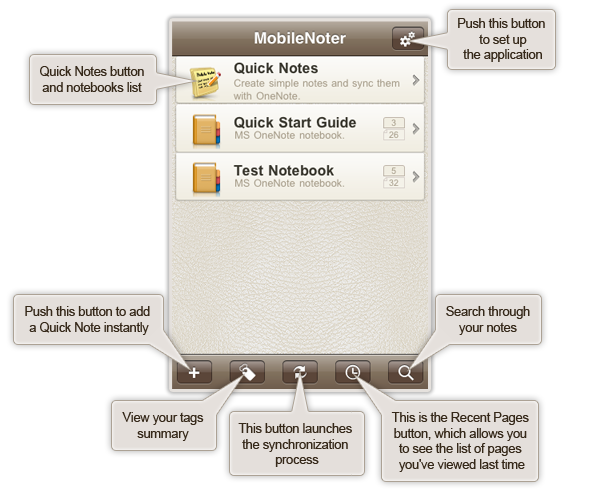
And we made it! At the beginning of the summer MobileNoter 2.0 was released - for both iPhone and iPad. Let it be while you can not create new pages / sections, but you can edit the existing ones - edit text, move content, etc. Another important feature of OneNote, file attachments, has also been supported. Those. Now you can put OneNote doc / xls / pdf file into a laptop and view it in MobileNoter. Over the interface, too, had to work.
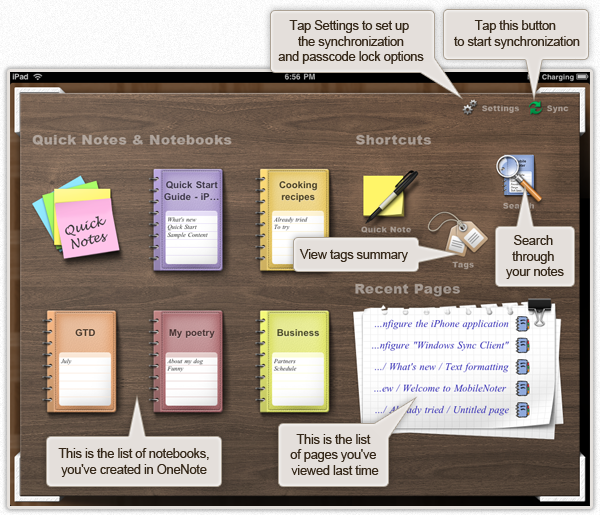
And here is the iPad version already mentioned above:
At the moment, version 2.0 is the latest available in the App Store. What's next? About a week later MobileNoter 2.1 will be released, with support for handwriting input. Those. Finally, it will be possible to draw in notes using the advantages of the touch screen. What is further? Advanced formatting, the ability to add audio recordings, notebook management - the creation of new pages, etc. Also, we will most likely release MobileNoter for Android.
Thank you for reading this topic to the end! I will be glad to answer questions and read ideas and suggestions in the comments.
The idea to create this product was born almost spontaneously: MS OneNote actively helped us in our work, and since some of us had iPhones, it was decided that the fact that the mobile version of OneNote exists only for Windows Mobile is a glaring injustice.
We did a little research and found out that we are not the only ones who would like to use OneNote on devices with iOS. It was decided - OneNote for iPhone to be!
The task before us was quite non-trivial - it was necessary to think of, first, how we would pull the pages out of ON, and second, how the synchronization would take place.
As a result, it was decided the following: the product will consist of two parts, the client for Windows (which will pull pages from OneNote) and applications for iOS, and synchronization between them will be carried out through the server. The application itself in the App Store will be free, but for the synchronization service you will have to pay - $ 5 for 3 months or $ 15 for 1 year.
MobileNoter 1.0 looked like this:
In the first version, OneNote laptops could only be viewed, plus the creation of Quick Notes, which after synchronization got into a separate laptop in OneNote. Many users even liked this functionality very much, but there were also those who were quite disappointed that laptops could not be edited, unlike OneNote for Windows Mobile. But we also had our own trump card - unlike the Microsoft product, MobileNoter retained page formatting and supported more content. In any case, it was clear that the functionality of the application must be expanded.
')
Also appeared a layer of users who do not want to use cloud sync, for security reasons. The fact that they could enable encryption, as a result of which no one could read their notes except themselves, did not reassure them. Plus, some did not like the subscription model, they preferred to buy the application once and for all. And then we decided to make a version with Wi-Fi synchronization, directly between the device and the computer, the license for which is sold by a one-time payment.
The next step was to add images to Quick Notes, and then we merged the Cloud and Wi-Fi versions into one - this is how MobileNoter 1.3 appeared.
Around this era, the notorious iPad was announced and the SDK appeared. We began to create a version of MN for iPad, even without seeing the device live. However, we are not alone. Yes, the first version came out not very successful, but it was the first. After a while, we drew a new, beautiful interface and released a high-quality version of MobileNoter for iPad. This gave us a large number of new users, but many of them asked - how can I not edit my laptops ?! It became clear that MN with editing should appear the sooner the better.
And we made it! At the beginning of the summer MobileNoter 2.0 was released - for both iPhone and iPad. Let it be while you can not create new pages / sections, but you can edit the existing ones - edit text, move content, etc. Another important feature of OneNote, file attachments, has also been supported. Those. Now you can put OneNote doc / xls / pdf file into a laptop and view it in MobileNoter. Over the interface, too, had to work.
And here is the iPad version already mentioned above:
At the moment, version 2.0 is the latest available in the App Store. What's next? About a week later MobileNoter 2.1 will be released, with support for handwriting input. Those. Finally, it will be possible to draw in notes using the advantages of the touch screen. What is further? Advanced formatting, the ability to add audio recordings, notebook management - the creation of new pages, etc. Also, we will most likely release MobileNoter for Android.
Thank you for reading this topic to the end! I will be glad to answer questions and read ideas and suggestions in the comments.
Source: https://habr.com/ru/post/99086/
All Articles