Russian-Latin keyboard layout with compatible punctuation marks
 I will add my contribution to the theme of keyboard layouts that appear regularly in articles. Verified since 2003.
Some problem of very innovative changes in layouts - in the lack of support for layouts in the material outside world - there are no keyboards with painted layout letters at hand. Therefore, enthusiasts keep both the lack of suitable and the presence of other layouts on the keys. It is possible to neutralize this doubled stopping force by using the forces in the direction of their action, which JCUKEN and YAWERT phonetic layouts successfully perform.
The proposed layout also uses the power of tradition, but not on such a revolutionary scale. It is proposed to replace only the location of the punctuation marks on the location more familiar to the Cyrillic register.
Similar articles that deal with "global" replacement layouts: all characters.
* " The JCUKEN keyboard phonetic layout. " (" The advantage of the phonetic layout is that it is very quickly learned if the layout on the basis of which it is made is studied. ")
* " Outdated QWERTY vs Apple and other inventors. " (" ... What is the reason? Probably, the army of users of standard QWERTY is not ready to relearn, as well as companies are not willing to sacrifice their current productivity to switch to a new type keyboard, which, moreover, is not a generally accepted standard. This example shows that standards, no matter how obsolete they are, often outperform the best technical solutions. ")
I made this layout and used it a very long time ago, since 2003, since when I finally got tired of remembering or keeping track of which register the keyboard is in when typing punctuation marks. Why follow, if you can accept the rule that the sign is always in one place, does not “jump” on the keys for reasons beyond its control? Strangely enough, the resulting encoding was derived not as a result of lengthy experiments, but on the basis of calculation, and then immediately got accustomed (some fluctuations were only in the plan, not to lower the "<" and ">" signs downwards). First, 11 changes were pasted onto their keyboard for memory; then, when the inscriptions were erased, it turned out that it is no less convenient to manage without them - and without that, it is easy to remember several displaced characters.
')
The inconvenience arises only when another person approaches the rebuilt layout (in Windows, the layout changes only after starting the registry * .reg file and rebooting the system). But this is not very critical, because only punctuation marks are affected, and only in the Latin register. Usually in 2 words you can explain the idea: everything is located, as in the Russian register. Some difficulties remain with signs unique to the Latin register - they are indeed moved, based on my convenience, but these are only 7 characters. In general, it is convenient to use if the workplace of the computer is individual, and third-party visitors are rare guests. (Perhaps, the registry can be customized for different users - I did not try it, there was no need, I usually changed the registry branches of the current user and the total.)
I will list the rules by which the layout was built.
1. Do not touch too many keys; leave all the letters, numbers and symbols in the Russian register on the ground.
1.a) If possible, do not move the characters in the Latin register.
2. In the Latin register, put all the characters as they became established in Russian (strictly, because for the sake of it everything is being started).
3. Place the removed characters on the places of the moved characters, proceeding from their own conveniences (more about them later).
In the figure, punctuation marks are marked with different colors, problem punctuation keys with “jumping” signs and symbols unique to the Latin register. So far, the standard character arrangement is shown. The key on the left is the Latin register, on the right is Russian. Above - upper case.
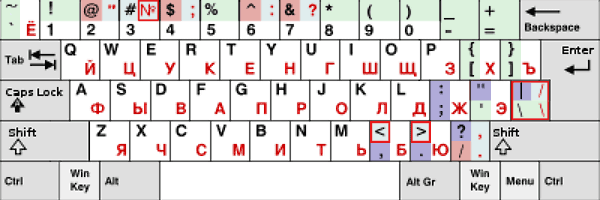
Not highlighted : letters and numbers. (For all the "chemistry" there are special characters.)
Green background - “happy coincidences” of special characters in Russian and Latin layouts. They should not be touched and moved, they correspond to the standards of their layouts (although, on reflection, I did not strictly follow this rule).
Blue background: the characters in the Russian layout, which agreed not to move. Now we move the same characters to them in the Latin register, simplifying the rules for typing: in any language register there will be the same character on the key. Therefore, lilac appear to the left of the blue fields: they will have other symbols displaced from the red fields . At this stage, everything turned out to be not so cloudless: several working questions appeared (fields marked with a red frame ).
4. What to do with the number sign in the Russian register? The question is resolved in favor of the presence of the "#" sign in both registers, to the detriment of the number sign: it is the only Unicode non-letter character, so you can take care of its dialing in special programs (Word). (Such a decision would hardly suit the humanities, but rule 2 is more important, and the "#" sign is more expensive.)
5. Own facilities include:
5.a) often you have to type "/", and it disappeared from the lower register, therefore we put it in the lower Russian register, not "\", and in the upper register - "\", breaking rule 1; in Latin on the same key - the same as rule 2;
5.b) more often you have to write tags than the special characters "|", "&", therefore put the angle brackets in lower case, breaking rule 1.a. (This is also a decision that doesn’t suit the humanities very much - this rule will be indifferent to them, therefore it’s superfluous. But I’m not too much: I tried in the time of week 1-2 to pick up in the traditional arrangement "<" and ">" - much less convenient.)
5.c) “$” is used more often than “^” or “@” (there were Pearl times), therefore we put it in lower case;
5.d) It is better to leave the "'" sign in its place, observing rule 1.a.
It turns out the layout shown in the following figure. The permutations are depicted on a gray-blue background.
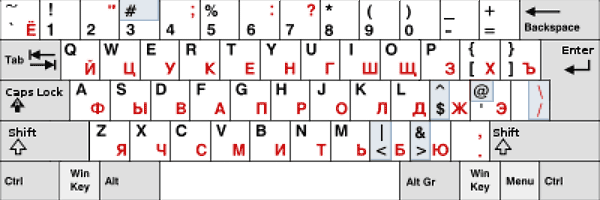
Permuted characters - 9, 2 of them - between upper and lower case, one character number removed. There could be 5 permutations of everything, but at the minimum there was no goal. The goal is a balance of convenience and minimal rearrangements.
We have advantages:
*) fewer corrections of punctuation marks in texts where the language register often changes;
*) the transition back to traditional layouts is not painful, because it concerns only part of special characters;
*) permutations almost do not need to be remembered: the characters "<" and ">" prompt for themselves, "$" is similar to "F", "/" and "\" are only rearranged between registers; There are 4 characters left to be memorized (or pasted on the keyboard). And then, in the location of the mnemonic, the following: the more frequent "&" and "@" symbols are closer to the "Shift", the logical symbols "|", "&" are on the signs "<" and ">".
After advantages, there are logical shortcomings:
*) there is no practice of memorizing the English arrangement of special characters (the comma especially tells);
*) there is a habit of "comfortable" keyboard;
*) New location for 7 characters is not written on the keyboard;
*) for the humanities it is not clear the movement of the characters "<" and ">" down, and the "@" up;
Also, you can speculate that there is a duplication of "/" on the main and gray keyboards in one register, but this is also the case in Russian, and in English layouts, and on laptops, where access to the gray keyboard is via "Fn + .. . ”, Such a“ non-optimality ”disappears.
Also, there are not quite correctly written programs (layout switches and simulators) that do not refer to the layout in the registry, but assume a fixed layout. But these are less common. Punto Switcher got rid of its self-confidence more than a year ago, version 3.1 (it used to patch), and the outdated Keyboard Ninja initially worked correctly.
How to make a layout driver (Windows of any version).
There are special programs that allow you to specify any character arrangement on the keys. For Windows, they give a kbd * .dll file, which is a driver that starts working after a system reboot, if located in the \ system32 \ directory. The file name should not be the same as the kbdus.dll, kbdru.dll layout driver and the other ones on the system. Linux also has its own programs or just text files for defining layouts.
 The archive contains ready-made drivers for layouts and an old free program for creating your own layouts, which can work from Win98 to at least WinXP. After saving, rename the file extension from “nkl” to “dll”.
How to install and uninstall driver layouts (Windows any version).
1. Download 4 files : 2 files of the KBDRUs.dll and KBDUSs.dll layouts, and 2 executable registry files - installation and removal of a new layout.
2. Configure the system to use 2 languages: Russian and English-US (priority is not important).
3. Locate KBDRUs.dll and KBDUSs.dll in the $ System root $ \ system32 \ directory.
4. Run instLayoutKbd.reg.
5. Restart the Windows system.
To return to the standard layouts:
(It is assumed that the kbdus.dll system files, kbdru.dll were not removed from $ System root $ \ system32 \.)
1. Run UNinstLayoutKbd.reg.
2. Restart the Windows system.
(It was checked up to Vista Home Edition, but not on Win7, but it should work there.)
Source: https://habr.com/ru/post/99042/
All Articles