Changing the background image on the Ubuntu 9.04 login screen
It was not reported anywhere, but in the new Ubuntu 9.04 operating system (and not only) you can easily change the background of the login window. You do not need to change the resources in executable files or perform any other special actions. The process of changing the image is quite simple and can be performed even without the involvement of additional tools. This functionality is available and works correctly in previous versions of Ubuntu, and in any other distribution using the GNOME desktop environment (and the gdm login manager). In distributions that use the kdm manager by default, this is done no more difficult, but we'll talk about this in the next article :)

In order to change the background on the login screen, you need to do the following steps.
That's all. To make sure everything works - re-log.
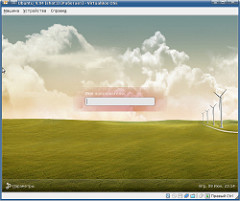
In order to change the background on the login screen, you need to do the following steps.
- Open “System” - “Administration” - “Login window” in the main menu, go to the “Local Login” tab and remember which theme is currently used (I have “Human”).
- Edit the appropriate theme file:
')$ sudo gedit /usr/share/gdm/themes/Human/Human.xml
replacing in line<normal file = "background.png" />
default “background.png” to the file path you need: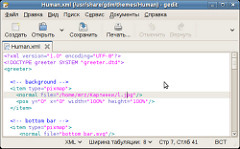
File size is not limited by anything. It can be PNG, JPEG and even SVG.
That's all. To make sure everything works - re-log.
Source: https://habr.com/ru/post/61730/
All Articles