The implementation of webhukov on the example of the interaction of third-party services with online cash registers

I asked our marketing team to draw an illustration and explained to a long time what webbooks are
Not so long ago, I was faced with the task of realizing the work of webhukas in the Personal Account of the owner of the Drimkas cash register. As it turned out, the network has almost no description and tutorials on how to do this. I will tell how we implemented it without heavy crowns on a DB.
The article will be useful for middle node.js developers.
Where do we use webbooks?
To understand the specifics, will have to start from afar.
Drimkas produces online ticketing and cloud service Drimkas Cabinet . All cash registers in real time send data on sales over the Internet to the tax - this is a requirement of the new law. By connecting to the Cabinet, the cashier’s owner gets remote access to these sales statistics and other tools.
The Drimkas office allows the cashier’s owner to monitor sales from the web interface, work with reports, create, edit and automatically load the product base on all cash desks, connect external accounting systems.
We needed webhookies when we connected online stores to the Cabinet. For online trading, too, need a cashier, only a paper receipt is not printed. We decided to create a tool for them so that they could write the sale data in the FN from the usual json with the purchase data and transfer it to the CRF.
Since the fiscalization operation may be delayed for a long time, exceeding the usual HTTP request, we needed to be given an opportunity to find out the status of this check. Every time knocking at the Cabinet for the status of the check is not beneficial either for us or for the online store. And with webhacks we kill two birds with one stone: The office makes a request only once, and the online store will receive a check as soon as it is ready.
When we started to implement them, we decided to give access to this functionality to integrator services. With their help, third-party services that are connected to the Cabinet, receive notifications about sales, opening / closing shifts, creating and editing products, making and withdrawing money. We have not stopped so far, and we immediately translate all the important events into webbooks.
Our requirements for webhacks
- Webbooks should be called upon certain events;
- It should be possible to "subscribe" to certain of them, if we do not want to receive all the events;
- WebHooks should repeat requests until a third-party service accepts them;
- A webhook is deleted if it is not accepted within 24 hours;
- The last point we need when a third-party service does not respond to the request. We assume that it has fallen, and sending new requests may drop it again. Therefore, we do these repeated requests at certain intervals.
Current stack backend
We write on node.js. Koa is selected as a web framework. We have two databases. Postrges with sequelize, where highly related data is stored, for example, cash registers and users. To store unrelated and unchangeable data — checks, shifts — we use MongoDB. Queues on rabbitMQ are still commonly used to smooth out spasmodic loads. Plus redis for cache.
Webchuk implementation
We define events to call webbukov
To begin with, we will define the places where we want to call webbuki. At the model level, we can use hooks in mongoose and in most cases sequelize.
Historically, in our sequelize model, you cannot create a product with data immediately. We create an empty product and change it immediately, so we had to add webbuk call handlers in all controllers.
When there is no such problem, everything is quite simple. Example from mongoose model:
schema.static('setStatus', async function (_id, status, data) { // const res = await this.update({ _id }, { … }); await Webhook.send({ ... }); return res; }); Event subscriptions
To define the concept of subscribing to certain events, we use bit masks.
In the backend we store all the information about the types of events in one number, and send the front-ready json object to the front:
{ "types": { "products": true, "receipts": false, "shifts": true, "encashments": false, "devices": false, "operations": true }, } To pack a number in json and extract it back, we create virtual attributes in sequelize. We install getters and setters in them. Virtual fields are calculated on the fly, change to fields in the table, but the databases are not stored.
// , import _ from 'lodash'; export const scopeBits = { products: 0, receipts: 1, shifts: 2, encashments: 3, devices: 4, operations: 5, }; /** * , , * * UPPER CASE . */ /* eslint-disable key-spacing */ const typeToTypes = { PRODUCT: { products: true }, RECEIPT: { receipts: true }, SHIFT: { shifts: true }, ENCASHMENT: { encashments: true }, DEVICE: { devices: true }, OPERATION: { operations: true }, }; /* eslint-enable key-spacing */ export function formMask(scope) { if (_.isEmpty(scope)) { return 0; } return _.reduce(Object.keys(scope), (mask, key) => { if (scope[key]) { mask |= 1 << scopeBits[key]; } return mask; }, 0); } export function formEvents(mask) { return _.reduce(scopeBits, (memo, bit, scope) => { if (mask & (1 << bit)) { memo[scope] = true; } else { memo[scope] = false; } return memo; }, {}); } // : subscribes: { type: DataTypes.INTEGER, allowNull: false, }, types: { type: DataTypes.VIRTUAL(DataTypes.INTEGER, ['subscribes']), get() { return this.constructor.formEvents(this.get('subscribes')); }, set(types) { this.setDataValue('subscribes', this.constructor.formMask(types)); }, }, CRUD for managing webhacks
The user manages the webhucks from the web interface or through the API. Therefore, we need standard CRUD for this model.
import _ from 'lodash'; const editCols = ['url', 'types', 'isActive']; export async function create(ctx) { const fields = _.pick(ctx.request.body.fields, editCols); fields.userId = ctx.state.user.id; const webhook = await Webhook.create(fields); ctx.body = { id: webhook.id }; ctx.status = 201; } Preparing for challenges
We do not call WebHooks in the static method of the Webhook class - this allows us to save resources of the main site. This is the work of the workers - to do background tasks without interfering with the REST-API.
When an event is generated on the site, we notify the workers about this:
import _ from 'lodash'; import { getClient } from '../../storage/redis'; import { stringify, getChannel } from '../../storage/rabbitmq'; /** * , * types: { products: true, devices: false, ...} */ async function search({ userId, types }) { const mask = formMask(types); /** * "" * , , * */ return Webhook.sequelize.query(`SELECT id, url, subscribes FROM "Webhook" WHERE subscribes & ? = ? AND "userId" = ? AND "isActive" = TRUE`, { type: Webhook.sequelize.QueryTypes.SELECT, replacements: [mask, mask, userId], }, ); } /** * , sequelize * SQL- */ /** * « » * type=PRODUCT|DEVICE|ENCASHMENT|RECEIPT|OPERATION|... * action=CREATE|UPDATE|DELETE */ export async function send({ userId, type, action, itemId }) { // Redis const client = getClient(); const key = `webhooks:${userId}:${type}`; const isWebhooksExist = await client.existsAsync(key); let webhooks; if (!isWebhooksExist) { // Postgres const types = typeToTypes[type]; webhooks = await search({ userId, types }); // Redis, await client.setAsync(key, JSON.stringify(webhooks), 'EX', 10); } else { webhooks = JSON.parse(await client.getAsync(key)); } _.each(webhooks, (w) => { const payload = stringify({ url: w.url, itemId, action, type, timestamp: Date.now(), }); /** * . , URL : * (, , , ...), (, , ..) * id */ getChannel().sendToQueue('kab-webhooks-delayed-0', payload, { persistent: true }); }); } In short, what we are doing is looking for in the database all the webhacks for this user who has a subscription to the current event. We cache them, even if nothing is found - if the user loads a bunch of goods, there will be extra requests to the database. When there is a webbook, we throw a task into the queue with a timestamp, a link, an identifier, and an event type.
There is a nuance: we save resources of the site, and we throw only the object identifier into the queue. If possible, it is better to throw the object itself. When an object is created and immediately deleted, two tasks fall into the queue. The first task at execution will not be able to pull out the object's body from the base. If you throw the entire body of the object, there will be no such problems.
Challenges and repeated calls webhukov
We use a message queue on the stack. We chose 5 time intervals, and for each created a queue. If the call failed on the first attempt, the webhuk moves to the next queue. When a worker receives a task for input, he postpones his execution for the required amount of time from 0 milliseconds to a day. After 24 hours, we call the webbook one last time and delete it.
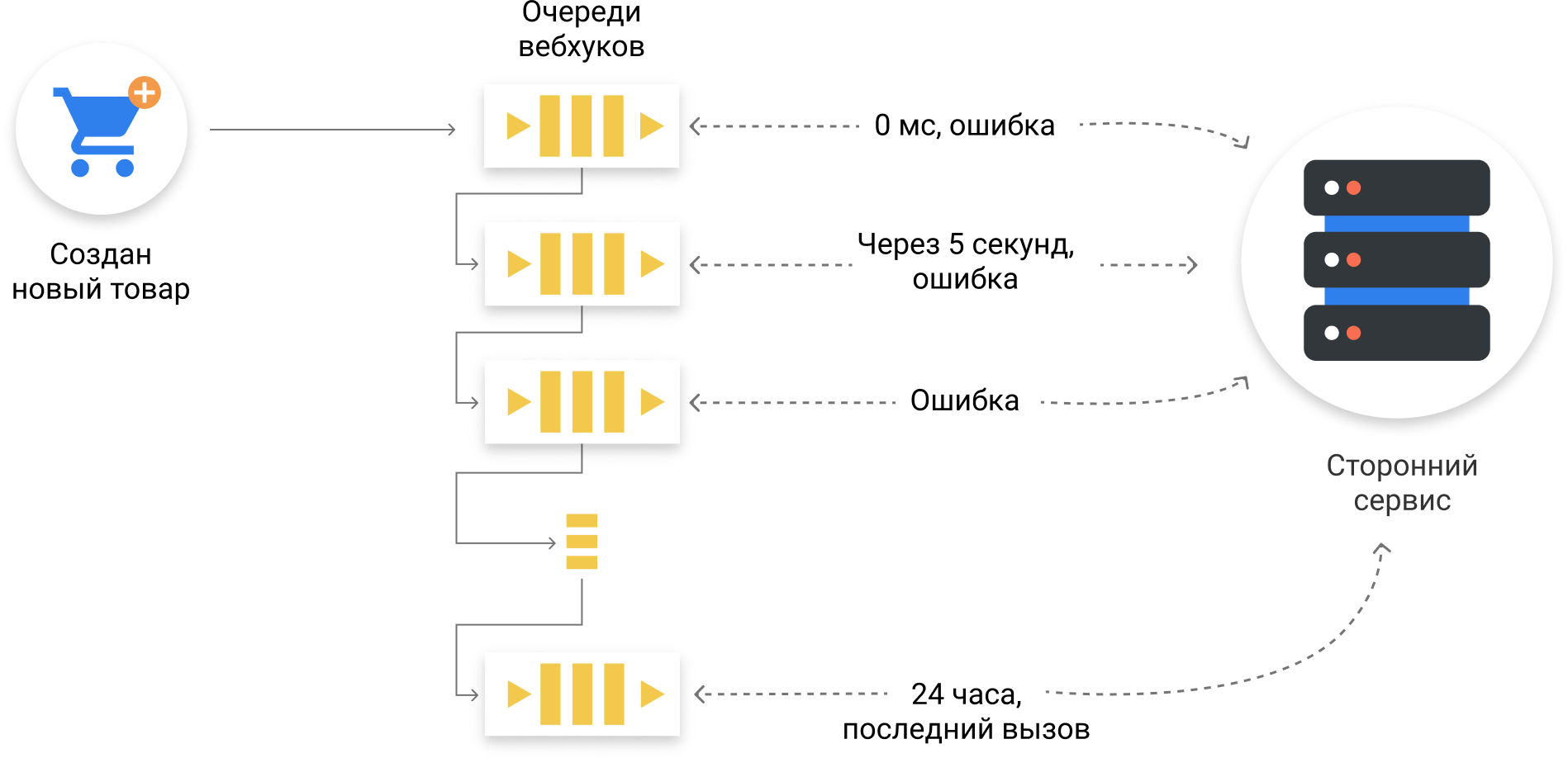
An example of a webhook that can not be taken within a day.
Each next task in the queue cannot be called earlier than the current one, since it was added there later. Therefore, when we took the task out of the queue and saw that it was too early to call the webhost, we did not complete this task in order not to get the next one.
import Bluebird from 'bluebird'; import request from 'request'; import { parse, getChannel, stringify } from '../../lib/storage/rabbitmq'; const requestPostAsync = Bluebird.promisify(request.post); const times = { 0: 0, '5sec': 5 * 1000, '1min': 1 * 60 * 1000, '1hour': 1 * 60 * 60 * 1000, '3hours': 3 * 60 * 60 * 1000, '1day': 24 * 60 * 60 * 1000, }; const getBodyById = async ({ itemId, type, action }) => { /** */ }; const handle = async (channel, msg, waitENUM, nextQueue) => { const task = parse(msg); const { url, itemId, type, action, timestamp } = task; const data = await getBodyById({ itemId, type, action }); const estimatedTime = Date.now() - (new Date(timestamp).getTime()); const wait = times[waitENUM]; if (estimatedTime < wait) { await Bluebird.delay(wait - estimatedTime); } try { const response = await requestPostAsync(url, { body: { action, type, data, }, headers: { 'content-type': 'application/json', }, json: true, timeout: 20 * 1000, }); if (response.statusCode < 200 || response.statusCode >= 300) { throw new Error(); } channel.ack(msg); } catch (err) { if (nextQueue) { getChannel().sendToQueue(nextQueue, stringify(task)); } channel.nack(msg, false, false); } }; /* eslint-disable no-multi-spaces */ export default function startConsume(channel) { channel.prefetch(2); channel.consume('kab-webhooks-delayed-0', msg => handle(channel, msg, 0, 'kab-webhooks-delayed-1'), { noAck: false }); channel.consume('kab-webhooks-delayed-1', msg => handle(channel, msg, '5sec', 'kab-webhooks-delayed-2'), { noAck: false }); channel.consume('kab-webhooks-delayed-2', msg => handle(channel, msg, '1min', 'kab-webhooks-delayed-3'), { noAck: false }); channel.consume('kab-webhooks-delayed-3', msg => handle(channel, msg, '1hour', 'kab-webhooks-delayed-4'), { noAck: false }); channel.consume('kab-webhooks-delayed-4', msg => handle(channel, msg, '3hour', 'kab-webhooks-delayed-5'), { noAck: false }); channel.consume('kab-webhooks-delayed-5', msg => handle(channel, msg, '1day', ''), { noAck: false });} /* eslint-enable no-multi-spaces */ 4 more facts
- It happens that tasks are queued in the wrong order - the next task in the queue must be completed before the current one. For us, this is not critical. The difference between them will not be more than 20 seconds - this is our request timeout.
- As time intervals, we selected the following set of values: 0 seconds, 5 seconds, 1 minute, 1 hour, 3 hours, and 24 hours.
- Requests that are not executed within 24 hours are not logged or stored. If a third-party service has a downtime of the day, then there is nothing terrible about the undelivered vebhukhs, because the problems are of a different scale there.
- If the worker does not respond to the received event and simply terminates the connection, RabbitMQ will add this message to the queue again. Thus, even if the application fell, the webhuk itself will not disappear anywhere.
')
Source: https://habr.com/ru/post/332798/
All Articles