Adding Bootstrap 4 Classes to the WordPress Menu
Many people want to use the bootstrap 4 feature right now when creating WordPress sites. The following describes one of the menu creation solutions using the bootstrap 4 classes.
Classes for navbar in bootstrap 4 differ from bootstrap 3.
Bootstrap 3
<ul class="nav navbar-nav"> <li><a href="#"></a></li> <li><a href="#"></a></li> <li><a href="#"></a></li> </ul> Bootstrap 4
<ul class="nav navbar-nav"> <li class="nav-item"><a class="nav-link" href="#"></a></li> <li class="nav-item"><a class="nav-link" href="#"></a></li> <li class="nav-item"><a class="nav-link" href="#"></a></li> </ul> If you use bootstrap 3 in WordPress, you can limit the addition to wp_nav_menu argument 'menu_class' => 'nav navbar-nav' . If bootstrap 4 is used, a little more movement is required.
The proposed method is definitely not the only one, but it works.
New wp_bootstrap_navwalker
Download or create a wp_bootstrap_navwalker.php file in your WordPress theme wp_bootstrap_navwalker.php .
Repository: https://github.com/sebakerckhof/wp-bootstrap-navwalker
In my case, the file was created in the theme folder ./src .
For standard WordPress themes, add a line to your theme's functions.php file.
require_once('./src/wp_bootstrap_navwalker.php'); For themes based on the starting theme of Sage, the link to the file will need to be added to includes
$sage_includes = [ 'src/helpers.php', 'src/setup.php', 'src/filters.php', 'src/admin.php', 'src/wp-bootstrap-navwalker.php' ]; Modify the wp_nav_menu function in the header.php file as follows
<?php wp_nav_menu( array( 'menu' => 'primary', 'theme_location' => 'primary', 'depth' => 2, 'container' => 'div', 'container_class' => 'collapse navbar-collapse', 'container_id' => 'bs-example-navbar-collapse-1', 'menu_class' => 'nav navbar-nav', 'fallback_cb' => 'wp_bootstrap_navwalker::fallback', 'walker' => new wp_bootstrap_navwalker()) ); ?> Now, before displaying the menu, a 'walker' will be processed, which will add the necessary classes to the menu.
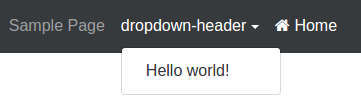
Dropdown
To create a drop-down list in the admin panel in the Title Attribute specify the value of a dropdown-header , and the URL value # .
If after this the link in the menu will be displayed below the rest, then try using a modified script. You can take it here:
https://github.com/eustatos/wp-bootstrap-navwalker .
Menu icons
This script also supports the creation of icons in the menu items. To do this, specify the class of the desired icon in the Title Attribute . If you use font-awesome , then this may be a fa fa-home .
')
Source: https://habr.com/ru/post/312704/
All Articles