Designing identical forms in WPF using abstract classes
Recently, I faced a very interesting task, which quite often can occur when designing user interfaces. The question, of course, is relatively trivial, but I did not find complete and comprehensive information on it, so I decided to share my own experience. The article may be useful for Junior-developers, as well as people just starting to learn OOP and who do not have serious practical experience in programming.
The bottom line is that we need to create a certain number of forms that are equivalent to each other to a certain extent. That is, each of these forms may have the same fields, methods, business logic, but they will not be absolutely equivalent. Each of them can have its own set of methods, variables, visual styles and other components that are specific to its presentation. In my case, these were forms for creating applications for production work, while each work had an individual set of fields.
How to most competently design such a system so that it is as user-friendly as possible and minimally redundant in implementation? It is obvious that the jumble of controls for all occasions, some of which can be hidden or deactivated, is not always a good option. First, over time, the number of parameters can grow to such an extent that the full set will no longer fit into the window size. Secondly, this system will look extremely overloaded and completely uncomfortable for the user. Based on this, we can say that it would be preferable to use the functional separation with the separation of components.
When developing several similar forms, the following problem arises. Since most of the methods and fields in each of them coincide, with an isolated implementation of logic for each individual form, as any inexperienced programmer can do, there is a redundancy of parameters and a lot of duplicate code. Consequently, with any changes in the structure of objects or in the logic of the program, each method must be separately corrected, which results in a monotonous copy-paste and significant loss of time for unnecessary actions, including possible errors when inserting the “wrong”.
')
A logical solution in this situation would be the use of polymorphism. In order to avoid cases like the one described in the previous paragraph, in languages that implement the object-oriented programming paradigm, features such as abstract classes — classes containing abstract methods and properties that can be used by any descendants inherited from it — were specially developed. We will take them as the basis in this example.
I developed my project on WPF, since it required high flexibility and a very complex structure of forms. However, the principle of this approach is common to all platforms and languages, so it can be freely used in the Web, mobile development and in many other places.
To demonstrate the capabilities of abstract classes on the example of the user interface, we formulate the original problem as follows:
It is necessary to calculate the total profit from movie rental based on the available statistics. In this film can be of two varieties: the full-length film or series. For feature films, the profit is calculated based on the total box office from film distribution. For TV shows - by total revenue from TV channels. According to the resulting data, the verdict is: whether the film turned out to be profitable, if yes - what is the income, if not - what is the loss. Provide for the possibility of changing and saving the calculated parameters.
To begin, create a Movie class that describes the movie:
Parameter designations:
We describe the main form containing the drop-down list with the list of films and fill it with four elements:
The first two copies of the Movie class are films with a full set of parameters, the last two are serials that lack data related to film distribution.
The form itself will look like this:
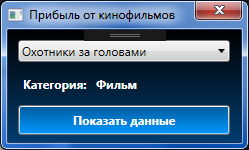
After selecting an item from the list by clicking on the button, the corresponding window should open containing the data on the film.
To carry out basic settlement operations and make changes to the list, we will create a new abstract class called MovieEdit, inherited from Window, which will describe the general logic of calculating profits and manipulating objects. This is our abstract form. It has no visual presentation, but only contains general methods for working with the Movie class, regardless of category and parameters:
Now we will create two forms for displaying statistics on films, differing by category: a separate form for films, a separate form for TV series. Each of them will contain three buttons: Calculate, Save and Cancel. In this case, they will no longer be inherited from Window, but from our abstract class MovieEdit, in order to be able to use the methods created earlier.
On each button we will put the handler and inside it we will call the corresponding functions of the base class, passing the necessary parameters:
It is also necessary to amend the layout of the constructor: instead of the top-level Window tag, we prescribe our class MovieEdit. Otherwise, an assembly error will occur: the visual part and the form code must be inherited from one class, as they are part of the same element.
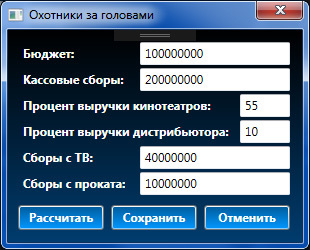
For the second form, we perform the same actions:
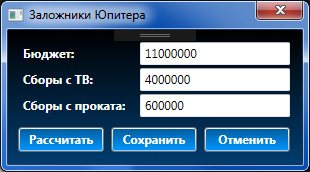
All the necessary information is available, you can test the project. Now the program automatically determines which form to open. Select any item from the list, click “Show data”, calculate the profit by the entered parameters and see the corresponding result:
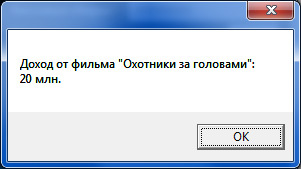
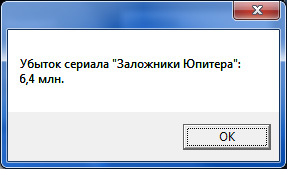
Bottom line: as we see, we managed to create two forms with the same behavior, but with different representations, and at the same time avoid duplication of code. The entire logic of working with data fits into three methods in a little more than 30 lines. Now, to change the implementation, it is enough to make an adjustment to a specific abstract method without having to edit each form separately. This example clearly demonstrates the benefits of abstract classes.
In actual practice, the forms, of course, will not be so modest. For example, at the moment I am developing two forms for editing applications, each of which contains a couple of dozen fields and almost as many buttons for downloading and downloading files from the database. Naturally, you have to constantly add and amend something, and if after each change you copy the code from one form to another, you will have to finish it not earlier than next year. It is better to spend this time on more useful things, is not it?)
Project sources can be found at .
The task of building uniform forms with patterned logic
The bottom line is that we need to create a certain number of forms that are equivalent to each other to a certain extent. That is, each of these forms may have the same fields, methods, business logic, but they will not be absolutely equivalent. Each of them can have its own set of methods, variables, visual styles and other components that are specific to its presentation. In my case, these were forms for creating applications for production work, while each work had an individual set of fields.
How to most competently design such a system so that it is as user-friendly as possible and minimally redundant in implementation? It is obvious that the jumble of controls for all occasions, some of which can be hidden or deactivated, is not always a good option. First, over time, the number of parameters can grow to such an extent that the full set will no longer fit into the window size. Secondly, this system will look extremely overloaded and completely uncomfortable for the user. Based on this, we can say that it would be preferable to use the functional separation with the separation of components.
When developing several similar forms, the following problem arises. Since most of the methods and fields in each of them coincide, with an isolated implementation of logic for each individual form, as any inexperienced programmer can do, there is a redundancy of parameters and a lot of duplicate code. Consequently, with any changes in the structure of objects or in the logic of the program, each method must be separately corrected, which results in a monotonous copy-paste and significant loss of time for unnecessary actions, including possible errors when inserting the “wrong”.
')
A logical solution in this situation would be the use of polymorphism. In order to avoid cases like the one described in the previous paragraph, in languages that implement the object-oriented programming paradigm, features such as abstract classes — classes containing abstract methods and properties that can be used by any descendants inherited from it — were specially developed. We will take them as the basis in this example.
Practical implementation on WPF
I developed my project on WPF, since it required high flexibility and a very complex structure of forms. However, the principle of this approach is common to all platforms and languages, so it can be freely used in the Web, mobile development and in many other places.
To demonstrate the capabilities of abstract classes on the example of the user interface, we formulate the original problem as follows:
It is necessary to calculate the total profit from movie rental based on the available statistics. In this film can be of two varieties: the full-length film or series. For feature films, the profit is calculated based on the total box office from film distribution. For TV shows - by total revenue from TV channels. According to the resulting data, the verdict is: whether the film turned out to be profitable, if yes - what is the income, if not - what is the loss. Provide for the possibility of changing and saving the calculated parameters.
To begin, create a Movie class that describes the movie:
public class Movie { public Movie(string Name, byte Type, int Cost, int? Dues, int DuesTV, int DuesExtra, short? CinemaPart, short? DistrPart) { this.Name = Name; this.Type = Type; this.Cost = Cost; this.Dues = Dues; this.DuesTV = DuesTV; this.DuesExtra = DuesExtra; this.CinemaPart = CinemaPart; this.DistrPart = DistrPart; } public string Name { get; set; } public byte Type { get; set; } public int Cost { get; set; } public int? Dues { get; set; } public int DuesTV { get; set; } public int DuesExtra { get; set; } public short? CinemaPart { get; set; } public short? DistrPart { get; set; } } Parameter designations:
- Name - the name of the painting
- Type - type, 0 - film, 1 - series
- Cost - total budget
- Dues - profit from film distribution
- DuesTV - profit from television
- DuesExtra - add. profit (DVD, rentals)
- CinemaPart - cinema share of profits
- DistrPart - share of distributors
We describe the main form containing the drop-down list with the list of films and fill it with four elements:
Markup
<Window x:Class="Earnings.Movies" xmlns="http://schemas.microsoft.com/winfx/2006/xaml/presentation" xmlns:x="http://schemas.microsoft.com/winfx/2006/xaml" xmlns:d="http://schemas.microsoft.com/expression/blend/2008" xmlns:mc="http://schemas.openxmlformats.org/markup-compatibility/2006" xmlns:local="clr-namespace:Earnings" mc:Ignorable="d" Title=" " Height="150" Width="249" Style="{StaticResource WindowStyle}" ResizeMode="NoResize" WindowStartupLocation="CenterScreen"> <Grid> <ComboBox x:Name="movieList" HorizontalAlignment="Left" Margin="10,10,0,0" VerticalAlignment="Top" Width="212" SelectionChanged="movieList_SelectionChanged"/> <Label x:Name="_Type" Content=":" HorizontalAlignment="Left" Margin="10,41,0,0" VerticalAlignment="Top" Style="{StaticResource LabelStyle}"/> <Label x:Name="Type" HorizontalAlignment="Left" Margin="83,41,0,0" VerticalAlignment="Top" Style="{StaticResource LabelStyle}"/> <Button x:Name="calc" Content=" " HorizontalAlignment="Left" Margin="10,75,0,0" VerticalAlignment="Top" Width="212" Style="{StaticResource ButtonStyle}" Click="calc_Click"/> </Grid> </Window> public partial class Movies : Window { public Movies() { InitializeComponent(); List<Movie> movies = new List<Movie>() { new Movie(" ", 0, 100000000, 200000000, 40000000, 10000000, 55, 10), new Movie("", 0, 160000000, 300000000, 60000000, 20000000, 50, 11), new Movie("", 1, 6000000, null, 22000000, 2000000, null, null), new Movie(" ", 1, 11000000, null, 4000000, 600000, null, null) }; movieList.ItemsSource = movies; movieList.DisplayMemberPath = "Name"; } private void calc_Click(object sender, RoutedEventArgs e) { if (movieList.SelectedIndex != -1) { Movie movie = ((Movie)movieList.SelectedItem); switch (movie.Type) { case 0: Film film = new Film(movie); film.ShowDialog(); break; default: Serial serial = new Serial(movie); serial.ShowDialog(); break; } } else { MessageBox.Show(" "); } } private void movieList_SelectionChanged(object sender, System.Windows.Controls.SelectionChangedEventArgs e) { if (((Movie)movieList.SelectedItem).Type == 0) Type.Content = ""; else Type.Content = ""; } } The first two copies of the Movie class are films with a full set of parameters, the last two are serials that lack data related to film distribution.
The form itself will look like this:
After selecting an item from the list by clicking on the button, the corresponding window should open containing the data on the film.
To carry out basic settlement operations and make changes to the list, we will create a new abstract class called MovieEdit, inherited from Window, which will describe the general logic of calculating profits and manipulating objects. This is our abstract form. It has no visual presentation, but only contains general methods for working with the Movie class, regardless of category and parameters:
public class MovieEdit : Window { protected Movie movie; protected void calculate(double cost, double cash, string type) { double result = (cash - cost) / 1000000; if (result > 0) { MessageBox.Show(" " + type + " \"" + Title + "\":\n" + result + " ."); } else { MessageBox.Show(" " + type + " \"" + Title + "\":\n" + -result + " ."); } } protected void save(int Cost, int? Dues, int DuesTV, int DuesExtra, short? CinemaPart, short? DistrPart) { MessageBoxResult view = MessageBox.Show(" ?", "", MessageBoxButton.YesNo, MessageBoxImage.Question); if (view == MessageBoxResult.Yes) { movie.Cost = Cost; if (Dues != null) movie.Dues = (int)Dues; if (CinemaPart != null) movie.CinemaPart = (short)CinemaPart; if (DistrPart != null) movie.DistrPart = (short)DistrPart; movie.DuesTV = DuesTV; movie.DuesExtra = DuesExtra; Close(); } } protected void cancel() { MessageBoxResult view = MessageBox.Show(" ?", "", MessageBoxButton.YesNo, MessageBoxImage.Question); if (view == MessageBoxResult.Yes) { Close(); } } } Now we will create two forms for displaying statistics on films, differing by category: a separate form for films, a separate form for TV series. Each of them will contain three buttons: Calculate, Save and Cancel. In this case, they will no longer be inherited from Window, but from our abstract class MovieEdit, in order to be able to use the methods created earlier.
Markup
<local:MovieEdit x:Class="Earnings.Film" xmlns="http://schemas.microsoft.com/winfx/2006/xaml/presentation" xmlns:x="http://schemas.microsoft.com/winfx/2006/xaml" xmlns:d="http://schemas.microsoft.com/expression/blend/2008" xmlns:mc="http://schemas.openxmlformats.org/markup-compatibility/2006" xmlns:local="clr-namespace:Earnings" mc:Ignorable="d" Height="250" Width="310" Style="{StaticResource WindowStyle}" ResizeMode="NoResize" WindowStartupLocation="CenterScreen"> <Grid> <Label x:Name="_cost" Content=":" HorizontalAlignment="Left" Margin="10,10,0,0" VerticalAlignment="Top" Style="{StaticResource LabelStyle}"/> <TextBox x:Name="cost" HorizontalAlignment="Left" Height="23" Margin="132,12,0,0" TextWrapping="Wrap" VerticalAlignment="Top" Width="150"/> <Label x:Name="_dues" Content=" :" HorizontalAlignment="Left" Margin="10,36,0,0" VerticalAlignment="Top" Style="{StaticResource LabelStyle}"/> <TextBox x:Name="dues" HorizontalAlignment="Left" Height="23" Margin="132,38,0,0" TextWrapping="Wrap" VerticalAlignment="Top" Width="150"/> <Label x:Name="_cinemaPart" Content=" :" HorizontalAlignment="Left" Margin="10,62,0,0" VerticalAlignment="Top" Style="{StaticResource LabelStyle}"/> <TextBox x:Name="cinemaPart" HorizontalAlignment="Left" Height="23" Margin="232,64,0,0" TextWrapping="Wrap" VerticalAlignment="Top" Width="50"/> <Label x:Name="_distrPart" Content=" :" HorizontalAlignment="Left" Margin="10,88,0,0" VerticalAlignment="Top" Style="{StaticResource LabelStyle}"/> <TextBox x:Name="distrPart" HorizontalAlignment="Left" Height="23" Margin="232,90,0,0" TextWrapping="Wrap" VerticalAlignment="Top" Width="50"/> <Label x:Name="_duesTV" Content=" :" HorizontalAlignment="Left" Margin="10,114,0,0" VerticalAlignment="Top" Style="{StaticResource LabelStyle}"/> <TextBox x:Name="duesTV" HorizontalAlignment="Left" Height="23" Margin="132,116,0,0" TextWrapping="Wrap" VerticalAlignment="Top" Width="150"/> <Label x:Name="_duesExtra" Content=" :" HorizontalAlignment="Left" Margin="10,140,0,0" VerticalAlignment="Top" Style="{StaticResource LabelStyle}"/> <TextBox x:Name="duesExtra" HorizontalAlignment="Left" Height="23" Margin="132,142,0,0" TextWrapping="Wrap" VerticalAlignment="Top" Width="150"/> <Button x:Name="_calc" Content="" HorizontalAlignment="Left" Margin="10,175,0,0" VerticalAlignment="Top" Width="86" Style="{StaticResource ButtonStyle}" Height="25" Click="_calc_Click"/> <Button x:Name="_save" Content="" HorizontalAlignment="Left" Margin="103,175,0,0" VerticalAlignment="Top" Width="86" Style="{StaticResource ButtonStyle}" Height="25" Click="_save_Click"/> <Button x:Name="_cancel" Content="" HorizontalAlignment="Left" Margin="196,175,0,0" VerticalAlignment="Top" Width="86" Style="{StaticResource ButtonStyle}" Height="25" Click="_cancel_Click"/> </Grid> </local:MovieEdit> On each button we will put the handler and inside it we will call the corresponding functions of the base class, passing the necessary parameters:
public partial class Film : MovieEdit { public Film(Movie movie) { InitializeComponent(); this.movie = movie; base.Title = movie.Name; cost.Text = movie.Cost.ToString(); dues.Text = movie.Dues.ToString(); cinemaPart.Text = movie.CinemaPart.ToString(); distrPart.Text = movie.DistrPart.ToString(); duesTV.Text = movie.DuesTV.ToString(); duesExtra.Text = movie.DuesExtra.ToString(); } private void _calc_Click(object sender, RoutedEventArgs e) { base.calculate(double.Parse(cost.Text), double.Parse(dues.Text) * (100 - double.Parse(cinemaPart.Text) - double.Parse(distrPart.Text)) / 100 + double.Parse(duesTV.Text) + double.Parse(duesExtra.Text), ""); } private void _save_Click(object sender, RoutedEventArgs e) { base.save(int.Parse(cost.Text), int.Parse(dues.Text), int.Parse(duesTV.Text), int.Parse(duesExtra.Text), short.Parse(cinemaPart.Text), short.Parse(distrPart.Text)); } private void _cancel_Click(object sender, RoutedEventArgs e) { base.cancel(); } } It is also necessary to amend the layout of the constructor: instead of the top-level Window tag, we prescribe our class MovieEdit. Otherwise, an assembly error will occur: the visual part and the form code must be inherited from one class, as they are part of the same element.
<local:MovieEdit x:Class="Earnings.Film" ... xmlns:local="clr-namespace:Earnings" ...> <Grid> ... </Grid> </local:MovieEdit> For the second form, we perform the same actions:
Markup
<local:MovieEdit x:Class="Earnings.Serial" xmlns="http://schemas.microsoft.com/winfx/2006/xaml/presentation" xmlns:x="http://schemas.microsoft.com/winfx/2006/xaml" xmlns:d="http://schemas.microsoft.com/expression/blend/2008" xmlns:mc="http://schemas.openxmlformats.org/markup-compatibility/2006" xmlns:local="clr-namespace:Earnings" mc:Ignorable="d" Height="172" Width="310" Style="{StaticResource WindowStyle}" ResizeMode="NoResize" WindowStartupLocation="CenterScreen"> <Grid> <Label x:Name="_cost" Content=":" HorizontalAlignment="Left" Margin="10,10,0,0" VerticalAlignment="Top" Style="{StaticResource LabelStyle}"/> <TextBox x:Name="cost" HorizontalAlignment="Left" Height="23" Margin="132,12,0,0" TextWrapping="Wrap" VerticalAlignment="Top" Width="150"/> <Label x:Name="_duesTV" Content=" :" HorizontalAlignment="Left" Margin="10,36,0,0" VerticalAlignment="Top" Style="{StaticResource LabelStyle}"/> <TextBox x:Name="duesTV" HorizontalAlignment="Left" Height="23" Margin="132,38,0,0" TextWrapping="Wrap" VerticalAlignment="Top" Width="150"/> <Label x:Name="_duesExtra" Content=" :" HorizontalAlignment="Left" Margin="10,62,0,0" VerticalAlignment="Top" Style="{StaticResource LabelStyle}"/> <TextBox x:Name="duesExtra" HorizontalAlignment="Left" Height="23" Margin="132,64,0,0" TextWrapping="Wrap" VerticalAlignment="Top" Width="150"/> <Button x:Name="_calc" Content="" HorizontalAlignment="Left" Margin="10,97,0,0" VerticalAlignment="Top" Width="86" Style="{StaticResource ButtonStyle}" Height="25" Click="_calc_Click"/> <Button x:Name="_save" Content="" HorizontalAlignment="Left" Margin="103,97,0,0" VerticalAlignment="Top" Width="86" Style="{StaticResource ButtonStyle}" Height="25" Click="_save_Click"/> <Button x:Name="_cancel" Content="" HorizontalAlignment="Left" Margin="196,97,0,0" VerticalAlignment="Top" Width="86" Style="{StaticResource ButtonStyle}" Height="25" Click="_cancel_Click"/> </Grid> </local:MovieEdit> public partial class Serial : MovieEdit { public Serial(Movie movie) { InitializeComponent(); base.Title = movie.Name; cost.Text = movie.Cost.ToString(); duesTV.Text = movie.DuesTV.ToString(); duesExtra.Text = movie.DuesExtra.ToString(); } private void _calc_Click(object sender, RoutedEventArgs e) { base.calculate(double.Parse(cost.Text), double.Parse(duesTV.Text) + double.Parse(duesExtra.Text), ""); } private void _save_Click(object sender, RoutedEventArgs e) { base.save(int.Parse(cost.Text), null, int.Parse(duesTV.Text), int.Parse(duesExtra.Text), null, null); } private void _cancel_Click(object sender, RoutedEventArgs e) { base.cancel(); } } All the necessary information is available, you can test the project. Now the program automatically determines which form to open. Select any item from the list, click “Show data”, calculate the profit by the entered parameters and see the corresponding result:
Bottom line: as we see, we managed to create two forms with the same behavior, but with different representations, and at the same time avoid duplication of code. The entire logic of working with data fits into three methods in a little more than 30 lines. Now, to change the implementation, it is enough to make an adjustment to a specific abstract method without having to edit each form separately. This example clearly demonstrates the benefits of abstract classes.
In actual practice, the forms, of course, will not be so modest. For example, at the moment I am developing two forms for editing applications, each of which contains a couple of dozen fields and almost as many buttons for downloading and downloading files from the database. Naturally, you have to constantly add and amend something, and if after each change you copy the code from one form to another, you will have to finish it not earlier than next year. It is better to spend this time on more useful things, is not it?)
Project sources can be found at .
Source: https://habr.com/ru/post/307308/
All Articles