UX design in the mobile application: a request to evaluate the application

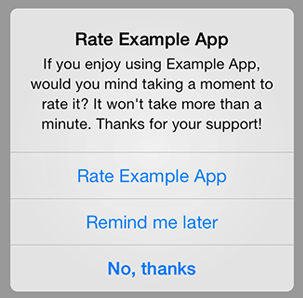
“Rate this app!” You won't surprise anyone with this pop-up dialog box, every day it catches my eye. Such requests are annoying in many mobile applications:
')
This lazy approach has been criticized by John Gruber, and this is what he said about Daring Fireball:
I have already launched a public campaign against this practice, in which I convince Daring Fireball readers, that every time the “Please rate this application” window pops up, follow the advice and evaluate, but only give one star, but below write "One for annoying me with the announcement of the evaluation of this application."
Getting users requests is an invalid moveton. However, evaluating your application is extremely important for a business. In this article we will try to answer the question: "How to make the user evaluate the application and leave a review and not lose it?"
Why ratings and reviews matter
Rated application people decide for themselves to download it or not. In other words, reviews determine the fate of the application:
For the developer . Reviews are extremely important to you, thanks to them you can understand what users like, and what you have to work on. Reviews also affect the position of your application in search queries, it depends on them whether the application will be presented to the App Store.
For users . Both in the Apple AppStore and in Google Play the rating is placed next to the icon and the name of the application, so that users can quickly assess its quality. As you know, the opinions of other people play an important role in the decision to purchase anything, whether cars, movies or applications. It’s no secret that the user's choice depends on the rating of the application (potential customers most often download an application with a rating of 4 stars and above).
Therefore, we, as developers, need to do everything we can to achieve the highest position for our applications. Let's keep that in mind and look at the best examples of how to ask a customer to leave a review.
Instructions for obtaining feedback: what you need and what not to do
Reviews of the application themselves do not appear. For people to rate the app and leave a review, they need to be pushed to this.
Not recommended: Distract the client during task execution or when launching the application.
"Ask, and you will get what you want." The easiest way to get feedback is to ask the user directly in the application. Unfortunately, in most applications, alerts appear at an inconvenient time - when starting from the very beginning or after a certain number of launches. Modal pop-up windows interrupt the user's workflow, offering him to leave feedback immediately, or postpone the reminder until later. If you used a mobile device, you almost certainly came across a dialog box that looks like this:

Nobody likes popups
Running the application is undoubtedly one of the most inappropriate moments for such requests. Think about how this looks from ordinary users. They barely had time to open the application, and what do they see: “Hey, you could not evaluate this application right now!” The fact is that no one likes being distracted from serious work, especially for something unimportant. Not surprisingly, a notice of app evaluation in 50% of cases will lead to its closure, compared to if it was shown at another time. The clumsiness of the “rate the app” dialog box caused discontent, both among ordinary users and critics.
Conclusion:
If the user has downloaded the application recently and used it only a few times, then do not remove it from work with requests to evaluate your product.
Do not ask for feedback at startup and try not to disturb the user during the workflow.
Not recommended: Ask for feedback with every update.
Use the “Rate App” trigger only once. Make sure that the user will no longer see this window if he chooses “No, thank you.”
Recommended: choose the right moments to ask for feedback.
You must select the least intrusive moment in your application. Of course, if your dialog box is displayed while the application is running, then in any case you will distract the user, but you can quite mitigate this inconvenience if you choose the moment when the user's attention is practically not taken. Clear is a good example here.

Choose the right time to ask to rate the application, as it did in Clear
As Dan Kunsel said: “In Clear for iOS, the dialog“ Rate app ”is displayed only under several conditions: first, the user must use the app for several weeks, and second, perform all the tasks from the list. This is a great moment: users feel satisfied that they have completed all the tasks and most often just want to quit the application. ”
Conclusion:
· Notify the user about the need to evaluate the application after completing a certain number of tasks or goals. Choose the most appropriate moment (especially after a positive interaction).
· Request for feedback, made at the moment when the user has a positive impression of the application at hand, as the application developers, and the users themselves. Most likely, such a user will appreciate your application and leave an informative review.
Recommended: integrated feedback requests
Pop-up windows interrupt the usual workflow of the user - this is their main drawback. Much better if the option of getting feedback is integrated into the user experience:
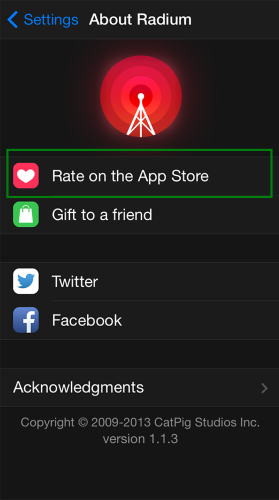
Implement getting feedback as an option in the menu . You can add “Rate this app” as an option. This option is good because it rejects the need to distract the user by asking for feedback.
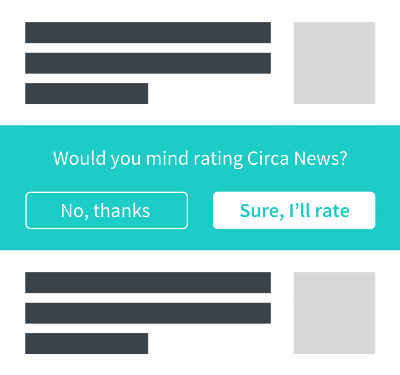
Place the request in the content. Circa News inserted a request for app evaluation in the middle of the news feed. Users can scroll through it without paying attention, in contrast to the pop-up window, to which you will have to pay attention
Recommended: ask for a review not in the app.
You can politely ask for feedback in the update. This approach, in addition to being more polite, significantly increases the number of reviews when a new update is released. Castro is a great confirmation of this.
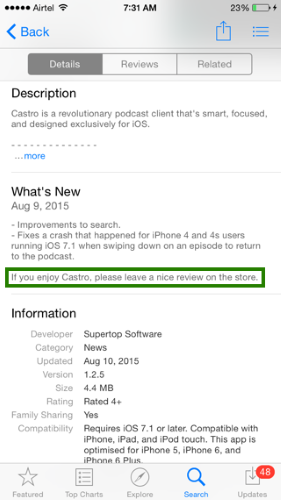
As the statistics show, information about updates is read by the most loyal users, and in order to preserve their interest, the developer should describe in detail all the changes. Users in this group leave feedback most of all.

Conclusion: A polite request at the very end of the update is an effective way to convince the user to leave a review, as well as to maintain his dedication.
Recommended: Communicate with users to learn about their experiences.
A simple request to evaluate the application may be ineffective, you need to bring the user to a conversation, especially when he is dissatisfied with something. Building a dialogue plays a key role in the consumer's journey. Consider any mood of the user (no matter whether he is happy, disappointed or he doesn’t know yet) as an opportunity to understand their problems. Such an attitude often brings useful feedback.
Every now and then in the applications you can observe the fixed button “Leave feedback”, when clicked, the email request form simply pops up. With quite a bit of effort, you can integrate active support into your application and communicate directly with users. With services like Helpshift, you can add real-time instant chat to your app. And the next time the user needs help, he can get it immediately.
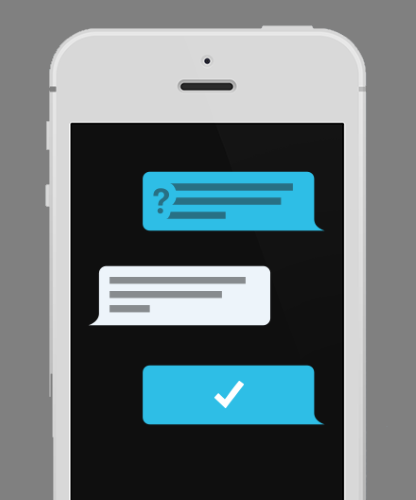
Provide users with direct support.
Conclusion: The secret of good reviews about the application lies in the high level of customer service. Start a dialogue with the user, and after you solve his problem, ask him to rate the application and leave a review.
Conclusion
In a request to leave a review there is absolutely nothing wrong, but remember that first, you must make a great impression on your user. Make a good application and get it to bring joy, not irritation. The more people like your product, the more they want to leave a positive feedback about it and advise it to other users.
Source: https://habr.com/ru/post/305374/
All Articles