Audits and correspondence in the design institute. Integration of easla.com and TDMS
The article will deal with specific for project enterprises document management procedures, or rather, the integration of technical document management (in our case, based on TDMS) and external correspondence. Other types of enterprises may also have similar needs, so if you have questions regarding integration or automation using easla.com, it is also worth reading the article - interesting technical details are described here.

I was going to speak at the annual conference in Giprotyumenneftegaz, but due to the strong current load I just did not have time to get ready. Than did not meet the expectations of my friends and colleagues (a small public discussion was expected). The decision described below does not contain anything revolutionary from an organizational point of view, but, I dare to hope, it nevertheless deserves some attention.
Several starting points in the article are devoted to "Why." Further - “How” (VBScript,MS SQL + XML). If you are more interested in how - scroll to the 5th item.
Audits are versions of documents. The word itself came from foreign standards, where the GOST standards of the 21st series have no distribution. There, "they", on the documents in the main inscriptions there is a field "Rev.", which, in fact, stands for "Revision".
In the process of developing project documentation, the designer does not just draw drawings. The designer very actively communicates with experts of the Customerand with designers of manufacturers. Both informally and formally. Those. sends the documentation for approval with a cover letter, responds to comments , amends, sends the documentation with a cover letter , etc. again . To the bitter end. While not agree. Every document under development.
The correct way to work is to submit the documentto the archive before sending . Upon delivery to the archive , an inventory number is assigned and the change number is put on the drawing. But the transfer to the archive is a long procedure, it involves at least two other units. Therefore, designers avoid submitting documents to the archive each time they are submitted for approval. And if only the designers - they avoid the GUIs, the Chief Engineer, and even the Customer himself is not interested in delaying the procedure for the coordination of documentation.
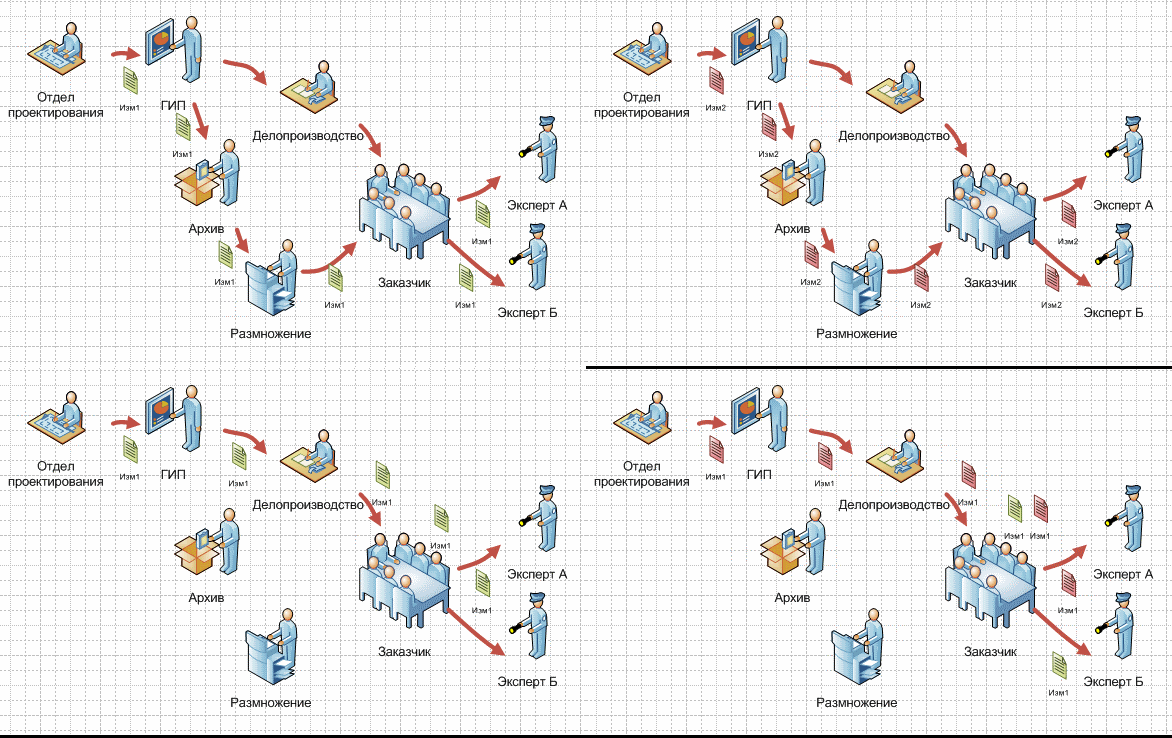
Those. accounting of revisions is introduced or not - the exchange “without an archive” is going on anyway. It is also impossible toput the change number without the archive. As a result, confusion arises. The documentation goes first to the Customer (can be identified by the outgoing number of the letter from the Designer), then to the expert (and here is the outgoing number from the Customer! The number of the Designer's letter is gone!). Customer’s specialists can transfer (and transmit!) To different experts (and there are a lot of experts from the Customer) documentation of different versions, and it is impossible to understand this until the debriefing begins .
In order that confusion did not occur - the accounting of audits is introduced. On each document transmittedin electronic or paper form, the revision number, date of issue and comment are written. Thus, when the designer and the expert are contacted by phone, it becomes clear by the revision number whether they hold the same documents in their hands or not.
Sadly, in most organizations, to this day, the usual situation is “manual automation”.Those. accounting functions are performed not by a machine, but by people. For example, using Excel. In the “good” case, there is a release team that controls the transfer of documentation. In the neglected (which is not uncommon) - there is no such group, the designers themselves keep records.
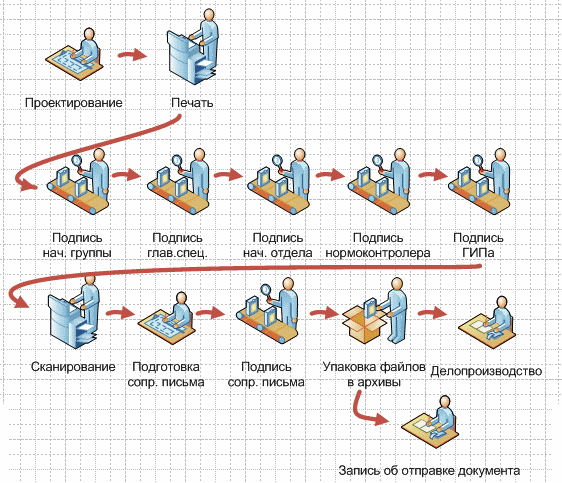
Those. in order to transfer the document to the Customer, the design engineer assigns the revision number, prints the document, goes to the head of the group, signs, then to the chief specialist,also signs, then to the head of the department, then to the normal controller, then, possibly, to the coordinators departments, finally, to the PIU, and - can scan it (manually !!!). After scanning - you need to make a cover letter, sign it, collect scans and send it all, for example, to the assistant engineer or specially designated person responsible for the workflow. This person will check everything; God willing , he will not find any mistakes (can you imagine how it is to go through all this again ?). Then, finally, a letter with attachments is sent ( oh yeah, the letter is also scanned, because there are signatures!).
Customers, I must say, come across different. One must by all means through the mail. Even if there is a couple of gigabytes. Another - certainly through a link to the resource Designer. Third, you need to put everythingin a certain order on the resource of the Customer. In general, many options. This, too, is usually done manually.
After the transfer of the document begins the most interesting. There are a lot of documents, so almost the very first thingwith which design is started is the register of documentation (no, there is, of course, a title list, but this is outside the scope of this article). Under this registry, as a rule, the readiness of work is then monitored. Each document may, in terms of readiness, be in one of the statuses:
And still it is necessary to take into account that coordination is a multi-step process, there is an internal examination, there is a GlavGosExpertiza, there is a link to the design documentation, etc ...
Such a registry in the "running" case is real, but it will take two weeks, and errors will be in 20% of cases.In the case of "manual automation", it seems to be easier - because there is a special person who, day and night, tracks (at least, should) the transfer of documentation and its coordination. What-no, but still centralization. That gives the result approximately “in a day” and ... 10-15% of errors. Why? But because coordination is a multi-step process, and the “responsible” is often far from design, he does not understand the nuances. The correct process is the developer himself.
In addition, there is the issue of controlling the compliance of the documentation with each other. Project documents often mention other project documents. A special “Statement of referenceand attached documents” is even compiled. According to GOST, a note must indicate the number of the document change. Thus, according to the register of documents with change numbers, it is possible to track whether the document is correct with respect to references, or whether it is based on outdated data. When accounting for revisions, as a rule, they require, in addition to the change number, to indicate the revision identifier. For the same purposes.
When introducing accounting revisions, we proceeded from 2 prerequisites. First , you need to reduce the amount of work the designer (all of these printing and scanning). Secondly , you need to give a tool to track the coordination process. Someone. Best of all - the designer.Well, we do not have a special person to track the agreement. Therefore - to the designer, and this tool should be convenient!
Let's start with the 1st point. At the time of introducing accounting revisions, we already had an established process of filinginto the archive, in which PDFs with signatures were created. Designers with might and main used it to bypass the printing and scanning with signatures (true, the archive was very tense at the same time). Therefore, we added several fields to our objects and implemented a procedure for fixing revisions, which included the automatic creation of PDF with signatures.
Then, at first, just uploading the document files (source and PDF) was implemented. And after that, a function was implemented that immediately resolved half of the confusion regarding tracking processes -in TDMS, the designer on the fixed revision presses the “Add to letter” button, selects the letter, and the revision itself enters the letter in easla.com, and the link is also set on the object of audit in TDMS. It seems to be a trifle, but how many problems it solves! The designer saves time on retrieving from TDMS, collecting materials, archiving them and transferring them to the workflow service, and the GUI can get a reliable list of what has been sent in 5 minutes!
And no one spends a lot of time archiving materials and their correct transfer to the customer.
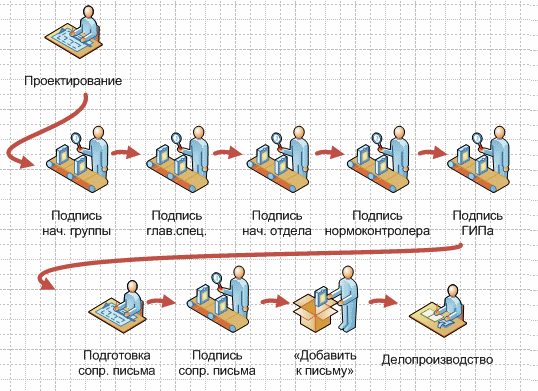
Under item 2, the following function was implemented - in the TDMS, the designer selects the revision of the document, clicks the “Letter of approval” button and selects the incoming letter from the list, which contains information on the approval of the document. Also selected, agreed document,or there are comments. Everything.
What do we have as a result? As a result, the designer:
Registry example:
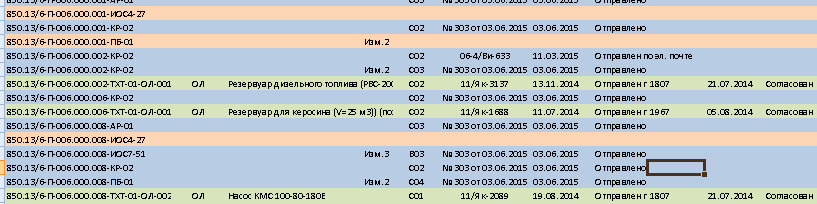
The designer does not need to create a registry - there is a special sample for itin the TDMS, in which the information on the transfer and approval is shown for the selected position:
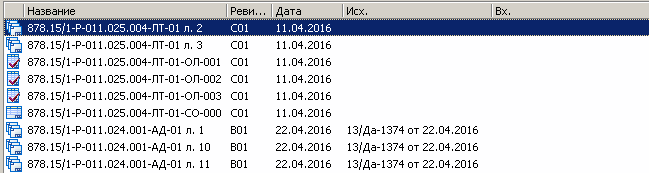
Integration is implemented in 3 points:
The peculiarity of the task is that when you remove an application from easla.com from a letter,this should affect the registry. In addition, if the designer prepares a letter, puts documents in it, and then, in the process of preparation, realizes that he added something not right there, then he needs to remove this “something not right” from the letter, and that’s all! References to objects in other systems should “die” for this particular file, no more!
Each application file has fields for storing information. Moreover, in each application file, easla.com allows you to store not just a description field with a length of, say, 256 bytes(as is most often done in other systems), but a whole list of “File composition”, in which each element “Name” can be stored , “Revision number”, “Revision name” and “Version parameters”:
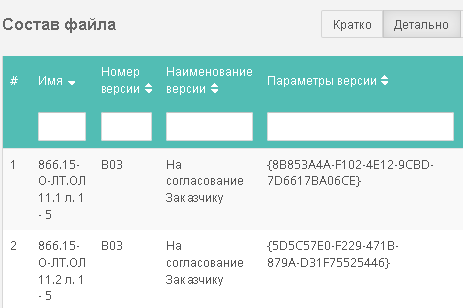
We, in fact, were customers of this easla.com feature, and it was very useful to us.Different Customers are asked to form archives in different ways, there may be several documents in one archive.
Business logic development in TDMS is done on VBS. Special thanks for the TDMS developers.Yes, VBS is already obsolete, and it would be better if it was .Net, but at least they didn’t invent any special programming language. What saved us from the limitations and glitches of the machine of its own design. Not to mention the fact that BASIC is taught to write at school.
In addition, the easla.com system has a COM interface for working with the system. It is built into the agent thatis installed on each workplace. This interface has several useful tools. In this case, we used a tool to select the list items that looks like this:
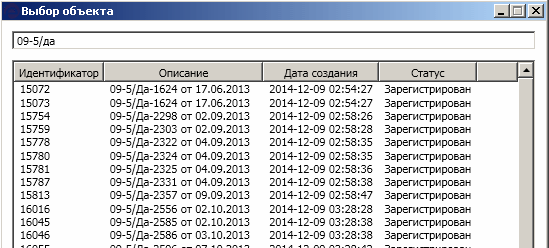
At the top is a line for filtering elements, at the bottom is a list of objects (in this case,outgoing letters, but there can be any other elements).
Next, a few pieces of code that show how the integration is implemented. Some places of the code are surprisingly not very professional, you can write more compact and prettier,but what to do is not the gods, they burn pots. The main thing is working.
Receive an outgoing letter from easla.com
Uploading a file to easla.com and setting parameters
The functions “Add to the letter” and “Letter of approval” in terms of receiving letter numbers are similaras twins, so I will not waste the reader’s time to receive the outgoing letter number from easla.com .
There are data on the communication of letters and revisions in the systems; now it is worthwhile to attend to the extraction of this datafor the preparation of the report. The report can be built based on TDMS samples using the “QueryAfterExecute” event to communicate with information obtained from easla.com, but for reasons of processing speed, we decided to do it through SQL, since easla.com has the ability to receive data in SQL queries. To do this, an extension is installed to the MS SQL server, which allows extracting any information from the easla.com database.
I will not give all the request code, I’ll focus on the key points.
Receiving a list of letters on the list of document identifiers
There is also a similar procedure PR_TDMSReport_GetDocList_RECEIVED, which asks for information on letters of approval. Attributes that specify the letter of approvalare stored in the TDMS, so there are differences, but in general, to describe the principle of operation are not essential.
There is a set of procedures through the JOIN operation that combine all these data with data from the TDMS(design area, construction site, master plan position, etc., about 50 parameters). Several procedures, because There are quite specific requirements of some customers. They are called from macros in MS Excel documents. There are about 10 document templates - reports differ, each of the Customers has its own version.
In my experience, the introduction of a very small number of types of accounting runs as smoothly as the introduction of accounting for audits. After the introduction, the archive became really “alive”, because the designers had the opportunity to significantly reduce their time for, let's say, not the most basic tasks.For two years (which, I will note, it says about a certain level of stability) more than 20 thousand letters (incoming and outgoing) have already been registered , the overwhelming part of which is related to the project documentation. I have no doubt that the customers of our company note a significant difference in terms of the organization of the coordination process in comparison with other enterprises.
A good role was also played by having a good working contact with the developers of easla.com.Justified requests for the implementation of features (such as File Composition) were always discussed and implemented in a timely manner.
I was going to speak at the annual conference in Giprotyumenneftegaz, but due to the strong current load I just did not have time to get ready. Than did not meet the expectations of my friends and colleagues (a small public discussion was expected). The decision described below does not contain anything revolutionary from an organizational point of view, but, I dare to hope, it nevertheless deserves some attention.
Several starting points in the article are devoted to "Why." Further - “How” (VBScript,
1. AUDITS. WHAT IT IS.
Audits are versions of documents. The word itself came from foreign standards, where the GOST standards of the 21st series have no distribution. There, "they", on the documents in the main inscriptions there is a field "Rev.", which, in fact, stands for "Revision".
Note
To be honest, the revisions themselves are somewhat flawed. For example, in order for a designer to replace a couple of sheets in a document, you need to issue a new revision to the entire document. And if the document has 300 pages ... In the State Standards 21. *, unlike revisions, all possible situations with sheets are considered in detail .
On the other hand, life leads us to ensure that the transfer of documents will be carried out electronically(and, I note, this is already the case in at least 60% of our orders, even GlavGosExpertiza accepts documentation in electronic form). And in electronic form, it is inconvenient to keep track of changes, for example, in Word documents , to say the least. With regard to files, for example, with 3D models, it is generally unclear which sheets are involved.
')
Companies with foreign participation began to actively introduce revisions about 3-4 years ago.
Those. revisions - to be. Moreover, one of our Customers, after receiving the first documentswith revisions (although he did not present such requirements), began to resent receiving documents without revisions. Further it becomes clear why.
On the other hand, life leads us to ensure that the transfer of documents will be carried out electronically
')
Companies with foreign participation began to actively introduce revisions about 3-4 years ago.
Those. revisions - to be. Moreover, one of our Customers, after receiving the first documents
In the process of developing project documentation, the designer does not just draw drawings. The designer very actively communicates with experts of the Customer
The correct way to work is to submit the document
Note
Why do we need to surrender to the archive? The fact is that there is a small but important difference between the transfer of “finished documentation” and the transfer “for approval”. When the finished documentation is transferred - the invoice is drawn up. This imposes legal obligations on the customer. And therefore there everything must be done exactly in accordance with GOST. But in terms of agreeing on the requirements, as a rule, they are not so tough - the Customer is well aware that it takes time, which is as important to him as the design institute , to submit to the archive .
Those. accounting of revisions is introduced or not - the exchange “without an archive” is going on anyway. It is also impossible to
In order that confusion did not occur - the accounting of audits is introduced. On each document transmitted
2. HOW USUALLY WORK WITH AUDITS.
Sadly, in most organizations, to this day, the usual situation is “manual automation”.
Those. in order to transfer the document to the Customer, the design engineer assigns the revision number, prints the document, goes to the head of the group, signs, then to the chief specialist,
Customers, I must say, come across different. One must by all means through the mail. Even if there is a couple of gigabytes. Another - certainly through a link to the resource Designer. Third, you need to put everything
3. AND WHAT IS NEEDED FROM AUDITS, OTHER THAN THEIR ACCOUNT?
After the transfer of the document begins the most interesting. There are a lot of documents, so almost the very first thing
- "In development" - has not yet been transferred to the Customer.
- "Transferred" - you need a letter number.
- “Revision” - there are comments.
- “Agreed” - the document has been agreed.
And still it is necessary to take into account that coordination is a multi-
Such a registry in the "running" case is real, but it will take two weeks, and errors will be in 20% of cases.
In addition, there is the issue of controlling the compliance of the documentation with each other. Project documents often mention other project documents. A special “Statement of reference
4. HOW AUTOMATED ACCOUNTING AUDITS WE.
When introducing accounting revisions, we proceeded from 2 prerequisites. First , you need to reduce the amount of work the designer (all of these printing and scanning). Secondly , you need to give a tool to track the coordination process. Someone. Best of all - the designer.
Let's start with the 1st point. At the time of introducing accounting revisions, we already had an established process of filing
Then, at first, just uploading the document files (source and PDF) was implemented. And after that, a function was implemented that immediately resolved half of the confusion regarding tracking processes -
And no one spends a lot of time archiving materials and their correct transfer to the customer.
Note
The dwarf, in fact, is based on the shoulders of giants. The work with revisions has not been adjusted (which, in turn, implies stable operation of the “live” archive), automatic installation of signatures in PDF (to avoid scanning), etc. - To introduce such "little things" is very problematic.
Under item 2, the following function was implemented - in the TDMS, the designer selects the revision of the document, clicks the “Letter of approval” button and selects the incoming letter from the list, which contains information on the approval of the document. Also selected, agreed document,
Note
It was possible to automate the approval process more fully - the designer would enumerate all the comments, contribute the answers, form the letter. But it was decided to limit ourselves to these opportunities because there is not much interest in compiling a detailed report with all the comments.
In this form, the process of coordination of design documentation is implemented. There is interest there,because a lot of departments prepare one common document, which is incredibly painful with “manual automation”. Chukovsky's work (or rather, Hugh Loftting) mentions Tyani-Push, which, of course, was not an allegory of our society, but symbolically in terms of the way we do things is very consistent. And not only "with us."
In this form, the process of coordination of design documentation is implemented. There is interest there,
What do we have as a result? As a result, the designer:
- obtains a method of storing in the system all the options that he developed for the Customer
and for related departments; - can indicate directly in the system, by which letter which option he sent;
- is engaged in sending not a day or two, as before, but only an hour (verification by higher specialists is necessary);
- he himself sees the state of his work (there are many documents, you can’t remember everything).
- does not distract weekly several times to the preparation of reports at the request of the Customer; the
ISU itself prepares a registry in 5 minutes! - etc.
Registry example:
The designer does not need to create a registry - there is a special sample for it
Note
No, we have not yet automated the referential integrity control by revision. We can do this, but the designers are still not morally ready for this.
5. TECHNICAL ASPECTS. INTEGRATION TDMS WITH EASLA.COM.
Integration is implemented in 3 points:
- The function "Add to the letter"
- “Letter of approval” function
- The Registry Preparation feature
The peculiarity of the task is that when you remove an application from easla.com from a letter,
Each application file has fields for storing information. Moreover, in each application file, easla.com allows you to store not just a description field with a length of, say, 256 bytes
We, in fact, were customers of this easla.com feature, and it was very useful to us.
5.1. FUNCTION "ADD TO LETTER" AND FUNCTION "LETTER OF AGREEMENT"
Business logic development in TDMS is done on VBS. Special thanks for the TDMS developers.
In addition, the easla.com system has a COM interface for working with the system. It is built into the agent that
At the top is a line for filtering elements, at the bottom is a list of objects (in this case,
Next, a few pieces of code that show how the integration is implemented. Some places of the code are surprisingly not very professional, you can write more compact and prettier,
Receive an outgoing letter from easla.com
Function GetOutingLetter() Set GetOutingLetter = Nothing Dim ea On Error Resume Next Err = 0 Set ea = CreateObject("Easla.Agent") If Err <> 0 Then MsgBox "EaslaAgent . ", VbOKOnly & VbCritical, "" Set ea = Nothing Exit Function End If ' « » Set process = ea.getProcessCOM("crs_management") If process Is Nothing Then MsgBox "EaslaAgent . ", VbOKOnly & VbCritical, "" Set ea = Nothing Exit Function End If ' «» Set object_def = ea.getObjectdefCOM(process, "crs_management_outgoing", 0) Dim arr1(2) arr1(0) = "crs_management_outgoing_regnum" arr1(1) = "crs_management_outgoing_document" arr1(2) = "crs_management_outgoing_attachments" ' , – Set d = ea.CreateKeyValuesPairSoapItemCOM("status", Array("crs_management_outgoing_created")) ' Set result = ea.getObjectrefsCOM(object_def, arr1, Array(d)) ' Set kvps1 = CreateObject("EaslaAgent.com.easla.KeyValuePairSoap") kvps1.key = "" kvps1.value = "id" Set kvps2 = CreateObject("EaslaAgent.com.easla.KeyValuePairSoap") kvps2.key = "" kvps2.value = "description" Set kvps3 = CreateObject("EaslaAgent.com.easla.KeyValuePairSoap") kvps3.key = " " kvps3.value = "createtime" Set kvps4 = CreateObject("EaslaAgent.com.easla.KeyValuePairSoap") kvps4.key = "" kvps4.value = "status.name" ' Err = 0 Set ooo = ea.ShowSelectObjectDialogCOM(result, Array(kvps1, kvps2, kvps3, kvps4)) If Err = 0 Then Set GetOutingLetter = ooo End If Set ea = Nothing End Function Uploading a file to easla.com and setting parameters
'o – 'commonname – 'revision – 'filename – 'revdata – 'guids – TDMS TDMSSheet « » Function AddFileToOutingLetter(o, commonname, revision, filename, guids, revdata) Set AddFileTotOutingLetter = Nothing Dim ea On Error Resume Next Err = 0 Set ea = CreateObject("Easla.Agent") If Err <> 0 Then MsgBox "EaslaAgent . ", VbOKOnly & VbCritical, "" Set ea = Nothing Exit Function End If Set process = ea.getProcessCOM("crs_management") If process Is Nothing Then MsgBox "EaslaAgent . ", VbOKOnly & VbCritical, "" Set ea = Nothing Exit Function End If ' – , (- easla.com , ) ' , – set attrs = ea.GetAttrsFromObjectCOM(o) colKeys = attrs.Keys For Each strKey In colKeys If attrs.Item(strKey).code = "crs_management_outgoing_attachments" Then For Each f In attrs.Item(strKey).values If f.nowname = commonname And f.isdeleted = "0" Then MsgBox " : " & commonname, VbOKOnly & VbCritical, "" Exit Function End If Next End If Next ' easla.com Set orss = CreateObject("EaslaAgent.com.easla.ObjectrefSimpleSoap") orss.id = o.id Err = 0 ' set uploadfile = ea.uploadFileCOM(orss, code, filename) If Err <> 0 or uploadfile is Nothing Then MsgBox " . ", VbOKOnly & VbCritical, "" Set ea = Nothing Exit Function End If Set kvps1 = CreateObject("EaslaAgent.com.easla.KeyValuePairSoap") kvps1.key = "srcname" kvps1.value = commonname Set kvps2 = CreateObject("EaslaAgent.com.easla.KeyValuePairSoap") kvps2.key = "revcode" kvps2.value = revision Set kvps4 = CreateObject("EaslaAgent.com.easla.KeyValuePairSoap") kvps4.key = "revdata" kvps4.value = revdata ' set ooo = ea.updateFileCOM(uploadfile, Array(kvps1, kvps2,kvps4)) If Err = 0 Then Dim arrFCSS() ReDim Preserve arrFCSS(0) ' « » For Each ob in guids.Objects n = UBound(arrFCSS) ReDim Preserve arrFCSS(n + 1) arrFCSS(n) = ob.description ' n = UBound(arrFCSS) ReDim Preserve arrFCSS(n + 1) arrFCSS(n) = ob.guid ' TDMS n = UBound(arrFCSS) ReDim Preserve arrFCSS(n + 1) arrFCSS(n) = ob.Attributes("REV_LETTER").Classifier.Code & ob.Attributes("REV_NUM") ' n = UBound(arrFCSS) ReDim Preserve arrFCSS(n + 1) arrFCSS(n) = ob.Attributes("REV_DESCRIPTION") ' Next ' Set AddFileTotOutingLetter = ea.updateFileConsistCOM2(ooo, arrFCSS) End If Set ea = Nothing End Function The functions “Add to the letter” and “Letter of approval” in terms of receiving letter numbers are similar
5.2. REGISTRY PREPARATION FUNCTION
There are data on the communication of letters and revisions in the systems; now it is worthwhile to attend to the extraction of this data
I will not give all the request code, I’ll focus on the key points.
Receiving a list of letters on the list of document identifiers
CREATE PROCEDURE [dbo].[PR_TDMSReport_GetDocList_SENT] ( @guid uniqueidentifier – , ) AS BEGIN declare @id bigint select @id = f_objid from tngptdms.dbo.tobject (nolock) where f_guid = @guid; declare @temp_revs table ([guid_rev] uniqueidentifier --GUID ,descr varchar(max) -- ,letter varchar(10) --1- - ,id varchar(10) --2- - ,t datetime -- ,objid_rev bigint -- - ); -- , insert into @temp_revs EXEC [TNGP].[dbo].[PR_TDMSRevision_GetListByObject] @guid = @guid -- GUID- XML- ESLA declare @subquery varchar (MAX) set @subquery = cast ((select '{'+cast([guid_rev] as varchar(50))+'}' from @temp_revs for xml path('item'), elements, type) as varchar(MAX)) -- XML- declare @query XML set @query = '<conditions> <item> <key>crs_management_outgoing_attachments</key> <values>' + @subquery + '</values> </item> </conditions>' -- , easla.com declare @temquerytbl table ( regnum varchar(32), regdate varchar(32), revguids xml, [SentStatus] varchar(40) ) --, easla.com DECLARE @organization_id AS INT; DECLARE @process_id AS INT; DECLARE @objectdef_id AS INT; DECLARE @user_id AS INT; declare @ret int declare @logined int set @logined = 0 if(@subquery is not NULL) begin -- , – ESLA, -- EASLAlogin – easla.com select @logined = [master].[dbo].[EASLAlogin](,) IF (@logined = 1) BEGIN -- easla.com SELECT @organization_id = organization.id, @process_id = process.id, @objectdef_id = objectdef.id FROM [master].[dbo].[EASLAgetOrganization] ('TNGP') AS organization LEFT JOIN [master].[dbo].[EASLAgetAllProcesses] () AS process ON process.oid = organization.id LEFT JOIN [master].[dbo].[EASLAgetAllObjectdefs] () AS objectdef ON objectdef.pid = process.id WHERE process.code = 'crs_management' AND objectdef.code = 'crs_management_outgoing'; -- - easla.com SELECT @user_id = id FROM [master].[dbo].[EASLAgetOrganizationUser] (@organization_id, ) -- easla.com insert into @temquerytbl SELECT attributerefs.value('(ArrayOfAttributerefSimpleSoap[1]/AttributerefSimpleSoap[1]/values/item/node())[1]','varchar(30)') as letternum ,attributerefs.value('(ArrayOfAttributerefSimpleSoap[1]/AttributerefSimpleSoap[2]/values/item/node())[1]','varchar(30)') as regdate ,cast(attributerefs.query('(ArrayOfAttributerefSimpleSoap[1]/AttributerefSimpleSoap[3]/values/item/consist/item/revdata)')as varchar(max)) as revguid ,cast([status].query('(StatusSimpleSoap[1]/name[1]/node())')as varchar(max)) as sentstatus from master.[dbo].[EASLAgetobjectrefs]( @process_id, @objectdef_id -- ,CAST(' <attributerefs> <item>crs_management_outgoing_regnum</item> <item>crs_management_outgoing_sentdate</item> <item>crs_management_outgoing_attachments</item> </attributerefs> ' AS XML) ,@query, @user_id ); end declare @temquerytbl1 table ( revguid varchar(50), regnum varchar(30), regdate varchar(30), sentstatus varchar(40) ) insert into @temquerytbl1 select cast(t2.loc.query('(./node())') as varchar(50)), regnum,replace(regdate,'/','.'),sentstatus from @temquerytbl as T CROSS APPLY revguids.nodes('/revdata') as T2(Loc) END IF (@logined = 1) BEGIN select @logined = 1 - [master].[dbo].[EASLAlogout]() end … There is also a similar procedure PR_TDMSReport_GetDocList_RECEIVED, which asks for information on letters of approval. Attributes that specify the letter of approval
There is a set of procedures through the JOIN operation that combine all these data with data from the TDMS
CONCLUSION
In my experience, the introduction of a very small number of types of accounting runs as smoothly as the introduction of accounting for audits. After the introduction, the archive became really “alive”, because the designers had the opportunity to significantly reduce their time for, let's say, not the most basic tasks.
A good role was also played by having a good working contact with the developers of easla.com.
Source: https://habr.com/ru/post/283386/
All Articles