Social login: strengths
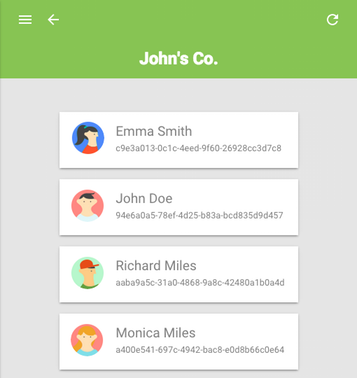
Social login (login using a Google+ account, Facebook, etc.) is increasingly common in mobile and web applications. Not surprisingly, it is convenient. The user does not have to mess with login and password. You do not need to memorize anything, then remember or restore. Do not have to solve the captcha. On mobile devices, password entry is highly undesirable and creates a negative user experience. The owner of the application gets its advantages: simple registration - a greater number of users, satisfied users - higher conversion rates. The presence of a user profile is already at the registration stage, and as a rule, much more reliable and complete than the forms requested by the application.
Integration of social login does not cause difficulties. A large number of libraries are written that implement the authentication protocol, take into account the specifics of implementations specific to each of the providers, use the provider's API to retrieve the user profile and then convert it to the established format.
')
Do libraries solve all problems?
What the user and the owner of the application want
As a user of the application, I would like to be able to combine several social accounts into one. Definitely, I do not want to lose access to the application, losing access to the social account. Or be in a situation where I have to continue using a certain social account only because it was once used for registration in the application. If I use several applications united by one brand (for example, GMail and Google+), I expect that after logging in or registering in one of them, I will also have access to others without having to re-login or register. If I have a reason to believe that access to my account fell into the wrong hands (perhaps after logging in to a public place), I would like to be able to revoke all previously issued access tokens and, thus, block unwanted access to my account .
As the owner of the application, I would not want to waste time integrating the social login every time I start a new project. Have a working version now, settings later, after launching the project. If the project can be executed in the form of a browser (frontend) or mobile application, on their implementation and focus their attention. Deploying a server application and data warehouse, just for the purpose of social login, is not at all what I would like to do while working on such a project. While not using the server application for a social login, means there are no guarantees that the user data will not be exposed to the attacker, and the access token will not be replaced. In the case of the development of a web service (frontend + backend), the interaction of its components should be simple and effective. Probably, I would not want to use tokens issued by a social login provider and requiring to validate an external request to the provider's server. I may want to release my own, on the basis of which SSO and Federated identity can be built. Definitely, I want to have mechanisms for revocation (cancellation) of access tokens. The presence of an administrative application could make it easier for me to access information about users.
Authentication as a service
The tasks voiced above can be solved as part of a web service. In the examples below, the PolyAuth web service is used . The purpose of which is to simplify the integration of authentication into the application, due to a single API, a standardized profile data format, the necessary tools and infrastructure. Two different APIs for authentication and data access are available. The Standalone Authentication API provides basic social login functionality, quick start, and features that will be described in the examples below. This API is freely available, without any payments or limits on requests. The Main Authentication API provides advanced functionality and is aimed at solving a wider range of tasks:
- Fast start. Whether it is a new project or an existing one, integration should not take time. Working version now, settings later.
- Social login. Login using Google, Facebook, and other providers.
- Standardized profile . User profile in a uniform format.
- Many providers - One User . Combining multiple social accounts into a single user account.
- Token management. Release, revocation (cancellation) and validation of tokens.
- Single Sign-On (SSO). When there are several applications, login in one allows the user to access the resources of others without re-login.
- Federated identity. One application can delegate task execution and get user resources managed by other applications.
- Support serverless applications. For projects that can be implemented as a browser (frontend) or mobile application, social login integration should not impose additional requirements.
- Administrative application. Information about users and the ability to perform operations on them should be available to the owner of the application in the form of a simple and clear graphical interface.
Before starting, you will need to create an account and group for future users (realm). Specify the URI of the application to which users will be sent after they delegate access to their data.
Browser-based authentication, web components
The scheme of interaction of the application with the service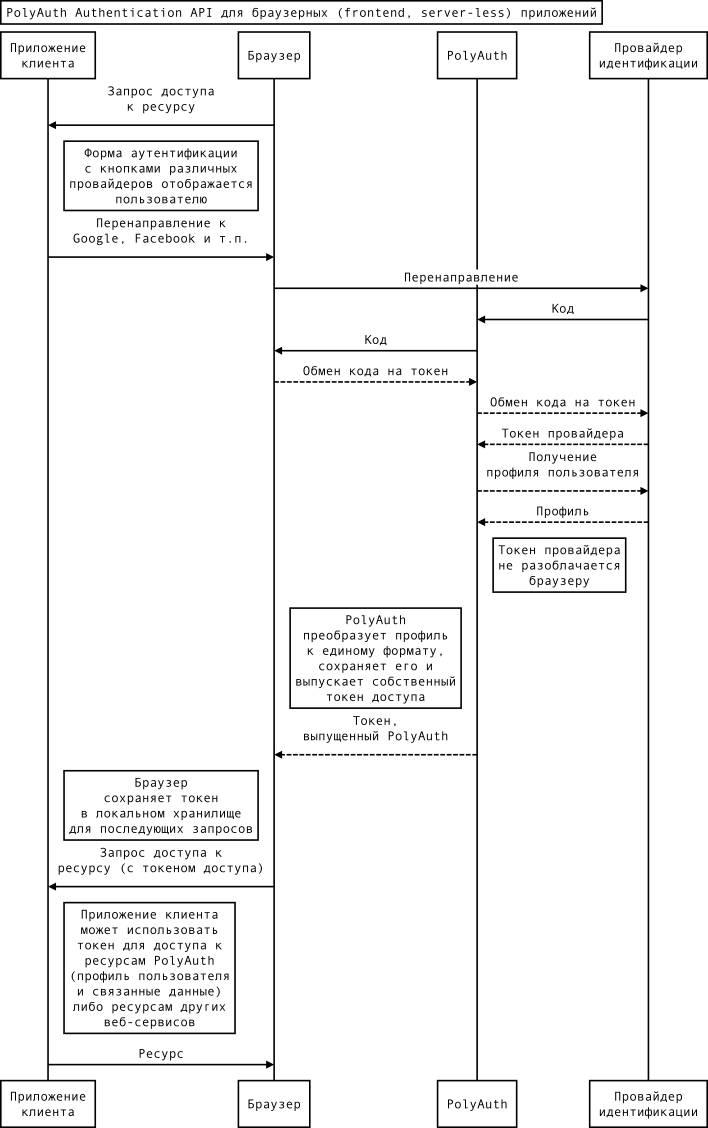
With web components, integration looks a lot easier than in the diagram. To install them, use Bower :
$ bower install --save \ polyauth-elements/polyauth-element \ polyauth-elements/polyauth-signin-pages \ fetch For import, you must include the following lines in the <head> section of the HTML document:
<script src='bower_components/fetch/fetch.js'></script> <script src='webcomponentsjs/webcomponents-lite.min.js'></script> <link rel='import' href='bower_components/polyauth-elements/polyauth-element.html'> For compatibility with versions of browsers that do not have a WebComponents implementation and Fetch API, polyfiles are imported. In the examples, additional web components will also be used. Their list, as well as all source code of examples are available on GitHub.
Social login begins with the authentication form and involves redirecting the user to the provider's page. Create buttons with logos of providers.
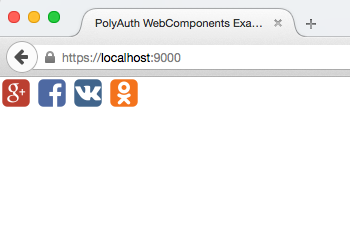
<template is='dom-repeat' items='[[endpoints]]'> <a href='[[item.authCodeURI]]'> <iron-icon icon$='[[item.icon]]'></iron-icon> </a> </template> <polyauth-authcode-endpoints apiv='v1' realm-id='REALM_ID' redirect-uri='REDIRECT_URI' objects='{{endpoints}}'> </polyauth-authcode-endpoints> After the user delegates access rights to his data, he is redirected by the provider back to the application with a special code, which can later be exchanged for an access token (in accordance with the OAuth2 Authorization Code Grant). The access token is stored by the application in local storage for reuse. The described scheme is fully implemented in the web component polyauth-signin-pages , which among other things, hides the form of authentication.
<polyauth-signin-pages apiv='v1' realm-id='REALM_ID' access-token='{{token}}' auto> <section signed-out> <!-- , --> <template is='dom-repeat' items='[[endpoints]]'> <a href='[[item.authCodeURI]]'> <iron-icon icon$='[[item.icon]]'></iron-icon> </a> </template> </section> <section signed-in> <!-- , --> </section> </polyauth-signin-pages> Having access token, you can get a user profile and display its avatar and welcome message:

<iron-image src='[[profile.data.info.image]]'></iron-image> <div>Hello, <span>[[profile.data.info.name]]</span>!</div> <polyauth-profile apiv='v1' access-token='[[token]]' object-id='me' object='{{profile}}' auto> </polyauth-profile> For the exit button, you will need one more HTML tag.
<button polyauth-sign-out>Sign Out</button> Combining multiple authentication records under one user account is not much more difficult:

<polyauth-user apiv='v1' access-token='[[token]]' object-id='me' fields='["profile", "auth"]' object='{{user}}' auto> </polyauth-user> <polyauth-user-authlinks id='authLinksProxy' apiv='v1' realm-id='REALM_ID' redirect-uri='REDIRECT_URI' access-token='[[token]]' user-id='me' objects='[[user.auth]]' objects-proxy='{{authLinks}}'> </polyauth-user-authlinks> <template is='dom-repeat' items='[[authLinks]]'> <iron-icon icon$='[[item.icon]]'></iron-icon> <paper-toggle-button checked='[[!item.removed]]' on-change='_handleAuthLink'> </paper-toggle-button> </template> This task requires a JavaScript event handler function:
_handleAuthLink: function(e) { this.$.authLinksProxy.handle(e.model.index); } Browser authentication, javascript
JavaScript library can be installed using Bower :
$ bower install --save fetch polyauth For import, you must include the following lines in the <head> section of the HTML document:
<script src='bower_components/fetch/fetch.js'></script> <script src='bower_components/polyauth/polyauth.js'></script> You can login and get a user profile as follows:
// window.location.href = PolyAuth.authCodeURI(REALM_ID, { apiv: 'v1', key: 'oauth2.google-plus', redirectURI: REDIRECT_URI } // PolyAuth .signIn(REALM_ID) .then(function(resp) { PolyAuth .fetch(PolyAuth.api(resp.accessToken, 'v1').profile('me').get()) .then(function(object) { console.log(resp); }); }); // { // "id": "8c63a8cb-b3dd-4772-b133-169f4b3d5e47", // "data": { // "info": { // "name": "John Doe", // "last_name": "Doe", // "first_name": "John", // "email": "john@example.com", // "image": "https://example.com/photo.jpg", // "uri": "https://plus.google.com/1aeb832ae4d6" // } // } // } In this and earlier examples with web components, the user profile is stored in the cloud, and an access token issued by the authentication service is issued for the application. Such a token can be revoked by the user or the owner of the application, transferred to another application, validated locally, without external requests.
Extended access to user data
For cases where user profile information is not enough or requires access to the provider's API, the Standalone Authentication API provides a unified interface for working with providers.
The scheme of interaction of the application with the service
// window.location.href = PolyAuth.authCodeURI(REALM_ID, { apiv: 'v1', key: 'oauth2.google-plus', redirectURI: REDIRECT_URI, op: 's/token' } // var qs = PolyAuth.QS.parse(); var req = PolyAuth .api('v1') .realm(REALM_ID) .auth(qs.key) .standaloneToken({code: qs.code, secret: REALM_SECRET}); PolyAuth .fetch(req) .then(function(resp) { console.log(resp); }); // { // "access_token": "eyPae7femio7jo9re4Cimish...", // "expires_in": 3575, // "id_token": "eyciO6hbGhJd5NiUjIIsImtp...", // "token_type": "Bearer" // } The request for an access token to be managed by the provider must contain Realm's Secret.
A feature of the Standalone Authentication API is that the user profile is not stored in the cloud and the application receives an access token controlled by a provider (not a service) of authentication.
Authentication without restrictions and limits
Using the Standalone Authentication API, a user profile can also be obtained. In this case, the provider access token will not be exposed to the application. Thus, the guarantee of the security of the user's personal data can be achieved even in an unprotected environment (browser and mobile applications). This functionality can be useful in cases when only its basic functionality is required from a social login.
Diagram of application interaction with the service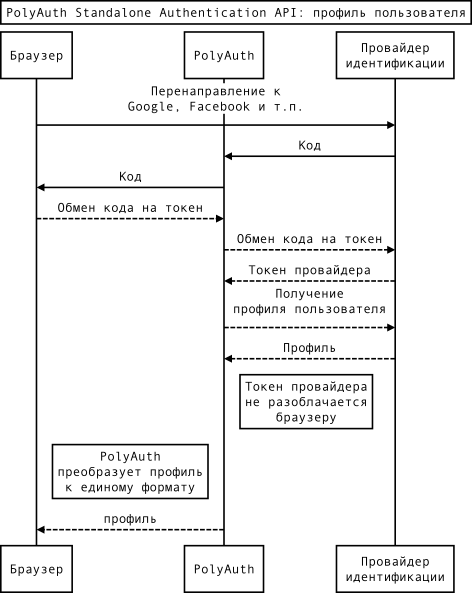
// window.location.href = PolyAuth.authCodeURI(REALM_ID, { apiv: 'v1', key: 'oauth2.google-plus', redirectURI: REDIRECT_URI, op: 's/profile' } // var qs = PolyAuth.QS.parse(); var req = PolyAuth .api('v1') .realm(REALM_ID) .auth(qs.key) .standaloneProfile({code: qs.code}); PolyAuth .fetch(req) .then(function(resp) { console.log(resp); }); // { // "info": { // "gender": "male", // "name": "John Doe", // "last_name": "Doe", // "first_name": "John", // "gender": "male", // "email": "john@example.com", // "image": "https://example.com/photo.jpg", // "uri": "https://plus.google.com/1aeb832ae4d6" // }, // "uid": "106276572039433743690" // } Source: https://habr.com/ru/post/264093/
All Articles