Features of mobile applications on the iOS platform, using the login and password of clients to access paid content
Mobile application developers are often faced with the need to store sensitive user data on a user device. This can be, for example, a credit card number or authentication data. In this article we will talk about typical implementation errors of storing confidential data from the point of view of information security using the example of the iOS mobile platform.
Usually, application settings are stored in configuration files. The Cocoa Touch library, used when developing applications for the iOS mobile platform, provides an abstraction layer for storing application settings in the NSUserDefaults class. The NSUserDefaults class implements the “Singleton” design pattern (better known as Singleton), which is unloved by many, providing access to the interface above the standard application configuration file.
The standard application configuration file is located in its home directory at the relative address Library / Preferences / <your.company.name>. <App.name> .plist. Like other files located in the sandbox, it is not readable for other user-level applications. Exceptions are devices subject to system security policy modifications (jailbroken devices).
Many developers have appreciated the convenience of working with the NSUserDefaults class. An overwhelming number of applications use it to store internal settings and / or user settings. Unfortunately, usability rarely correlates with safety. Storing confidential user data in a standard settings file is a typical mistake of developers, resulting in leakage of user information.
As a result of examining the source code of Appendix A for errors in the context of information security, it was revealed that the application stores user authentication data in the configuration settings file. Having downloaded Application A on the iPad under the control of the original iOS operating system version 6.1.3, we went through the authentication stage and began studying the application settings file.

Fig. 1. Download the application on iPad
To demonstrate the vulnerability, we used the iExplorer application, available for the operating systems of the Windows NT and Mac OS X families. The iExplorer application is a graphical file manager for iOS devices. Find Application A in the list of installed applications and open Library / Preferences / <settings-name> .plist for reading.
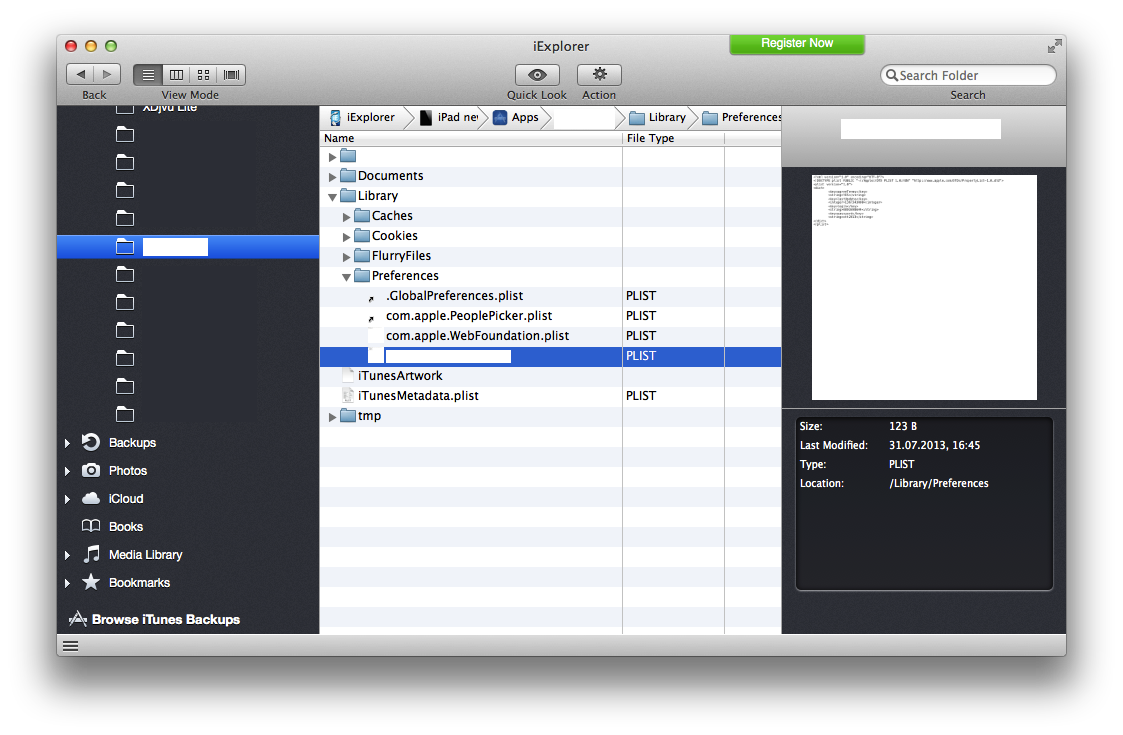
Fig. 2. Appearance of the iExplorer application with access to the required file
')
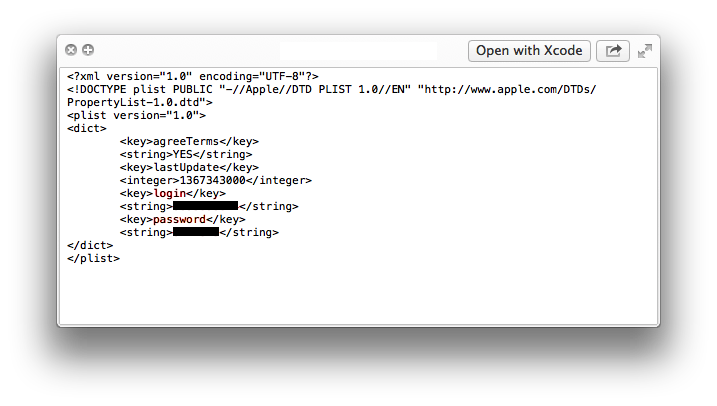
Fig. 3. Confidential file configuration file
It is quite obvious that the same actions could be performed by an attacker with the aim of unauthorized access to confidential information. Moreover, the process of extracting the application settings file can be automated in malicious applications running on the user's computer or on jailbroken devices.
Consider another example of incorrect use of the standard application configuration file. As a result of the study of the source codes of another application, say, Annex B, it was revealed that the user authentication data is stored in an encrypted configuration file. The data is encrypted using the composition of the AES256 symmetric encryption algorithm with a permanent key of the Base64 encoding algorithm.
At first glance, this approach may seem quite reasonable. It seems that the interception of encrypted information by the attacker will do little. However, in fact, the attacker, there are at least two ways to use the data.
1. Substitution of the configuration file. By making a substitution of the configuration file, an attacker gets partial or full access to the user's confidential data.
2. Recognize the encryption algorithm and extract the key.
If in the first case the lack of the algorithm used is obvious, then in the second case it is required to estimate the complexity of such a hacking. Install Application B on a device running the iOS operating system and upload the application image. Since the application image is usually partially or fully encrypted, it must first be decrypted. Using the debugger, we unload the image of the application from memory and edit the binary image of the application, replacing the decrypted segments. A detailed description of this process is beyond the scope of the article; we only mention that there are means for automatically decrypting binary images of applications in the Mach-O format.
The next step is to disassemble the binary image of the application. To do this, we use the interactive disassembler IDA Pro. Let's try to look for the string password in the __cfstring section and ask the disassembler to show cross-references.
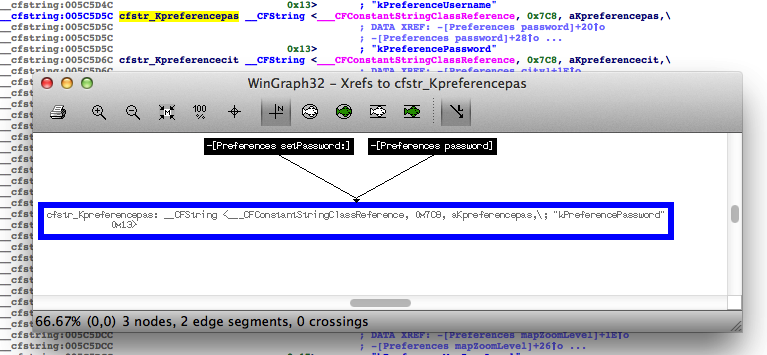
Fig. 4. Work with IDA Pro disassembler
Go to the subroutine - [Preferences setPassword:]. IDA Pro did not fail here either: it did all the work for us.
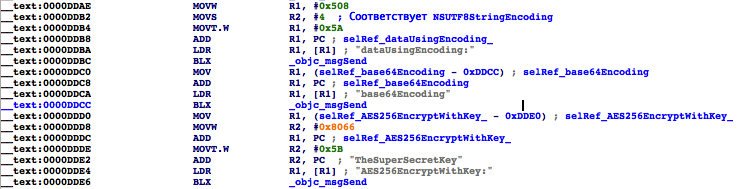
Fig. 5. Binary image assembler
You don't need to be an ARM architecture guru to understand what's going on here. At offset 0x0000DDCC, the user's password is encoded with Base64, and at offset 0x0000DDE6, AES256 is encrypted with the TheSuperSecretKey key (in the real application, another encryption key was used).
So, the encryption algorithm together with the key can be compromised by an attacker even with a not very high level of skill in less than 10 minutes. With this knowledge, an attacker can gain unauthorized access to confidential user information and automate the process of collecting user data.
Recommendations for addressing such vulnerabilities may include the following:
Usually, application settings are stored in configuration files. The Cocoa Touch library, used when developing applications for the iOS mobile platform, provides an abstraction layer for storing application settings in the NSUserDefaults class. The NSUserDefaults class implements the “Singleton” design pattern (better known as Singleton), which is unloved by many, providing access to the interface above the standard application configuration file.
The standard application configuration file is located in its home directory at the relative address Library / Preferences / <your.company.name>. <App.name> .plist. Like other files located in the sandbox, it is not readable for other user-level applications. Exceptions are devices subject to system security policy modifications (jailbroken devices).
Many developers have appreciated the convenience of working with the NSUserDefaults class. An overwhelming number of applications use it to store internal settings and / or user settings. Unfortunately, usability rarely correlates with safety. Storing confidential user data in a standard settings file is a typical mistake of developers, resulting in leakage of user information.
As a result of examining the source code of Appendix A for errors in the context of information security, it was revealed that the application stores user authentication data in the configuration settings file. Having downloaded Application A on the iPad under the control of the original iOS operating system version 6.1.3, we went through the authentication stage and began studying the application settings file.
Fig. 1. Download the application on iPad
To demonstrate the vulnerability, we used the iExplorer application, available for the operating systems of the Windows NT and Mac OS X families. The iExplorer application is a graphical file manager for iOS devices. Find Application A in the list of installed applications and open Library / Preferences / <settings-name> .plist for reading.
Fig. 2. Appearance of the iExplorer application with access to the required file
')
Fig. 3. Confidential file configuration file
It is quite obvious that the same actions could be performed by an attacker with the aim of unauthorized access to confidential information. Moreover, the process of extracting the application settings file can be automated in malicious applications running on the user's computer or on jailbroken devices.
Consider another example of incorrect use of the standard application configuration file. As a result of the study of the source codes of another application, say, Annex B, it was revealed that the user authentication data is stored in an encrypted configuration file. The data is encrypted using the composition of the AES256 symmetric encryption algorithm with a permanent key of the Base64 encoding algorithm.
At first glance, this approach may seem quite reasonable. It seems that the interception of encrypted information by the attacker will do little. However, in fact, the attacker, there are at least two ways to use the data.
1. Substitution of the configuration file. By making a substitution of the configuration file, an attacker gets partial or full access to the user's confidential data.
2. Recognize the encryption algorithm and extract the key.
If in the first case the lack of the algorithm used is obvious, then in the second case it is required to estimate the complexity of such a hacking. Install Application B on a device running the iOS operating system and upload the application image. Since the application image is usually partially or fully encrypted, it must first be decrypted. Using the debugger, we unload the image of the application from memory and edit the binary image of the application, replacing the decrypted segments. A detailed description of this process is beyond the scope of the article; we only mention that there are means for automatically decrypting binary images of applications in the Mach-O format.
The next step is to disassemble the binary image of the application. To do this, we use the interactive disassembler IDA Pro. Let's try to look for the string password in the __cfstring section and ask the disassembler to show cross-references.
Fig. 4. Work with IDA Pro disassembler
Go to the subroutine - [Preferences setPassword:]. IDA Pro did not fail here either: it did all the work for us.
Fig. 5. Binary image assembler
You don't need to be an ARM architecture guru to understand what's going on here. At offset 0x0000DDCC, the user's password is encoded with Base64, and at offset 0x0000DDE6, AES256 is encrypted with the TheSuperSecretKey key (in the real application, another encryption key was used).
So, the encryption algorithm together with the key can be compromised by an attacker even with a not very high level of skill in less than 10 minutes. With this knowledge, an attacker can gain unauthorized access to confidential user information and automate the process of collecting user data.
Recommendations for addressing such vulnerabilities may include the following:
- Use Key Chains to store sensitive data. Different levels of access can be applied to keychain items, and they can be protected from being transferred to another device.
- Use encryption on keychain items. On devices that have been granted unauthorized privileged access, an attacker can view all keychain items. To do this, it is enough to create an application with access to all groups of access to the keychain or to the group com.apple.keystore.access-keychain-keys.
- Use dynamic encryption key generation algorithms unique to each user.
- Write protections in a pure C language. Consider using embedded functions or use macros.
- Do not store sensitive data on the user device.
Source: https://habr.com/ru/post/218007/
All Articles