Signing files through the browser
In a number of projects, it is required to sign arbitrary format files (for example, tender documentation in PDF format) when uploading them to the server.
Usually a signature is required according to GOST R 34.10-2001, using X.509 digital certificates. In this case, the signature itself is then conveniently stored on the server in the CMS detached format.
Just want to note that the problem is solved for a long time (CryptoPro CSP, CAPICOM, etc). But there are nuances that make such a decision is not always convenient. For one of the projects, we proposed a solution for file signing, which really made life easier for end users and technical support. About him below.
')
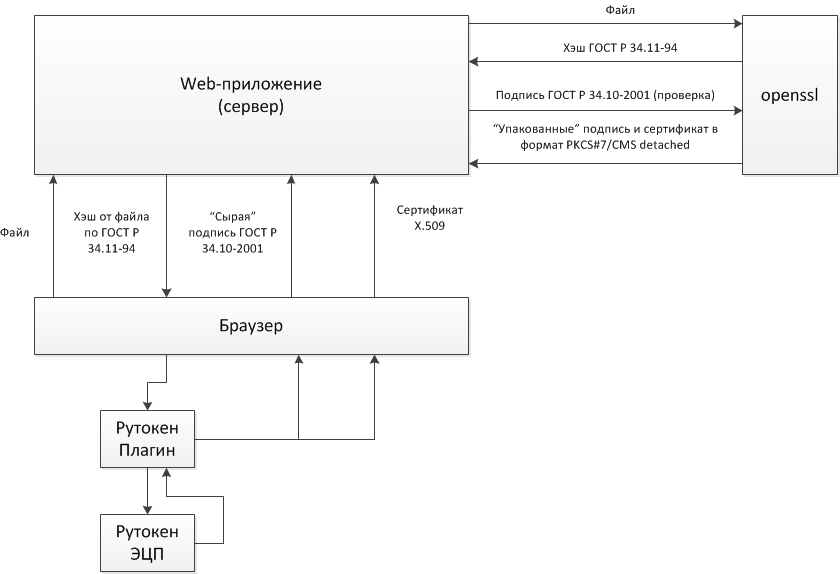
The general scheme of the solution is shown in the picture.
Components on the client.
On the server we use a modified openssl + wrapper for ASP.NET. Using openssl gives you the opportunity to go to MagPro CryptoPack 2.1 2.1 certified by CIPS without any special changes to the server part.
Description of the protocol by which the signature occurs.
Now about the technical means.
The server-wrapper library over openssl has the following API:
As you can see, these functions are fairly easy to call from ASP.NET (and not only).
On the client, the hash signature is executed by a sequence of calls to the Rutoken Plugin:
The hash and certificate are sent to the server.
The solution is easy for both the developer and the end user.
Usually a signature is required according to GOST R 34.10-2001, using X.509 digital certificates. In this case, the signature itself is then conveniently stored on the server in the CMS detached format.
Just want to note that the problem is solved for a long time (CryptoPro CSP, CAPICOM, etc). But there are nuances that make such a decision is not always convenient. For one of the projects, we proposed a solution for file signing, which really made life easier for end users and technical support. About him below.
')
The general scheme of the solution is shown in the picture.
Components on the client.
- Rutoken EDS as a hardware SKZI
- Rutoken Plugin to support Rutoken EDS in the browser + support for digital certificates
On the server we use a modified openssl + wrapper for ASP.NET. Using openssl gives you the opportunity to go to MagPro CryptoPack 2.1 2.1 certified by CIPS without any special changes to the server part.
Description of the protocol by which the signature occurs.
- Uploading the document to the server using standard browser tools (or generating a document on the server, as often happens)
- Calculation of the hash sum from the document on the server according to GOST R 34.11-94 using openssl
- Sending the calculated hash sum to the client
- Signature according to GOST R 34.10-2001 hash amount on the client with the private key associated with the certificate
- Sending a signature and certificate to the server
- Signature verification
- Packaging signature and certificate in CMS format detached
Now about the technical means.
The server-wrapper library over openssl has the following API:
- Hash Sum function
unsigned char * HashData (unsigned char * buffer, size_t size); - CMS formation function detached
char * CreateSignedCMSDetached (unsigned char * signature, const char * cert); - The signature verification function is not universal and is implemented only for this project, so I will not describe it here.
As you can see, these functions are fairly easy to call from ASP.NET (and not only).
On the client, the hash signature is executed by a sequence of calls to the Rutoken Plugin:
- User selects certificate
- Find the private key by certificate
getKeyByCertificate (deviceId, certId, resultCallback, errorCallback) → {string} - Get the “body” of the certificate to be sent to the server
getCertificate (deviceId, certId, resultCallback, errorCallback) → {string} - Sign a hash using the private key
rawSign (deviceId, keyId, data, options, resultCallback, errorCallback) → {string}
Returns the signature of GOST R 34.10-2001 in hex from the transmitted hash
The hash and certificate are sent to the server.
The solution is easy for both the developer and the end user.
Source: https://habr.com/ru/post/214881/
All Articles