Lightweight Tables or practical tips when designing a database ...
 In this topic, I would like to talk about improving performance when working with tables.
The topic is not new, but it becomes especially relevant when there is a constant growth of data in the database - the tables become large, and the search and selection for them is slow.
As a rule, this is due to a poorly designed scheme - initially not designed for operating with large amounts of data.
')
In order for the growth of data in the tables not to lead to a drop in performance when working with them, it is recommended to adopt a few rules when designing a circuit.
The first and probably the most important. Data types in tables must have minimal redundancy.
All data operated by SQL Server is stored on the so-called pages, which have a fixed size of 8 KB. When writing and reading, the server operates with pages, not separate lines.
Therefore, the more compact data types are used in the table, the fewer pages are required to store them. Fewer pages - fewer disk operations.
In addition to the obvious reduction in the load on the disk subsystem - in this case there is another advantage - when reading from a disk, any page is initially placed in a special memory area ( Buffer Pool ), and then used for its intended purpose - to read or modify data.
When using compact data types, you can put more data on the same number of pages in the Buffer Pool - due to this we do not waste memory and reduce the number of logical operations.
Now consider a small example - a table that stores information about the working days of each employee.
CREATE TABLE dbo.WorkOut1 ( DateOut DATETIME , EmployeeID BIGINT , WorkShiftCD NVARCHAR(10) , WorkHours DECIMAL(24,2) , CONSTRAINT PK_WorkOut1 PRIMARY KEY (DateOut, EmployeeID) ) Are the data types selected correctly in this table? Apparently not.
For example, it is very doubtful how many employees in an enterprise (2 ^ 63-1) are, that the BIGINT data type was chosen to cover such a situation.
Remove the redundancy and see if the query from such a table will be faster?
CREATE TABLE dbo.WorkOut2 ( DateOut SMALLDATETIME , EmployeeID INT , WorkShiftCD VARCHAR(10) , WorkHours DECIMAL(8,2) , CONSTRAINT PK_WorkOut2 PRIMARY KEY (DateOut, EmployeeID) ) On the execution plan, you can see the difference in cost, which depends on the average line size and the expected number of lines that the query will return:
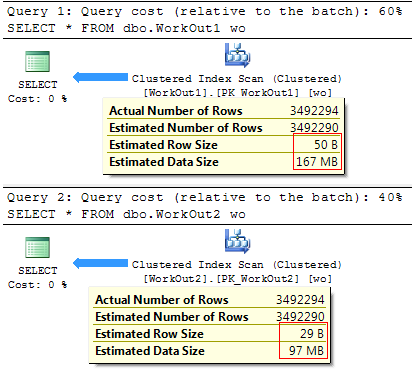
It is quite logical that the less data is required to read - the faster the query will be executed:
(3492294 row (s) affected)
SQL Server Execution Times:
CPU time = 1919 ms, elapsed time = 33606 ms.
(3492294 row (s) affected)
SQL Server Execution Times:
CPU time = 1420 ms, elapsed time = 29694 ms.
As you can see, the use of less redundant data types often has a positive effect on query performance and can significantly reduce the size of problem tables.
By the way, you can find out the size of the table by the following query:
SELECT table_name = SCHEMA_NAME(o.[schema_id]) + '.' + o.name , data_size_mb = CAST(do.pages * 8. / 1024 AS DECIMAL(8,4)) FROM sys.objects o JOIN ( SELECT p.[object_id] , total_rows = SUM(p.[rows]) , total_pages = SUM(a.total_pages) , usedpages = SUM(a.used_pages) , pages = SUM( CASE WHEN it.internal_type IN (202, 204, 207, 211, 212, 213, 214, 215, 216, 221, 222) THEN 0 WHEN a.[type] != 1 AND p.index_id < 2 THEN a.used_pages WHEN p.index_id < 2 THEN a.data_pages ELSE 0 END ) FROM sys.partitions p JOIN sys.allocation_units a ON p.[partition_id] = a.container_id LEFT JOIN sys.internal_tables it ON p.[object_id] = it.[object_id] GROUP BY p.[object_id] ) do ON o.[object_id] = do.[object_id] WHERE o.[type] = 'U' For the tables in question, the query will return the following results:
table_name data_size_mb -------------------- ------------------------------- dbo.WorkOut1 167.2578 dbo.WorkOut2 97.1250 Rule two. Avoid duplication and apply data normalization.
Actually, I recently analyzed a database of one free web service for formatting T-SQL code. The server part there is very simple and consisted of a single table:
CREATE TABLE dbo.format_history ( session_id BIGINT , format_date DATETIME , format_options XML ) Each time formatting, the current session id was saved, the server system time and settings with which the user formatted his SQL code. The data was then used to identify the most popular formatting styles.
With the growing popularity of the service, the number of rows in the table has increased, and the processing of formatting profiles took more and more time. The reason was in the architecture of the service - with each insertion into the table the full set of settings was saved.
The settings had the following XML structure:
<FormatProfile> <FormatOptions> <PropertyValue Name="Select_SelectList_IndentColumnList">true</PropertyValue> <PropertyValue Name="Select_SelectList_SingleLineColumns">false</PropertyValue> <PropertyValue Name="Select_SelectList_StackColumns">true</PropertyValue> <PropertyValue Name="Select_SelectList_StackColumnsMode">1</PropertyValue> <PropertyValue Name="Select_Into_LineBreakBeforeInto">true</PropertyValue> ... <PropertyValue Name="UnionExceptIntersect_LineBreakBeforeUnion">true</PropertyValue> <PropertyValue Name="UnionExceptIntersect_LineBreakAfterUnion">true</PropertyValue> <PropertyValue Name="UnionExceptIntersect_IndentKeyword">true</PropertyValue> <PropertyValue Name="UnionExceptIntersect_IndentSubquery">false</PropertyValue> ... </FormatOptions> </FormatProfile> A total of 450 formatting options - each such line in the table occupied approximately 33Kb. A daily increase in data was more than 100MB. Every day the base grew, and it became longer to do analytics on it.
It was easy to correct the situation - all unique profiles were moved to a separate table, where for each set of options a hash was obtained. Beginning with SQL Server 2008 , you can use the sys.fn_repl_hash_binary function for this.
As a result, the circuit was normalized:
CREATE TABLE dbo.format_profile ( format_hash BINARY(16) PRIMARY KEY , format_profile XML NOT NULL ) CREATE TABLE dbo.format_history ( session_id BIGINT , format_date SMALLDATETIME , format_hash BINARY(16) NOT NULL , CONSTRAINT PK_format_history PRIMARY KEY CLUSTERED (session_id, format_date) ) And if the request for proofreading used to be this:
SELECT fh.session_id, fh.format_date, fh.format_options FROM SQLF.dbo.format_history fh Then to get the same data in the new scheme, it was necessary to make a JOIN:
SELECT fh.session_id, fh.format_date, fp.format_profile FROM SQLF_v2.dbo.format_history fh JOIN SQLF_v2.dbo.format_profile fp ON fh.format_hash = fp.format_hash If we compare the execution time of requests, we will not see a clear advantage from changing the scheme.
(3090 row (s) affected)
SQL Server Execution Times:
CPU time = 203 ms, elapsed time = 4698 ms.
(3090 row (s) affected)
SQL Server Execution Times:
CPU time = 125 ms, elapsed time = 4479 ms.
But the goal in this case was pursued by another - to accelerate the analytics. And if before you had to write a very clever request to get a list of the most popular formatting profiles:
;WITH cte AS ( SELECT fh.format_options , hsh = sys.fn_repl_hash_binary(CAST(fh.format_options AS VARBINARY(MAX))) , rn = ROW_NUMBER() OVER (ORDER BY 1/0) FROM SQLF.dbo.format_history fh ) SELECT c2.format_options, c1.cnt FROM ( SELECT TOP (10) hsh, rn = MIN(rn), cnt = COUNT(1) FROM cte GROUP BY hsh ORDER BY cnt DESC ) c1 JOIN cte c2 ON c1.rn = c2.rn ORDER BY c1.cnt DESC Then, due to data normalization, it became possible to significantly simplify not only the query itself:
SELECT fp.format_profile , t.cnt FROM ( SELECT TOP (10) fh.format_hash , cnt = COUNT(1) FROM SQLF_v2.dbo.format_history fh GROUP BY fh.format_hash ORDER BY cnt DESC ) t JOIN SQLF_v2.dbo.format_profile fp ON t.format_hash = fp.format_hash But also to reduce the time of its implementation:
(10 row (s) affected)
SQL Server Execution Times:
CPU time = 2684 ms, elapsed time = 2774 ms.
(10 row (s) affected)
SQL Server Execution Times:
CPU time = 15 ms, elapsed time = 379 ms.
A nice addition was also the reduction in the size of the database on disk:
database_name row_size_mb ---------------- --------------- SQLF 123.50 SQLF_v2 7.88 You can return the size of the data file for the database by the following query:
SELECT database_name = DB_NAME(database_id) , row_size_mb = CAST(SUM(CASE WHEN type_desc = 'ROWS' THEN size END) * 8. / 1024 AS DECIMAL(8,2)) FROM sys.master_files WHERE database_id IN (DB_ID('SQLF'), DB_ID('SQLF_v2')) GROUP BY database_id I hope, with this example, I was able to show the importance of normalizing data and minimizing redundancy in the database.
Third. Carefully select the columns included in the indexes.
Indexes can significantly speed up the selection of the table. As well as data from tables, indexes are stored on pages. Appropriately. the fewer pages needed to store an index, the faster it can be searched.
It is very important to choose the fields that will be included in the cluster index. Because all the clustered index columns are automatically included in each nonclustered (by pointer).
Fourth. Use intermediate and consolidated tables.
Everything is quite simple here - why make a complex query every time from a large table, if you can make a simple query from a small one.
For example, there is a request for data consolidation:
SELECT WorkOutID , CE = SUM(CASE WHEN WorkKeyCD = 'CE' THEN Value END) , DE = SUM(CASE WHEN WorkKeyCD = 'DE' THEN Value END) , RE = SUM(CASE WHEN WorkKeyCD = 'RE' THEN Value END) , FD = SUM(CASE WHEN WorkKeyCD = 'FD' THEN Value END) , TR = SUM(CASE WHEN WorkKeyCD = 'TR' THEN Value END) , FF = SUM(CASE WHEN WorkKeyCD = 'FF' THEN Value END) , PF = SUM(CASE WHEN WorkKeyCD = 'PF' THEN Value END) , QW = SUM(CASE WHEN WorkKeyCD = 'QW' THEN Value END) , FH = SUM(CASE WHEN WorkKeyCD = 'FH' THEN Value END) , UH = SUM(CASE WHEN WorkKeyCD = 'UH' THEN Value END) , NU = SUM(CASE WHEN WorkKeyCD = 'NU' THEN Value END) , CS = SUM(CASE WHEN WorkKeyCD = 'CS' THEN Value END) FROM dbo.WorkOutFactor WHERE Value > 0 GROUP BY WorkOutID If the data in the table does not change too often, you can create a separate table:
SELECT * FROM dbo.WorkOutFactorCache And it is not surprising that reading from the consolidated table will be faster:
(185916 row (s) affected)
SQL Server Execution Times:
CPU time = 3448 ms, elapsed time = 3116 ms.
(185916 row (s) affected)
SQL Server Execution Times:
CPU time = 1410 ms, elapsed time = 1202 ms.
The fifth. Each rule has its exceptions.
I have shown a couple of examples when changing data types to less redundant ones allows shortening query execution time. But this is not always the case.
For example, the BIT data type has one feature - SQL Server optimizes the storage of a group of similar type columns on a disk. For example, if there are 8 or less BIT columns in a table, they are stored on the page as 1 byte, if there are up to 16 columns of BIT type, they are stored as 2 bytes, etc.
The good news is that the table will take up significantly less space and will reduce the number of disk operations.
The bad news is that when sampling data of this type, implicit decoding will occur, which is very demanding on processor resources.
I will show it by example. There are three identical tables that contain information about employee schedules (31 + 2 PK columns). All of them differ only in the data type for consolidated values (1 — went to work, 0 — was missing):
SELECT * FROM dbo.E_51_INT SELECT * FROM dbo.E_52_TINYINT SELECT * FROM dbo.E_53_BIT When using less redundant data, the size of the table has noticeably decreased (especially the last table):
table_name data_size_mb -------------------- -------------- dbo.E31_INT 150.2578 dbo.E32_TINYINT 50.4141 dbo.E33_BIT 24.1953 But we will not get a significant gain in execution speed from using the BIT type:
(1000000 row(s) affected) Table 'E31_INT'. Scan count 1, logical reads 19296, physical reads 1, read-ahead reads 19260, ... SQL Server Execution Times: CPU time = 1607 ms, elapsed time = 19962 ms. (1000000 row(s) affected) Table 'E32_TINYINT'. Scan count 1, logical reads 6471, physical reads 1, read-ahead reads 6477, ... SQL Server Execution Times: CPU time = 1029 ms, elapsed time = 16533 ms. (1000000 row(s) affected) Table 'E33_BIT'. Scan count 1, logical reads 3109, physical reads 1, read-ahead reads 3096, ... SQL Server Execution Times: CPU time = 1820 ms, elapsed time = 17121 ms. Although the implementation plan will suggest the opposite:
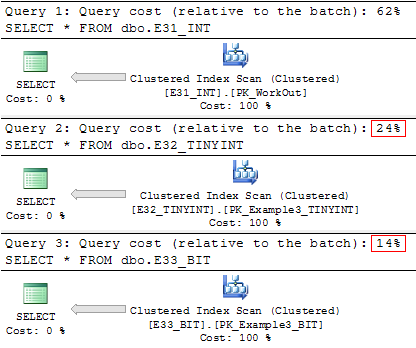
As a result of the observations, it was noticed that the negative effect of decoding will not appear if the table contains no more than 8 BIT columns.
At the same time, it is worth noting that in the SQL Server metadata, the BIT data type is used very rarely - the BINARY type is used more often and a manual shift is made to get one or another value.
And the last thing to mention. Delete unnecessary data.
Actually, why do this?
When sampling data, SQL Server supports a performance optimization mechanism, called read-ahead, which attempts to predict exactly which data and index pages will be needed to execute a query, and places these pages in the buffer cache before the real need arises.
Accordingly, if the table contains a lot of unnecessary data - this can lead to unnecessary disk operations.
In addition, the removal of unnecessary data reduces the number of logical operations when reading data from the Buffer Pool - the search and retrieval of data will take place on a smaller amount of data.
In conclusion, I can add more - carefully select the data types for the columns in your tables and try to take into account the future load on the database.
If you want to share this article with an English-speaking audience, then please use the link to translate:
SQL Server Database Table Size
Source: https://habr.com/ru/post/211885/
All Articles