Login to site using authorization file
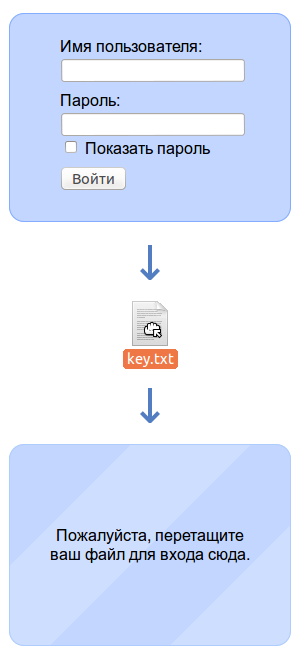 Earlier, I already talked about how you can add authorization QR codes so that users who have already logged into the site on a computer can also immediately authorize on mobile devices (for example, on a tablet or mobile phone) and without having to enter site address, no login, no password. On the right is another authorization option - using a file.
The essence is as follows. The user enters the site, sees on the page the usual login form, in which he can enter the username and password and log in. But besides this, instead of entering a username and password, he can simply drag a special authorization file onto the authorization form, and thus enter the site without touching the keyboard at all.
The source code (Python / Django) of a simple implementation variant can be found here . Each authorization file contains a randomly generated string of characters for which there is a hash in the database on the server associated with a specific user ID. Thus, the time required for entry is minimal: after the user drags the authorization file onto the page, JS checks the file size, inserts the contents into a special text field and immediately sends the form - no additional actions are required to enter, even the “ Sign in "no need to click.
If you want to try the above authorization method, then you just have to clone your repository, create a database structure using the syncdb management command (you can just create a user), create an authorization file and start a development server.
')
git clone https://github.com/aruseni/fileauth.git cd fileauth/ python manage.py syncdb python manage.py makeauthfile 1 key.txt python manage.py runserver After opening http://127.0.0.1:8000/ in the browser, you need to drag the file key.txt that appears in the fileauth directory into the authorization form.
This approach, of course, has both advantages and disadvantages. So I advise you to implement such a solution only if you are sure that you have provided sufficient security for your users, and they understand what they are doing.
Source: https://habr.com/ru/post/206450/
All Articles