Designing a notification system for web applications
This article is about how we designed a universal alert system for our web applications and what happened in the end. I will not argue that the result obtained is the only correct one, but I consider it to be quite good. If you have experience in solving such a problem, I invite you to share it in the comments.
Given: a web-based collaboration application. For simplicity, we assume that this is a CRM or Task Tracker.
Required: timely notify users of events in the application to which their response is required.
Everything would be very simple if we had a specific application with strictly defined work scenarios and fixed user roles. But in our case it is not. We develop various systems for accounting and automating business processes based on the platform constructor. And the alert system needs to be done at the platform level, so that later it can be used in any applications.
Initially, the simplest version of alerts was implemented - showing all changes made by other users when users logged in to the application. With a small amount of changes, this method has the right to exist, but with an increase in the amount of data and the number of users, we get an endless list, which once, and there is no need to look at:
')
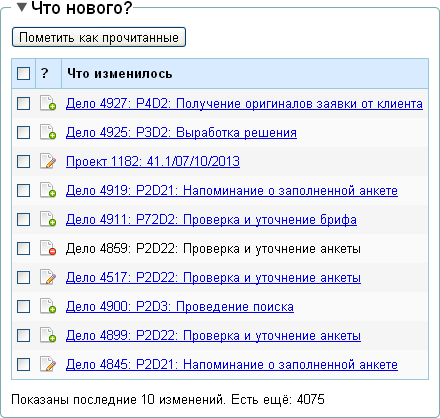
In addition to a too large list of changes, this block has “What's new?” And other problems:
It would seem that to answer all these questions there is an action log, which stores the most detailed information about each transaction:
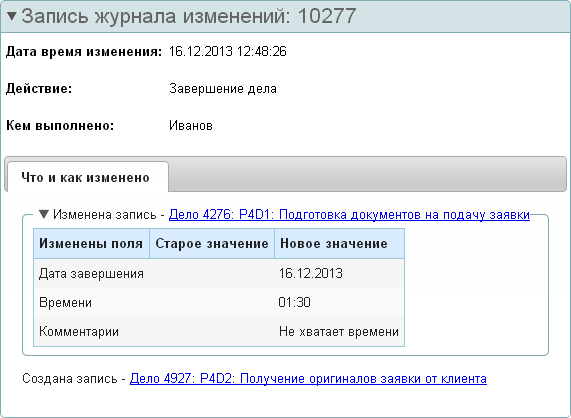
However, as practice shows, it is inconvenient to use the action log to obtain operational information about events in the application. As a rule, such detailed information about changes is required in rare cases - it is used by the manager during the "debriefing". And in real time, an employee needs not so much detailed , how much selective information - with an emphasis on the changes he is interested in. For example, after the “Completion of the Case” (from the example above) I would like to see such information:
This is if I am the leader of these Ivanov and Petrov and I want to control them as much as possible. If I am Petrov, then it will be more convenient for me to receive an alert in this form:
It turns out that alerts should be configured differently for different users and different events (thanks, cap) . It's time to analyze when and which alerts users really need.
So, all needs are taken into account in the analysis. Like nothing is forgotten. Now you need to come up with a setting that allows you to create any alert. We have not yet thought about the beauty of the interface, and the configuration structure turned out like this:
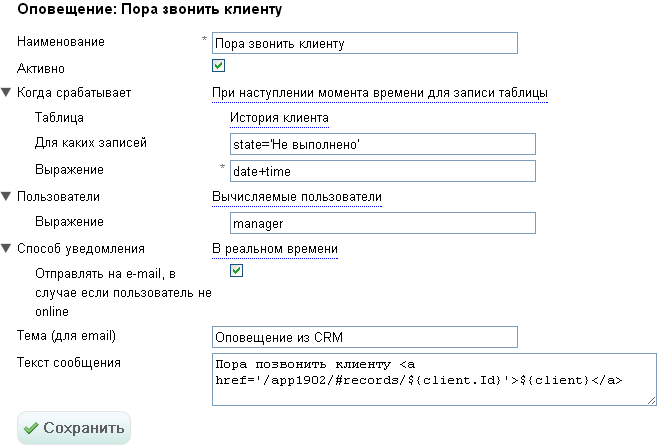
The attentive reader will notice that the retention period for alerts in this setting is not selected. We decided that this setting can be set not for each individual alert, but at a higher level - for the entire application. Perhaps this is a temporary solution, and a fine tuning of the shelf life is still needed. Experience will show.
As already mentioned at the beginning of the article, the solution found does not claim to be ideal. I do not exclude that in the future it may somehow be supplemented or even completely changed. I hope in the comments to meet constructive criticism and other solutions to the problem.
The essence of the task
Given: a web-based collaboration application. For simplicity, we assume that this is a CRM or Task Tracker.
Required: timely notify users of events in the application to which their response is required.
What is the problem?
Everything would be very simple if we had a specific application with strictly defined work scenarios and fixed user roles. But in our case it is not. We develop various systems for accounting and automating business processes based on the platform constructor. And the alert system needs to be done at the platform level, so that later it can be used in any applications.
The first pancake The first quick decision
Initially, the simplest version of alerts was implemented - showing all changes made by other users when users logged in to the application. With a small amount of changes, this method has the right to exist, but with an increase in the amount of data and the number of users, we get an endless list, which once, and there is no need to look at:
')
In addition to a too large list of changes, this block has “What's new?” And other problems:
- It is not clear which changes occurred in the data (which field has changed and how)
- It is not known who made these changes and when
- It is not clear if I (as a user) are required to react to these changes.
It would seem that to answer all these questions there is an action log, which stores the most detailed information about each transaction:
However, as practice shows, it is inconvenient to use the action log to obtain operational information about events in the application. As a rule, such detailed information about changes is required in rare cases - it is used by the manager during the "debriefing". And in real time, an employee needs not so much detailed , how much selective information - with an emphasis on the changes he is interested in. For example, after the “Completion of the Case” (from the example above) I would like to see such information:
Today, at 12:48 pm, Ivanov completed the P4D1 case : Preparation of application documents .
Petrov is assigned the P4D2 case : Obtaining the original application from the client .
This is if I am the leader of these Ivanov and Petrov and I want to control them as much as possible. If I am Petrov, then it will be more convenient for me to receive an alert in this form:
You have a P4D2 case assigned: Receiving the original application from the client . Deadline - 2 days.
It turns out that alerts should be configured differently for different users and different events (thanks, cap) . It's time to analyze when and which alerts users really need.
Alert classification
By origin
- The data that interests me is changed. For example, if a task is assigned to me, I want to know it. If tasks are created or changed that have nothing to do with me, then it is not interesting for me.
- The time has come. For example, a week ago we agreed with a client that I would call him today at 3:00 pm. If this is not my only agreement for this week, then it is likely that I will safely forget about it. So it will be useful for me to receive a reminder at the right time (or some time before it).
- A specific event has occurred. For example, an attempt was made to log in to the application with an incorrect password or from a forbidden IP address. It may worry me (as the administrator of the application).
By the one who needs to be notified
- All users. In practice, it rarely happens that everyone should be notified of the same events. Unless it is any news of the company about which all employees should know.
- Users with a specific role. The administrator configures which user roles which alerts should be displayed.
- Specific users. It happens that some user needs a unique set of alerts, and creating a new role for him only to configure this set does not make sense. Then you can assign an alert to a specific user. Another situation where this may be needed is if the administrator is not opposed to users choosing which alerts they want to see. In this case, it is also necessary to store the setting for a specific user.
- Calculated users. For example, when creating a task, you need to notify only the user specified in the "Responsible" field. It is not known in advance (at the setup stage) who will be responsible for which task, so it is impossible to assign an alert to a specific user. And when saving data, this information in the system already exists - that’s what we use when generating an alert.
By way of notification
- Real-time. Alerts come in real time. As soon as the event has come, the user is given a message directly in the browser or as a pop-up window in the tray. To attract attention, the message may flash and make a sound.
- By SMS. This method of notification makes sense when the reaction to an event is required immediately and the user does not have access to the real-time notification. As a rule, this method is used to report important events to employees working “in the fields” without access to the Internet or simply without the ability to keep the browser open all the time.
- By email. Notification in the form of an e-mail makes sense to use for rare events that do not require prompt response. You can also use the email alert as a backup option in case the user was not in the app at the right moment.
- In the news feed. Such alerts do not attract attention at the time of appearance, but they can be viewed at any time at the initiative of the user. Rather, it is not even an alert, but a personalized event history in the application.
By shelf life
- Generally not stored in the database. They informed the user about an important event for him - they sent a message to the browser or a letter to the post office - and in no way control whether it reached the addressee. The problem with this option is that in some cases the user may not receive a notification — for example, he closed the browser, did not read the message, or the letter got into spam — and we won’t find out about it. And the user does not know that he missed something.
- Removed automatically after reading. A suitable option when there are a lot of alerts, and there is little information in the alert text. When the user only needs to read the message once and he can start the task right away.
- Marked read, requires explicit removal. Suitable for the case when we learn about the task now, and it can be done later. Then the alert will remain in the list as a reminder, and when the task is completed, you can delete it manually.
- Removed automatically after a while. If there are many alerts and they lose relevance over time (for example, notification of a colleague's birthday or a change in work schedule on a certain day), then it makes sense to delete them automatically after a specified time - regardless of whether they are read by the user or not.
Result
So, all needs are taken into account in the analysis. Like nothing is forgotten. Now you need to come up with a setting that allows you to create any alert. We have not yet thought about the beauty of the interface, and the configuration structure turned out like this:
The attentive reader will notice that the retention period for alerts in this setting is not selected. We decided that this setting can be set not for each individual alert, but at a higher level - for the entire application. Perhaps this is a temporary solution, and a fine tuning of the shelf life is still needed. Experience will show.
Conclusion
As already mentioned at the beginning of the article, the solution found does not claim to be ideal. I do not exclude that in the future it may somehow be supplemented or even completely changed. I hope in the comments to meet constructive criticism and other solutions to the problem.
Source: https://habr.com/ru/post/206220/
All Articles