Signing a Java applet and some java security details
Formulation of the problem:
In our application java applet Oxygen Author Component is used as WYSIWYG XML editor. When downloading this applet on a Java client, it should not throw out any frightening varings about unsafe code, but calmly and quietly load the applet without straining the user and not forcing him to take heavy responsibility. We have a solid application after all.
Prologue
The article does not pretend to scientific accuracy and accuracy, I admit some incorrectness in the definitions. I did not open Wikipedia, I write, so to speak, from the heart, but comments are accepted.
How does the applet on the fingers
When a tag is detected in the HTML page, the browser transfers control of the applet download to the corresponding java-plugin, which in turn transfers control to the JRE installed on the client machine. There are two ways to load an applet (an applet is some kind of java application that is a jar-app set, where there is a main jar with the Main class implementing the Applet class):
')
- Applet tag lists jar files of the applet that need to be downloaded and where to load them (codebase)
- using the jnlp file, which specifies this information, as well as many other options and arguments
In our case, we use jnlp. The advantage of the jnlp approach among others is that when changing some parameters of the applet download (for example, codebase) you do not need to change the HTML or JavaScript code responsible for loading the applet. Just change jnlp. Replacing the codebase (the codebase is the url address indicating where the applet jars are located) is a rather unpleasant problem, since you need to specify an absolute URL, which means that, depending on which server the applet is running on, this should be the codebase . On the local machine, this is one address, on the QA stand another, on the third production, so when building the application, you must explicitly indicate the Context Path, that is, the absolute address of the web application on which it will work.
Using the jnlp file solves this problem by the fact that there is a special servlet, the essence of which is dynamically changing the codebase to the current one when the jnlp file is loaded by the client.
Go
So, the applet loading begins with the jnlp file loading, in which, besides the list of necessary jar files and their codebase, java arguments are also indicated (this is a very important point, you will find out why) with which this java should start on the client machine. Java starts loading jars and checking them for security. This is where the java security mechanism comes into effect, which begins to check the downloadable frying, before classes are loaded from it. This mechanism is complex and multifaceted: setting the general security level when loading applets and java security policy on the client (permission grants), security settings in the jar manifests themselves, checking the digital signature verification jar and so on. I do not want to go deep and I will only touch on those aspects that are important in the described task.
For reference: signing an applet implies signing jar-files. Signing a jar is a java-command signjar, which results in the jar-ke information about the key, which was signed in an encrypted form, as well as each resource packed jar is assigned a ney code encoded with this key, containing information about the content resource Thus, if you try to change the signed frying, throwing some class there, for example, or changing the old one, such frying will become invalid and it will not pass the security check and will not be loaded.
So, an applet can be unsigned, self-signed and signed by a trusted certificate. Depending on the version of client java on which the applet is loaded, the level of the applet’s subscription affects whether the applet is loaded or blocked at all, but loaded with a bunch of options and messages like “If you agree to launch this applet, then a global cataclysm will occur and everything will disappear , so run at your own risk, "
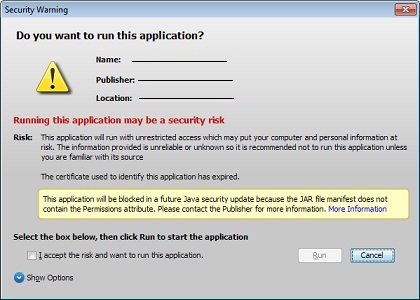
or loaded with one beautiful and non-intimidating message, which can not be repeated in the future by pressing the appropriate check mark. Here we got to the task. At the time of solving the described problem, our Oxygen applet was self-signed. That is, the signature was, but fake - the keys were generated by us with the help of the keytool utility.
Naturally, when loading such an applet, java threw feces into the ventilator and swore, although it loaded the applet eventually. But we needed to get rid of these messages, so we needed a certificate from a trusted certificate authority (Trusted Certifictae Authority).
So, we need a certificate from a trusted authority. How to get it? Easy, but pleasure is not cheap. A certificate for a year will cost about 500 US. We used the services of the center www.verisign.com . You need to create a keystore with your alias and other information about the publisher (using the keytool utility) and create a special request (and of course, pay). In response, the CA sends the keys. Ours sent as many as 3 pieces: Code Signing certificate, intermediate CA certificate and certificate in pkcs7 format. For the JKS type of certificate, we need intermediate and Code Signing certificate. First, an intermediate certificate is added to the previously created keystore, and then the main Code Signing certificate. The resulting keystore will be used to sign the jar-app.
If your frying was previously signed (and in my case they were signed, or rather self-signed), then before signing them again, you must first delete the old signatures. If you do not do this, then when loading the applet, the java will choke on the first frying and send you far away. You can delete a signature, for example, with your hands - delete .RSA (or .DSA) and .SF files from the META-INF folder, as well as delete all Digest resource signatures from the manifest file.
I almost forgot: before signing the jar, you need to add security attributes to the manifest:
Permissions: all-permissions Codebase: * Caller-Allowable-Codebase: * Application-Library-Allowable-Codebase: * Starting from 51 update 7 of java, all jars that do not contain security attributes will be automatically blocked.
And here is the ant script for this:
<target name="addSecurityProperty"> <jar file="${jarFile}" update="true"> <manifest> <attribute name="Permissions" value="all-permissions"/> <attribute name="Codebase" value="*"/> <attribute name="Application-Library-Allowable-Codebase" value="*"/> <attribute name="Caller-Allowable-Codebase" value="*"/> </manifest> </jar> </target> <target name="addSecurityProperties" if="hasForEach"> <foreach target="addSecurityProperty" param="jarFile"> <path> <fileset dir="lib" includes="**/*.jar, **/*.zip"/> </path> </foreach> </target> Important: you will need antcontrib to be able to use foreach in this script.
So, we clean the frying, add the necessary attributes to the manifestos, sign, launch and ... Again we see the cooking!
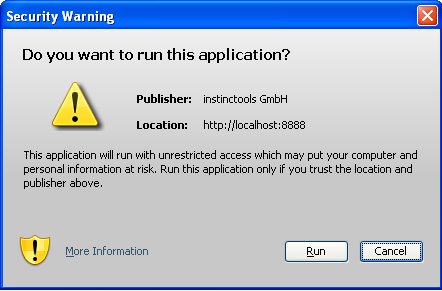
What's again? It turns out that you need to sign not only frying, but also a jnlp file. And how to sign it? And so . Who is too lazy to read: jnlp file is thrown into your main jar in the directory of JNLP-INF and the file name should be exactly this: APPLICATION.JNLP. Not a question, add to our ant the script building the main jar and signing jar-ki, a simple code that copies our source jnlp to the signed jnlp.
<target name="compile"> <mkdir dir="classes"/> <javac srcdir="src" destdir="classes" includeantruntime="false" debug="on"> <classpath> <fileset dir="lib"> <include name="*.jar"/> </fileset> </classpath> </javac> <mkdir dir="classes/JNLP-INF"/> <copy file="author-component-dita.jnlp" tofile="classes/JNLP-INF/APPLICATION.JNLP" overwrite="true"/> </target> Fathers will understand right away, but I will still explain, just in case, what happens in this Antovsky target. In the first part, everything is clear - we create a classes directory and compile the code of our applet there. Please note that when compiling, a daddy lib is added to the class folder, in which there is a bunch of jar-ok, the necessary applets and all of them need to be signed. Next, the JNLP-INF folder is created there, and our source is copied there.
author-component-dita.jnlp.
Next, we pack it all into a jar (this is our main jar) and throw it into the same lib folder next to the rest of the jar.
It turns out that now we have 2 jnlp files: the original author-component-dita.jnlp and APPLICATION.JNLP are packaged in a jar. It confuses me a little, okay. I launch an applet - error!
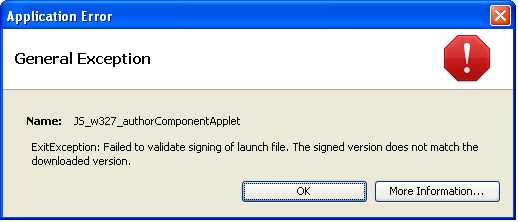
What is it this time? It turns out that these jnlp files do not match, but should. The original jnlp is used to load the applet, and the packaged one is used to verify the signature and they should not be different. But why are they different, are they copies? And here we recall our wonderful servlet ( JnlpDownloadServlet ), which is used to facilitate the deployment of your web application - I have already mentioned this above. Using it, you can not write a specific codebase in jnlp (for example, localhost: 8888 / oxygen-editor /), but use the
$$CODEBASE variable, and the servlet on runtime itself changes jnlp by substituting the desired values of variables into it. That is why the loaded jnlp does not match the signed one. What to do? Deploit for different server addresses different brewing? This is not our way. It's simple: you need to use APPLICATION-TEMPLATE.JNLP instead of APPLICATION.JNLP. Using the template APPLICATION-TEMPLATE.JNLP differs in that it may differ from the original jnlp, if you specify "*" instead of specific parameter values, for example, codebase = "*". Let's modify our Antovsk build.xml: <target name="compile"> <mkdir dir="classes"/> <javac srcdir="src" destdir="classes" includeantruntime="false" debug="on"> <classpath> <fileset dir="lib"> <include name="*.jar"/> </fileset> </classpath> </javac> <mkdir dir="classes/JNLP-INF"/> <copy file="author-component-dita.jnlp" tofile="classes/JNLP-INF/APPLICATION-TEMPLATE.JNLP" overwrite="true"/> <replace file="classes/JNLP-INF/APPLICATION-TEMPLATE.JNLP" token="@@CODEBASE@@" value="*"/> <replace file="classes/JNLP-INF/APPLICATION-TEMPLATE.JNLP" token="@@HREF@@" value="*"/> </target> So, is this really all and I will finally see when I download the applet a long-awaited user-friendly message with a blue shield stating that the applet is trusted, reliable and does not arouse suspicion? Not believing in my happiness, I start the application with shaking hands, load the applet and ...
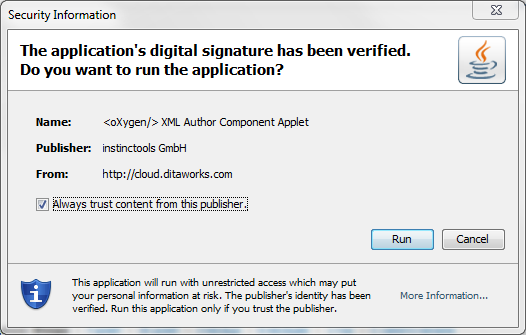
Hooray! It is finished! I finally saw this message with a blue shield! And sprinkling the drool of joy, I click the tick "Always trust this publisher", it closes, the applet starts up and ... then this appears:
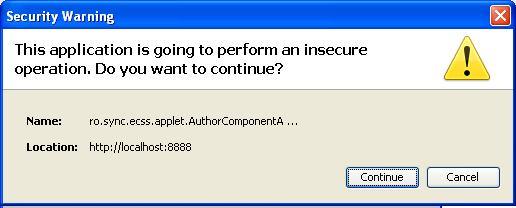
What the ...!? Swiftly, I start frantically sticking to the code — what is so nonsecure about it? In general, I killed 2 more days to find this line in the jnlp file:
<j2se java-vm-args="-Xmx512m -XX:MaxPermSize=80m -Xss4m -Xdebug -Xrunjdwp:transport=dt_socket,server=y,suspend=n,address=5021" version="1.6+" /> These are the java arguments with which the applet runs. So, debug arguments are non-secundary . And if your applet is signed with a trusted certificate, these arguments are forbidden. What is interesting, if your applet is self-signed, then run the applet with even a bald devil, because the client is warned that the executable application is unknown, which means it is initially dangerous.
Here is the complete list of forbidden arguments:
// note: this list MUST correspond to native secure.c file private static String[] secureVmArgs = { "-d32", /* use 32-bit data model if available */ "-client", /* to select the "client" VM */ "-server", /* to select the "server" VM */ "-verbose", /* enable verbose output */ "-version", /* print product version and exit */ "-showversion", /* print product version and continue */ "-help", /* print this help message */ "-X", /* print help on non-standard options */ "-ea", /* enable assertions */ "-enableassertions", /* enable assertions */ "-da", /* disable assertions */ "-disableassertions", /* disable assertions */ "-esa", /* enable system assertions */ "-enablesystemassertions", /* enable system assertions */ "-dsa", /* disable system assertione */ "-disablesystemassertions", /* disable system assertione */ "-Xmixed", /* mixed mode execution (default) */ "-Xint", /* interpreted mode execution only */ "-Xnoclassgc", /* disable class garbage collection */ "-Xincgc", /* enable incremental gc. */ "-Xbatch", /* disable background compilation */ "-Xprof", /* output cpu profiling data */ "-Xdebug", /* enable remote debugging */ "-Xfuture", /* enable strictest checks */ "-Xrs", /* reduce use of OS signals */ "-XX:+ForceTimeHighResolution", /* use high resolution timer */ "-XX:-ForceTimeHighResolution", /* use low resolution (default) */ "-XX:+PrintGCDetails", /* Gives some details about the GCs */ "-XX:+PrintGCTimeStamps", /* Prints GCs times happen to the start of the application */ "-XX:+PrintHeapAtGC", /* Prints detailed GC info including heap occupancy */ "-XX:PrintCMSStatistics", /* If > 0, Print statistics about the concurrent collections */ "-XX:+PrintTenuringDistribution", /* Gives the aging distribution of the allocated objects */ "-XX:+TraceClassUnloading", /* Display classes as they are unloaded */ "-XX:SurvivorRatio", /* Sets the ratio of the survivor spaces */ "-XX:MaxTenuringThreshol", /* Determines how much the objects may age */ "-XX:CMSMarkStackSize", "-XX:CMSMarkStackSizeMax", "-XX:+CMSClassUnloadingEnabled",/* It needs to be combined with -XX:+CMSPermGenSweepingEnabled */ "-XX:+CMSIncrementalMode", /* Enables the incremental mode */ "-XX:CMSIncrementalDutyCycleMin", /* The percentage which is the lower bound on the duty cycle */ "-XX:+CMSIncrementalPacing", /* Automatic adjustment of the incremental mode duty cycle */ "-XX:CMSInitiatingOccupancyFraction", /* Sets the threshold percentage of the used heap */ "-XX:+UseConcMarkSweepGC", /* Turns on concurrent garbage collection */ "-XX:-ParallelRefProcEnabled", "-XX:ParallelGCThreads", /* Sets the number of parallel GC threads */ "-XX:ParallelCMSThreads", "-XX:+DisableExplicitGC", /* Disable calls to System.gc() */ "-XX:+UseCompressedOops", /* Enables compressed references in 64-bit JVMs */ "-XX:+UseG1GC", "-XX:GCPauseIntervalMillis", "-XX:MaxGCPauseMillis" /* A hint to the virtual machine to pause times */ }; Thank you for your attention, I hope this article will be useful.
Source: https://habr.com/ru/post/204984/
All Articles