ABCat: New version of the application for downloading and cataloging audiobooks

A month has passed since the first article .
On November 20, ABCat v2.1.1a was released, which included quite a few changes:
- SQL CE + EF 6.0.1 replaced by SQLite.Net-PCL
- Application logic is decoupled from data storage features
- Significantly redesigned system configuration
- Improved plugin download audiobooks
- Improved plugin for editing the autochange list
- Added error logging
- Simplify application deployment
- Many changes "under the hood"
Installation and Run Order
- Download the archive with the release
- Unpack the archive
- Run ABCat.exe
- When you first start the configuration window will appear - configure everything you need, click "save" in the configuration window
- Use
Change DB and ORM
According to the results of operating version 2.0.1a, it turned out that most of the problems for users arise from SQL Compact Edition. Despite the fact that the portable version of the DLL was included in the release of the application, most users still needed to install the SQL CE engine into the system. Someone even had to remove SQL CE 4.0 from the system and install SQL CE 4.0 to start the application.

')
Some people failed to start at all and no manipulations with SQL CE helped.
Considering all this, and also the fact that SQL CE itself can in fact be considered dead, it was decided to replace it with another embedded database, SQLite. Looking for ways to get the Entity Framework 6.0.1 on SQLite, I came across the SQLite.Net-PCL project. This is rather primitive in ORM functionality, but its capabilities for ABCat turned out to be quite enough. The performance tests (without numbers - by eye) turned out to be more than impressive. Even in primitive operations such as adding objects to the database, a speed increase was obtained, which was measured not in percentage, but in times. I do not know what exactly caused this increase - replacing SQL CE with SQLite or EF with SQLite.Net-PCL. Most likely both.
The big surprise was the reduction of the database file. The file of cached pages, which, according to SQL CE version, weighed 200+ MB, lost almost 60 megabytes.
SQLite.Net-PCL does not track object changes, support mass operations, selective mass deletion of objects, multi-threaded access to the database file, etc. These things had to be implemented independently.
From the negative consequences of the transition - loss of compatibility of the database with the previous release of ABCat. There are no tools to import old autochange settings. If someone in the first version has a lot of settings - report it - you can write a utility for converting. The brave can try to transfer data from the old database to the new one manually - the logical structure of the databases has not changed much.
Moving the DAL to the plugin, decoupling the main logic from the data storage features
In the process of moving to a new ORM, I rethought the architecture of the application. In order not to tie the main application logic on the features of one particular database, I rendered the entire DAL in a separate plugin. From this point on, you can add plugins to support other databases, without changing the logic of the other plugins.
Configuration
The next major change was the application configuration system. Before the release of the previous version, I thought that habravchane though technically savvy people, but still make people poking around in XML-files to configure the application will be inhumane. Because I then spent a couple of hours and blinded the system setup window. It worked according to the logic that no one could understand (even to me), possessed the beginnings of intelligence and free will. Many complained that such a window is not the best way to meet a new user of the system. In the new version, I decided to completely redo the configuration system.
ABCat is built on plugins, so it's pretty tricky with the settings. Plug-ins can disappear and appear, each of them has its own specific parameters for configuration, therefore, one configuration file is indispensable. In the new version, the plug-ins received individual settings. A single window is still responsible for configuring the application, but now it contains several sections, for each plug-in separately. The system for checking the correctness of settings has also changed and now correctly handles various situations like the absence of files and folders.
New configuration window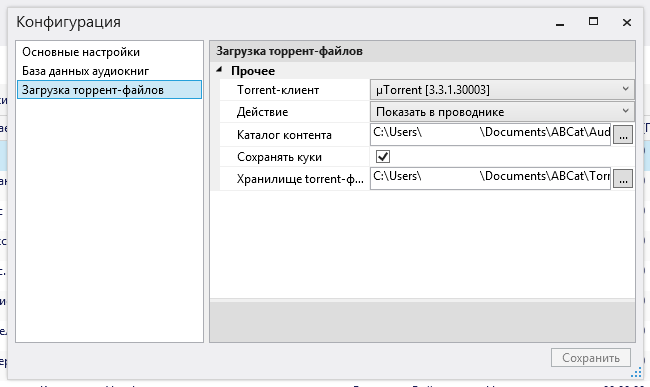
Download audiobooks
Became smarter plugin download audiobooks. Previously, it was required to specify the path to uTorrent in order to be able to start the download.
Now in the settings you can select the action that will be performed on the downloaded torrent file:
- Just show in the conductor. For those who feed NAS torrent files and do not use clients on a PC.
- Perform a system action. After downloading, the torrent file will simply be launched for execution and the OS will automatically perform the action associated with this file type.
- Start the download in the torrent client. This is exactly the action that was only possible in the first version. The torrent client will be launched with command line parameters and the download will start automatically. The path to the torrent client is no longer needed - ABCat loads the list of installed torrent clients from the registry and you just need to select the preferred client from the combo box in the settings window. Added BitTorrent support.
Re-authorization on rutracker happens using a saved cookie.
Briefly about other changes
For error logging, NLog was bolted.
The next change was the rejection of MahApps.Metro. This library provided a stylized look for the application. Perhaps the developer at some point will modify it to a normal state, but at the moment I ran into a lot of unexplainable problems, starting with the impossibility of changing the color of the window title (no matter how I tried to follow the instructions - nothing worked), ending with displaying black rectangles instead of pop-up tips By and large, I only needed styling the application header (which for some reason defaults to WPF for Windows 7 for some reason), and this problem was solved in a different way, without using third-party components.
In addition, the control of editing autochange lists has been reworked. The viewer and editor were combined into one window, buttons for deleting items appeared.
Quick deletion of elements in the AutoCorrect editor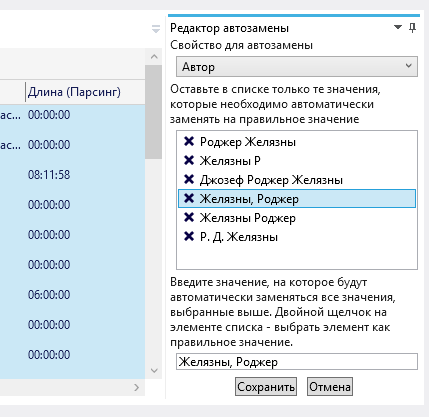
Quickly delete items in the AutoCorrect list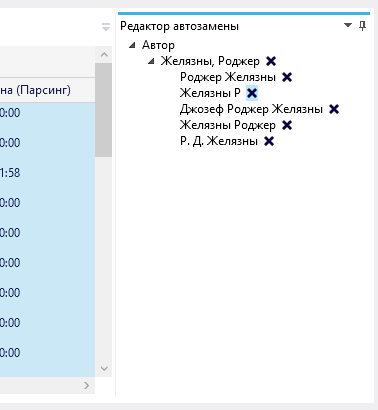
In the list of records appeared conditional coloring lines. Entries added to the list in the last 24 hours are colored green, in the last week - yellow. Entries that have not been updated for more than 30 days are colored red.
Added 2 more options for the logic of grouping records.
A lot of minor changes happened under the hood, so I will not dwell on them in detail.
To start the application, you no longer need to download any additional files - the release already has a starting database.
Links
Project page on codeplex
Report all problems here.
Sources
I thank everyone who reported errors, made suggestions for improvements and tested intermediate versions.
Special thanks to romantk , SlavasssR and ItGold .
The application still does not ask for money, donates, does not show ads and does not offer to install a panel for the browser or the “defender” of the system. Please understand the possible errors and omissions.
Before downloading the book, make sure that the release author has taken care of respecting the copyright to it.
And do not go with the distribution.
Source: https://habr.com/ru/post/203500/
All Articles