Installer Testing: Automate Windows Login
 Suppose we chose a tool that satisfies us (and here I mean not only the thing from the previous article , but also the sane tools like TFS etc), even made him do some part of the work for us. We were able to automate the installation of the product and now it seemed that happiness, it is like this, reach out and ... find that in the last stage of the installation we need to go through a system reboot. Or maybe even later boot under a limited account \ domain \ other record. And if you are not so lucky that your product changes msgina.dll, then ... yes, yes, I mean that we need to get under the winlogon and automate account input.
 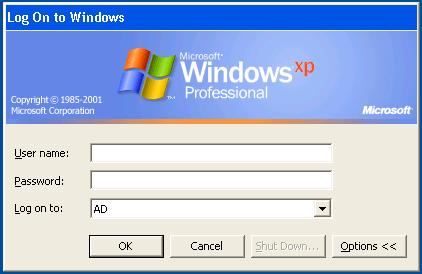 It would seem - what can stop us? Let's create a service that starts after a reboot, which will revive the process with the necessary autotest, and he will already read from the file - under what user to boot and do all the work.
Anamnesis
As planned, I created a service, looked, that it can run the command
ping localhost > c:\outping.txtimmediately after reboot, before logging in. I replaced the ping with my autotest, and nothing worked . Services that may start before the first login are launched on behalf of the system localsystem account and cannot be interactive . This means that, while running my autotest, I did not receive a system object that describes the windows displayed on the screen, the so-called desktop. The bottom line is that in windows there are three areas in which windows can be displayed - default (loaded after entering login / password), winlogon (displays a familiar authentication request to everyone) and invisible area for non-interactive services.
The phrase is so streamlined
Switching between these areas can be done by calling the function winapi SetThreadDesktopI deliberately avoid terminology here so that the article does not grow into it or quoting the chapter “Sessions, window stations, desktops and window messages” of the book by Mark Russinovich “Sysinternals Utilities. Admin Reference »

- Ok, - the coder thought, - All you need to do is call one winapi function, start your autotest, and compile it with a static link so that the tester does not suffer from dependencies.
-Ok, the tester thought, Just now it will be necessary to check on all systems a prog to start the prog.
It is impossible not to test the testing tool. However, I didn’t follow this path - more recently, when meeting with incomprehensible things in the behavior of Windows that threaten the invention of bicycles, I began to resort to building a query for Google, starting with the last name: Russinovich. It worked now. PSexec will help us out.
')
Recipe
- Download srvAny and install it into the test environment.
- In the Application parameter of the srvAny program, we indicate the line
"\\\\_psexec\\PSexec.exe /x /s /d /accepteula cmd.exe".
Actually the parameter / x and ensures the launch in the winlogon working environment - Reboot, wait for the authentication prompt, if everything is done correctly - the cmd console will loom up in the background (on windows 7 it may not loom, but you can switch to it by pressing alt + tab). Replace cmd with your autotest (for tfs, as I understand it, you need to run a test agent with some parameters) entering login password \ testing the performance of the new msgina. Is done.
Source: https://habr.com/ru/post/199234/
All Articles