Interface Design in MMORPG Skyforge
Hello, I'm Anton Kruglyakov, Skyforge User Interface Team Leader. In this article I will talk about our experience in designing interface design. I tried to minimize the theoretical part as much as possible, but, looking at the final result, I understand that I did not really succeed in this.

In the family of user interfaces, the game interface is in a special position. He allows himself to actively use graphics, non-standard sounds and materialism in any limits, but all this fades before one simple fact - a different user motivation. Everything is quite simple and at the same time very difficult: office programs serve to achieve the goal, games also exist for pleasure. What does this change in terms of interfaces?
In the case of an office program, interface designers proceed from the goal that the user wants to achieve. In developing the game, we need to understand what brings the user the greatest pleasure, and set goals for him that will allow him to get pleasure. Wait, how can we determine what brings pleasure? Fortunately, all this has already figured out before us. It turns out that there are not so many factors providing pleasure from the game. According to Bartle's simple classification, players are divided into 4 types, each of which is focused on achieving their goals.
')

In short, they can be described as:
If we know our audience, we know what motivates the player, and we can easily create the gameplay that our users will like. Here we come to a simple, but important fact: the player faces artificially set goals, which he must achieve in a system with unique rules and atmosphere.
The second most important factor that is present in many games is the way the player interacts with information, in our case with the game world. It does not occur directly, but through a chain of intermediate objects (through a character, a game camera, etc.).

Gaming interfaces, unlike office interfaces, have other tasks. If the PowerPoint interface is designed to make it as easy as possible for the user to reach the goal, then the task of the game is not only convenient to broadcast the player’s goal, but also to convey the atmosphere of the game. Some of the elements can be stylized to the world of the game, and some - abstract. Some groups of elements can be brought into the game world and are accessible only through a character, and some - directly to the user. Implementation options are many, and they all affect the convenience, the level of immersion in the atmosphere of the game and other nuances.
Objects in the game world, watched by character and player

Objects that you see on the monitor screen and your character in the game universe. This may be a map of the galaxy in the space of the game world, on which the planets and information about them are displayed.
A plus:
Minuses:
Objects outside the world, observed by the character and player

Skevomorphic to the world of the game two-dimensional or three-dimensional interfaces that exist outside the world of the game. A good example is a character’s pocket computer that a player cannot see in the game space.
Pros:
Minus:
Objects in the game, invisible to the character

Objects perceived only by the player and related to information that does not make sense within the framework of the game atmosphere. An example of such objects is the highlighting of the selected entity or sector. It does not make any sense for the character and does not exist within the framework of the narration, but is visible to the player and shows the object with which the interaction will occur.
Pros:
Minus:
Objects outside the game space, invisible to the character

Any non-atmospheric interfaces that are outside the space of the game world.
Pros:
Minus:
Meta-perception in the space of the game world

A special group of interfaces associated with the transfer of the character's state, his sensations and perception of the world. An example would be the visualization of sounds heard by the hero, as well as changes related to perception, for example, the effect of "night vision".
A plus:
Minuses:
Meta-perception out of game space

A special group of interfaces associated with the transfer of the character's state, his sensations and perceptions without reference to the position in the world. An example of such interfaces is the visualization of damage taken by a character in the form of blood on the screen.
A plus:
Minuses:
The MMORPG genre has a rich history and a set of standard mechanics that players expect to see in the game. To briefly formulate our goals, we wanted to implement all the variety of accepted mechanics and not get a picture, as in the example below.
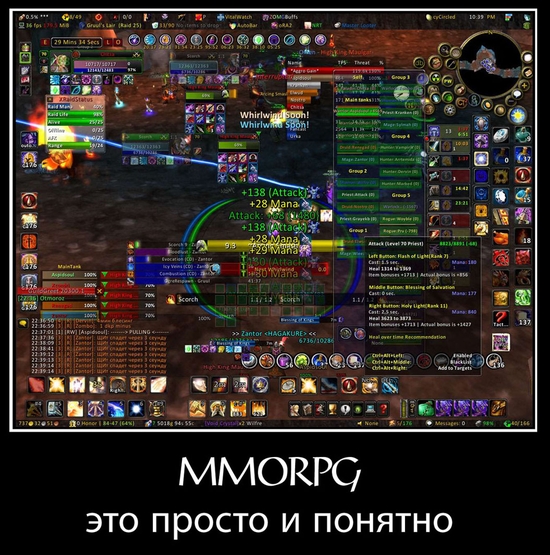
For all the simplicity of the criterion, most MMO developers continue to stumble over it. It is not so easy to take and bring all the necessary indicators into the world. But there are games in which this is done. Unfortunately, this solution has two major drawbacks:
In cases where you cannot sacrifice convenience, you have to go back to the good old indicators. In the general case, game designers are ready to sacrifice convenience about ... never. To avoid this, we developed three simple rules:
In fact, to clear the screen of useless information, we transferred all interface elements to the game world that do not require constant player attention or affect the effectiveness of the gameplay. On the screen we left only what relates to the operational management and the current context in which the character or game is located. All functions that do not have reflections in the world or lose a lot of convenience when transferring to it, we designed in the form of interface windows. Consider in detail each block.
From research, we know that human vision and perception are very tricky: the information will be perceived differently depending on the location and method of presentation. It is important to transfer it to the player in the most convenient and easy to read way. For this information can be grouped.

For different groups, a different approach to visualization and a different place on the screen are used. We divided the screen conditionally into 3 types of zones:

Zone 1. Used for information of the “Important, Urgent, with the Maximum Completeness” group. This is the area where the player looks the most. Here is placed all the most important, without which it is impossible to play.
Zone 2. Used for the group “Medium importance, not urgent, with details”. This area is clearly visible in a calm state, but in combat a player can get into the “stream”, which is characterized by a narrowing of the field of view, concentrating on the main task. For example, if you play an interesting game and your character dies, a bank may be robbed, but you will not notice. To attract the player's attention to these areas, you need to put more effort. We use for this purpose:
Zone 3. Used for the group “Minority, not urgent, with maximum completeness”. This is the information that the player can safely read outside the battlefield, in a safe zone for the character.
All information that is not required within the framework of the battle, but is often needed by the player “in a peaceful mode” and requires a structured presentation, we have drawn up in the form of separate windows. Windows, combined by a functional basis, are hubs that encompass everything that relates to a separate, completed function of a game, for example, an auction or socialization. I will not describe in detail the approaches that we used to design windows. This process is very close to those used to develop web and office applications. I will only note that for games because of the non-standard graphic design of the interface, it is imperative to develop a guideline, design rules and examples, and
also a description of all possible reactions and behaviors.

In some situations, when the speed of decision making is not so important, and immersion in the world of the game is crucial, we make the interfaces full screen. For example, in Skyforge, an interface for choosing an adventure, which is designed as a single object in the world and interface, is assigned to such interfaces. Due to the special design, we strengthened the feeling of connectedness of events at the player, while simultaneously showing the magnitude of the events taking place. Similar approaches have been applied to a number of other interfaces, which our developer blog will gladly tell you about in the future.
No wonder there is a saying "Meet on clothes ...". Coding systems play a huge role in our life. Take, for example, clothing. This is a social status encoding. In the game interface, we applied three basic types of encoding: color, form, and style.
Color coding is the simplest. It is used to denote the goal-player relationship (aggressive, neutral or friendly) and the usefulness of the items.

The form encoding we use for the skills and spells of the character - according to the type of their impact. The system adds an extra level of recognition and convenience.

We use coding style for cases when it is necessary to show which entity belongs to the game world, and which is an interface function. In the interface, icons of spells and objects differ in style from system icons - they are difficult to confuse.
The game interface consists not only of classifications and approaches. This is the painstaking work of artists, designers, programmers and screenwriters of the project. Our task as interface commands is to make user input as simple as possible, and the game process as transparent as possible.
Despite its apparent simplicity, such a system is very difficult to maintain. It’s all the fault of the very principle of game development, its fickleness and fuzzy goal - “to give pleasure to the player” - in conditions when the preferences of the audience and developers can change.
If you are interested in learning about the technical side of the process and how we did the UI in Adobe Flash and in ActionScript 3 with 160 thousand lines of code, write about it in the comments and we will prepare another article. Good luck!
Other materials can be viewed on the Skyforge developers website and in our Vkontakte community .
Unique Differences
In the family of user interfaces, the game interface is in a special position. He allows himself to actively use graphics, non-standard sounds and materialism in any limits, but all this fades before one simple fact - a different user motivation. Everything is quite simple and at the same time very difficult: office programs serve to achieve the goal, games also exist for pleasure. What does this change in terms of interfaces?
In the case of an office program, interface designers proceed from the goal that the user wants to achieve. In developing the game, we need to understand what brings the user the greatest pleasure, and set goals for him that will allow him to get pleasure. Wait, how can we determine what brings pleasure? Fortunately, all this has already figured out before us. It turns out that there are not so many factors providing pleasure from the game. According to Bartle's simple classification, players are divided into 4 types, each of which is focused on achieving their goals.
')
In short, they can be described as:
- careerists (achievers) - always in search of achievements;
- researchers (explorers) - "dig their nose to the ground" for the sake of information;
- socialists (socialisers) - form communities, enjoy conversations;
- killers (killers) - seeking to assert themselves at the expense of others.
If we know our audience, we know what motivates the player, and we can easily create the gameplay that our users will like. Here we come to a simple, but important fact: the player faces artificially set goals, which he must achieve in a system with unique rules and atmosphere.
The second most important factor that is present in many games is the way the player interacts with information, in our case with the game world. It does not occur directly, but through a chain of intermediate objects (through a character, a game camera, etc.).
Gaming interfaces, unlike office interfaces, have other tasks. If the PowerPoint interface is designed to make it as easy as possible for the user to reach the goal, then the task of the game is not only convenient to broadcast the player’s goal, but also to convey the atmosphere of the game. Some of the elements can be stylized to the world of the game, and some - abstract. Some groups of elements can be brought into the game world and are accessible only through a character, and some - directly to the user. Implementation options are many, and they all affect the convenience, the level of immersion in the atmosphere of the game and other nuances.
| Observed by character | Observed by player only | Meta-sensations | |
|---|---|---|---|
| In the space of the game | interactive objects | geometric interface elements | character's spatial sensations |
| Outside the game space | metaobjects | indicators | character's own feelings |
Interface elements
Objects in the game world, watched by character and player
Objects that you see on the monitor screen and your character in the game universe. This may be a map of the galaxy in the space of the game world, on which the planets and information about them are displayed.
A plus:
- information transfer without separation from the game world.
Minuses:
- restrictions on the design of information related to the atmosphere of the game;
- difficulty of access, character movement is required.
Objects outside the world, observed by the character and player
Skevomorphic to the world of the game two-dimensional or three-dimensional interfaces that exist outside the world of the game. A good example is a character’s pocket computer that a player cannot see in the game space.
Pros:
- the transfer of information without interrupting the game world;
- quick access to information;
- the player interacts with the interface directly.
Minus:
- restrictions on the design of information related to the atmosphere of the game.
Objects in the game, invisible to the character
Objects perceived only by the player and related to information that does not make sense within the framework of the game atmosphere. An example of such objects is the highlighting of the selected entity or sector. It does not make any sense for the character and does not exist within the framework of the narration, but is visible to the player and shows the object with which the interaction will occur.
Pros:
- spatial reference;
- the player interacts with the interface directly.
Minus:
- spoils the picture from an artistic point of view.
Objects outside the game space, invisible to the character
Any non-atmospheric interfaces that are outside the space of the game world.
Pros:
- the player interacts with the interface directly;
- the ability to provide information to the player in the most convenient and understandable form.
Minus:
- with excessive use quickly reduces the game to the table.
Meta-perception in the space of the game world
A special group of interfaces associated with the transfer of the character's state, his sensations and perception of the world. An example would be the visualization of sounds heard by the hero, as well as changes related to perception, for example, the effect of "night vision".
A plus:
- spatial reference.
Minuses:
- limited use;
- high degree of abstraction.
Meta-perception out of game space
A special group of interfaces associated with the transfer of the character's state, his sensations and perceptions without reference to the position in the world. An example of such interfaces is the visualization of damage taken by a character in the form of blood on the screen.
A plus:
- visibility.
Minuses:
- limited use;
- high degree of abstraction.
MMORPG is simple and straightforward.
The MMORPG genre has a rich history and a set of standard mechanics that players expect to see in the game. To briefly formulate our goals, we wanted to implement all the variety of accepted mechanics and not get a picture, as in the example below.
For all the simplicity of the criterion, most MMO developers continue to stumble over it. It is not so easy to take and bring all the necessary indicators into the world. But there are games in which this is done. Unfortunately, this solution has two major drawbacks:
- Indicators accept all restrictions related to the game world.
- Access to such an indicator is complicated.
In cases where you cannot sacrifice convenience, you have to go back to the good old indicators. In the general case, game designers are ready to sacrifice convenience about ... never. To avoid this, we developed three simple rules:
- HUD - combat, target designation.
- Interface windows - strategic planning (selection of a new goal, the situation around the player).
- Interfaces in the game world - tactical planning, information about the world.
In fact, to clear the screen of useless information, we transferred all interface elements to the game world that do not require constant player attention or affect the effectiveness of the gameplay. On the screen we left only what relates to the operational management and the current context in which the character or game is located. All functions that do not have reflections in the world or lose a lot of convenience when transferring to it, we designed in the form of interface windows. Consider in detail each block.
Hud
From research, we know that human vision and perception are very tricky: the information will be perceived differently depending on the location and method of presentation. It is important to transfer it to the player in the most convenient and easy to read way. For this information can be grouped.
- Important, urgent, with the most capacious flow:
- character state;
- possible actions;
- damage;
- control the status of enemies and friendly characters nearby;
- alerts from game masters.
- Of medium importance, not urgent, with details:
- update task status;
- performance of tasks;
- receiving items;
- events that require the decision of the player (invitation to the group).
- Small, not urgent, with details:
- alerts from different game mechanics (auction, craft);
- social functions.
- Important, not urgent, with the maximum completeness:
- mechanics of the game, related to long-term goals: character development, craft, etc.
For different groups, a different approach to visualization and a different place on the screen are used. We divided the screen conditionally into 3 types of zones:
Zone 1. Used for information of the “Important, Urgent, with the Maximum Completeness” group. This is the area where the player looks the most. Here is placed all the most important, without which it is impossible to play.
Zone 2. Used for the group “Medium importance, not urgent, with details”. This area is clearly visible in a calm state, but in combat a player can get into the “stream”, which is characterized by a narrowing of the field of view, concentrating on the main task. For example, if you play an interesting game and your character dies, a bank may be robbed, but you will not notice. To attract the player's attention to these areas, you need to put more effort. We use for this purpose:
- simple animations. They work poorly, because no one has yet canceled banner blindness.
- “Animated breadcrumbs” when we show an entity in zone 1 is compact and associate the animation with the region in zone 2, where we give additional information.
Zone 3. Used for the group “Minority, not urgent, with maximum completeness”. This is the information that the player can safely read outside the battlefield, in a safe zone for the character.
Window
All information that is not required within the framework of the battle, but is often needed by the player “in a peaceful mode” and requires a structured presentation, we have drawn up in the form of separate windows. Windows, combined by a functional basis, are hubs that encompass everything that relates to a separate, completed function of a game, for example, an auction or socialization. I will not describe in detail the approaches that we used to design windows. This process is very close to those used to develop web and office applications. I will only note that for games because of the non-standard graphic design of the interface, it is imperative to develop a guideline, design rules and examples, and
also a description of all possible reactions and behaviors.
Full-screen interfaces and interfaces in the game world
In some situations, when the speed of decision making is not so important, and immersion in the world of the game is crucial, we make the interfaces full screen. For example, in Skyforge, an interface for choosing an adventure, which is designed as a single object in the world and interface, is assigned to such interfaces. Due to the special design, we strengthened the feeling of connectedness of events at the player, while simultaneously showing the magnitude of the events taking place. Similar approaches have been applied to a number of other interfaces, which our developer blog will gladly tell you about in the future.
Consistency
No wonder there is a saying "Meet on clothes ...". Coding systems play a huge role in our life. Take, for example, clothing. This is a social status encoding. In the game interface, we applied three basic types of encoding: color, form, and style.
Color coding is the simplest. It is used to denote the goal-player relationship (aggressive, neutral or friendly) and the usefulness of the items.
The form encoding we use for the skills and spells of the character - according to the type of their impact. The system adds an extra level of recognition and convenience.
We use coding style for cases when it is necessary to show which entity belongs to the game world, and which is an interface function. In the interface, icons of spells and objects differ in style from system icons - they are difficult to confuse.
Conclusion
The game interface consists not only of classifications and approaches. This is the painstaking work of artists, designers, programmers and screenwriters of the project. Our task as interface commands is to make user input as simple as possible, and the game process as transparent as possible.
Despite its apparent simplicity, such a system is very difficult to maintain. It’s all the fault of the very principle of game development, its fickleness and fuzzy goal - “to give pleasure to the player” - in conditions when the preferences of the audience and developers can change.
If you are interested in learning about the technical side of the process and how we did the UI in Adobe Flash and in ActionScript 3 with 160 thousand lines of code, write about it in the comments and we will prepare another article. Good luck!
Other materials can be viewed on the Skyforge developers website and in our Vkontakte community .
Source: https://habr.com/ru/post/195438/
All Articles