Guide to designing relational databases (4-6 part of 15) [translation]
I post the continuation of the translation of a series of articles for beginners.
In the present and subsequent - more information on the merits.
The beginning is here .
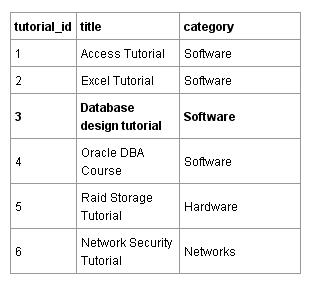
As you already know from past parts, data is stored in tables that contain rows or differently records . Earlier, I gave an example of a table containing information about lessons. Let's take a look at it again.
')
There are 6 lessons in the table. All 6 are different, but for each lesson the values of the same fields are stored in the table, namely: tutorial_id (lesson ID), title (title) and category (category). Tutorial_id is the primary key of the lesson table. A primary key is a value that is unique to each entry in the table.
In the customer table below customer_id is the primary key. In this case, the primary key is also a unique value (number) for each record.

In the database, primary keys are used for identification. In life, primary keys are around us everywhere. Every time you encounter a unique number, this number can serve as the primary key in the database (it can, but does not have to be used as such. All databases can automatically generate a unique value for each record as a number that automatically increases and is inserted together with each new record [So-called synthetic or surrogate primary key - note of translation].
A few examples
What unites these examples? The fact that in all of them a unique, non-repeating value is chosen as the primary key for each record. Again. The field values of a database table selected as the primary key are always unique.
The primary key is used to identify records.
The primary key is used to identify the records in the table so that each record becomes unique. Another analogy ... When you call technical support, the operator usually asks you to call any number (contract, phone, etc.) by which you can be identified in the system.
If you have forgotten your number, the technical support operator will ask for any other information to help you uniquely identify you. For example, a combination of your birthday and last name. They can also be the primary key, or rather their combination.
The primary key is unique.
The primary key is always unique. Imagine that its value is not unique. Then it could not be used to identify the data in the table. This means that any value of the primary key can occur in the column that is selected as the primary key only once. RDBMSs are designed so that they do not allow you to insert duplicates in the primary key field, you will get an error.
One more example. Imagine that you have a table with the fields first_name and last_name and there are two entries:
| first_name | last_name |
| vasya | pupkin |
| vasya | pupkin |
Those. There are two Vasya. You want to choose from the table of a particular Vasya. How to do it? Records do not differ from each other. This is where the primary key helps. Add an id column (the classic version of the synthetic primary key) and ...
Id | first_name | last_name |
1 | vasya | pupkin |
2 | vasya | pupkin |
Now every Vasya is unique.
Types of primary keys.
Typically, the primary key is a numeric value. But it can also be any other data type. It is not common practice to use a string as a primary key (a string is a fragment of text), but theoretically and practically this is possible.
Composite primary keys.
Often the primary key consists of one field, but it can be a combination of several columns, for example, two (three, four ...). But you remember that the primary key is always unique, which means that it is necessary that the combination of the n-th number of fields, in this case 2, be unique. More on this later.
Auto numbering
The primary key field is often, but not always, processed by the database itself. You can, relatively speaking, tell the database to automatically assign a unique numeric value to each record when it is created. The database usually starts numbering from 1 and increases this number for each record by one unit. Such a primary key is called auto-increment or auto-numbered. Using auto-increment keys is a good way to set unique primary keys. The classic name of such a key is the surrogate primary key [As mentioned above. - approx. trans.]. This key does not contain useful information related to the entity (object), information about which is stored in the table, so it is called surrogate.
When I started developing databases, I often tried to keep information that seemed related in one table. I could, for example, store order information in the customer table. After all, orders belong to customers, right? Not. Customers and orders are separate entities in the database. Both need their own table. And the entries in these two tables can be linked in order to establish relationships between them. Database design is the solution to two questions:
Customers and orders have a one-to-many relationship (they are in a relationship) because one customer can have many orders, but each specific order ( many of them) is issued only by one customer, i.e. may have only one customer. Do not worry if at the moment the understanding of this connection is vague. I will also talk about the connections in the following sections.
One thing that is important now is that one-to-many relationship requires two separate tables. One for customers, the other for orders. Let's practice a little by creating these two tables.
To begin, we will determine what information about orders and customers we will store. In order to do this, we must ask ourselves the question: “Which unit blocks of information relate to customers, and which unit blocks of information relate to orders?”
We design the table of clients.
Orders really belong to customers, but an order is not a minimum block of information that applies to customers (that is, this block can be broken down into smaller ones: order date, order delivery address, etc., for example).
The fields below are minimal pieces of information that relate to customers:
Let's proceed to the direct creation of this table in SQLyog (naturally, you can use any other program). Below is an example of how a table might look in SQLyog after it was created. All graphical database management applications have approximately the same interface structure. You can also create a table using the command line without using a graphical utility.
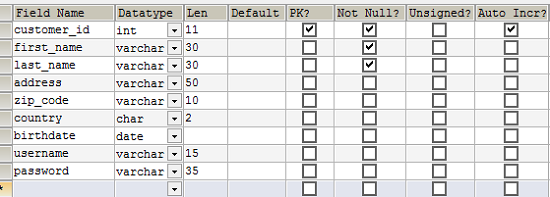
Creating a table in SQLyog. Notice that the primary key (PK) checkbox is selected for the customer_id field. The customer_id field is the primary key. The Auto Incr checkbox is also selected, which means that the database will automatically substitute a unique numeric value, which, starting from zero, will increase by one unit each time.
We design the table of orders.
What are the minimum pieces of information we need for an order?
Below is an example table in SQLyog.

Draft table. The customer field is the reference (foreign key) for the customer_id field in the customer table.
These two tables ( customers and orders ) are related because the customer field in the order table refers to the primary key ( customer_id ) of the customer table. Such a connection is called a foreign key relationship . You must think of a foreign key as a simple copy (copy of the value) of the primary key of another table. In our case, the value of the customer_id field from the customer table is copied to the order table when inserting each record. Thus, we have each order tied to the customer. And each client can have orders a lot, as mentioned above.
Creating a foreign key relationship.
You may ask yourself: “How can I make sure or how can I see that the customer field in the order table refers to the customer_id field in the customer table”. The answer is simple - you cannot do this because I have not shown you how to create a connection.
Below is a SQLyog window with a window that I used to create a link between the tables.
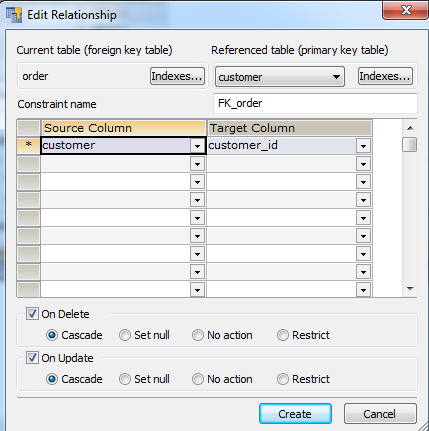
Creating a foreign key relationship between order and customer tables.
In the window above, you can see how the customer field of the order table on the left is associated with the primary key (customer_id) of the customer table on the right.
Now, when you look at the data that might be in the tables, you will see that the two tables are related.
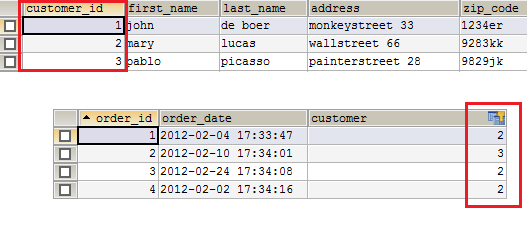
Orders are linked to customers through the customer field, which refers to the customer table.
On the image you can see that the customer mary placed three orders, the customer pablo placed one, and the client john placed none.
You may ask: “What exactly did all these people order?” This is a good question. You might have expected to see the ordered items in the order table. But this is a bad example of design. How would you put multiple products in a single record? Products are separate entities that should be stored in a separate table. And the relationship between the orders and goods tables will be a one-to-many relationship. I will tell about it further.
Earlier you learned how records from different tables are linked to each other in relational databases. Before creating and linking tables, it is important that you think about the entities that exist in your system (for which you are creating the database) and decide how these entities would communicate with each other. In database design, entities and their relationships are usually provided in an entity-relationship diagram (ERD) . This diagram is the result of a database design process.
You may wonder what the entity is. Well ... this is the “thing” in the system. There. My Mom always wanted me to become a teacher because I explain various things very well.
In the context of database design, an entity is something that deserves its own table in your database model. When you are designing a database, you must define these entities in the system for which you are creating the database. It is rather a matter of dialogue with the client or with yourself in order to find out what data your system will work with.
Let's take an online store for example. Online store sells goods . The product could be an obvious entity in the online store system. Products are ordered by customers . Here we are with you and saw two more obvious entities: orders and customers .
The order is paid by the client ... it's interesting. We are going to create a separate table for payments in the database of our online store? Maybe. But is payments a minimum block of information related to orders? This is also possible.
If you are not sure, then just think about what information about payments you want to store. You may want to keep the payment method or date of payment . But these are still minimal pieces of information that could relate to an order . You can change the wording. Payment method - order payment method. Payment date - the date of payment of the order. Thus, I do not see the need to make payments in a separate table, although conceptually you could select payments as an entity, since You could consider payments as a container of information (method of payment, date of payment).
Let's not be too academic.
As you can see, there is a difference between an entity and the table itself in the database, i.e. it is not the same thing. Information technology professionals can be VERY academic and pedantic in this matter. I am not a specialist. This difference depends on your point of view on your data, your information. If you are looking at data modeling from a software perspective, then you can come up with a host of entities that cannot be transferred directly to the database. In this tutorial, we look at data strictly from a database point of view, and in our small world, an entity is a table.

Hold on there, you are really close to getting your database degree.
How you see the definition of what entities your system has is a bit of an intellectual process that requires some experience and is often subject to change, revision, reflection, but, of course, this is not rocket science.
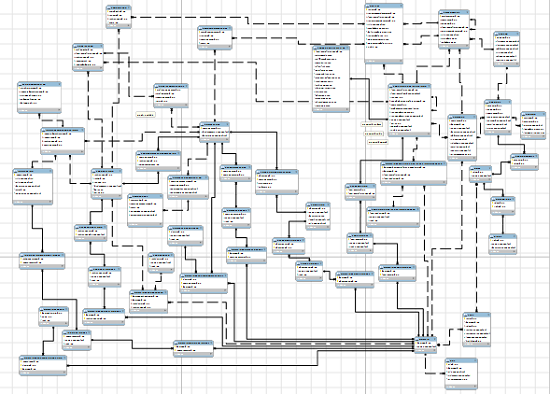
An entity-relationship diagram can be quite large if you are working on a complex application. Some charts may contain hundreds or even thousands of tables.
The second step in database design is the choice of which relationships exist between the entities in your system. Now it may be a little difficult to understand, but, once again, this is not rocket science. With the acquisition of some experience and rethinking of the work done, you will complete the next database model in the right or almost right way.
So. I told you about the one-to-many relationship and I will tell you more about the links in the further parts of this guide, so now I will not dwell on it anymore. Just remember that deciding which relationships your entities will have is an important part of database design and these relationships are displayed in an entity-relationship diagram.
In the present and subsequent - more information on the merits.
The beginning is here .
4. TABLES AND PRIMARY KEYS
As you already know from past parts, data is stored in tables that contain rows or differently records . Earlier, I gave an example of a table containing information about lessons. Let's take a look at it again.
')
There are 6 lessons in the table. All 6 are different, but for each lesson the values of the same fields are stored in the table, namely: tutorial_id (lesson ID), title (title) and category (category). Tutorial_id is the primary key of the lesson table. A primary key is a value that is unique to each entry in the table.
In the customer table below customer_id is the primary key. In this case, the primary key is also a unique value (number) for each record.
Primary keys in everyday life
In the database, primary keys are used for identification. In life, primary keys are around us everywhere. Every time you encounter a unique number, this number can serve as the primary key in the database (it can, but does not have to be used as such. All databases can automatically generate a unique value for each record as a number that automatically increases and is inserted together with each new record [So-called synthetic or surrogate primary key - note of translation].
A few examples
- The order number that you receive when you purchase from an online store can be the primary key of any order table in the database of this store, since It is a unique value.
- The social security number can be the primary key in any table in the database of a public institution, since it is also unique as in the previous example.
- The invoice number can be used as the primary key in the database table in which the invoices issued to customers are stored.
- The customer number is often used as the primary key in the customer table.
- ...
What unites these examples? The fact that in all of them a unique, non-repeating value is chosen as the primary key for each record. Again. The field values of a database table selected as the primary key are always unique.
What characterizes a primary key? Characteristics of the primary key.
The primary key is used to identify records.
The primary key is used to identify the records in the table so that each record becomes unique. Another analogy ... When you call technical support, the operator usually asks you to call any number (contract, phone, etc.) by which you can be identified in the system.
If you have forgotten your number, the technical support operator will ask for any other information to help you uniquely identify you. For example, a combination of your birthday and last name. They can also be the primary key, or rather their combination.
The primary key is unique.
The primary key is always unique. Imagine that its value is not unique. Then it could not be used to identify the data in the table. This means that any value of the primary key can occur in the column that is selected as the primary key only once. RDBMSs are designed so that they do not allow you to insert duplicates in the primary key field, you will get an error.
One more example. Imagine that you have a table with the fields first_name and last_name and there are two entries:
| first_name | last_name |
| vasya | pupkin |
| vasya | pupkin |
Those. There are two Vasya. You want to choose from the table of a particular Vasya. How to do it? Records do not differ from each other. This is where the primary key helps. Add an id column (the classic version of the synthetic primary key) and ...
Id | first_name | last_name |
1 | vasya | pupkin |
2 | vasya | pupkin |
Now every Vasya is unique.
Types of primary keys.
Typically, the primary key is a numeric value. But it can also be any other data type. It is not common practice to use a string as a primary key (a string is a fragment of text), but theoretically and practically this is possible.
Composite primary keys.
Often the primary key consists of one field, but it can be a combination of several columns, for example, two (three, four ...). But you remember that the primary key is always unique, which means that it is necessary that the combination of the n-th number of fields, in this case 2, be unique. More on this later.
Auto numbering
The primary key field is often, but not always, processed by the database itself. You can, relatively speaking, tell the database to automatically assign a unique numeric value to each record when it is created. The database usually starts numbering from 1 and increases this number for each record by one unit. Such a primary key is called auto-increment or auto-numbered. Using auto-increment keys is a good way to set unique primary keys. The classic name of such a key is the surrogate primary key [As mentioned above. - approx. trans.]. This key does not contain useful information related to the entity (object), information about which is stored in the table, so it is called surrogate.
5. BINDING TABLES WITH EXTERNAL KEYS
When I started developing databases, I often tried to keep information that seemed related in one table. I could, for example, store order information in the customer table. After all, orders belong to customers, right? Not. Customers and orders are separate entities in the database. Both need their own table. And the entries in these two tables can be linked in order to establish relationships between them. Database design is the solution to two questions:
- determining which entities you want to store in it
- what connections between these entities exist
One to many.
Customers and orders have a one-to-many relationship (they are in a relationship) because one customer can have many orders, but each specific order ( many of them) is issued only by one customer, i.e. may have only one customer. Do not worry if at the moment the understanding of this connection is vague. I will also talk about the connections in the following sections.
One thing that is important now is that one-to-many relationship requires two separate tables. One for customers, the other for orders. Let's practice a little by creating these two tables.
What information will we store? We solve the first question.
To begin, we will determine what information about orders and customers we will store. In order to do this, we must ask ourselves the question: “Which unit blocks of information relate to customers, and which unit blocks of information relate to orders?”
We design the table of clients.
Orders really belong to customers, but an order is not a minimum block of information that applies to customers (that is, this block can be broken down into smaller ones: order date, order delivery address, etc., for example).
The fields below are minimal pieces of information that relate to customers:
- customer_id (primary key) - customer ID
- first_name - name
- last_name - middle name
- address - the address
- zip_code - zip code
- country - country
- birth_date - date of birth
- username - login username
- password - password
Let's proceed to the direct creation of this table in SQLyog (naturally, you can use any other program). Below is an example of how a table might look in SQLyog after it was created. All graphical database management applications have approximately the same interface structure. You can also create a table using the command line without using a graphical utility.
Creating a table in SQLyog. Notice that the primary key (PK) checkbox is selected for the customer_id field. The customer_id field is the primary key. The Auto Incr checkbox is also selected, which means that the database will automatically substitute a unique numeric value, which, starting from zero, will increase by one unit each time.
We design the table of orders.
What are the minimum pieces of information we need for an order?
- order_id (primary key) - order identifier
- order_date - date and time of order
- customer - the customer who made the order
Below is an example table in SQLyog.
Draft table. The customer field is the reference (foreign key) for the customer_id field in the customer table.
These two tables ( customers and orders ) are related because the customer field in the order table refers to the primary key ( customer_id ) of the customer table. Such a connection is called a foreign key relationship . You must think of a foreign key as a simple copy (copy of the value) of the primary key of another table. In our case, the value of the customer_id field from the customer table is copied to the order table when inserting each record. Thus, we have each order tied to the customer. And each client can have orders a lot, as mentioned above.
Creating a foreign key relationship.
You may ask yourself: “How can I make sure or how can I see that the customer field in the order table refers to the customer_id field in the customer table”. The answer is simple - you cannot do this because I have not shown you how to create a connection.
Below is a SQLyog window with a window that I used to create a link between the tables.
Creating a foreign key relationship between order and customer tables.
In the window above, you can see how the customer field of the order table on the left is associated with the primary key (customer_id) of the customer table on the right.
Now, when you look at the data that might be in the tables, you will see that the two tables are related.
Orders are linked to customers through the customer field, which refers to the customer table.
On the image you can see that the customer mary placed three orders, the customer pablo placed one, and the client john placed none.
You may ask: “What exactly did all these people order?” This is a good question. You might have expected to see the ordered items in the order table. But this is a bad example of design. How would you put multiple products in a single record? Products are separate entities that should be stored in a separate table. And the relationship between the orders and goods tables will be a one-to-many relationship. I will tell about it further.
6. CREATING A DIAGRAM OF ESSENCE-COMMUNICATION
Earlier you learned how records from different tables are linked to each other in relational databases. Before creating and linking tables, it is important that you think about the entities that exist in your system (for which you are creating the database) and decide how these entities would communicate with each other. In database design, entities and their relationships are usually provided in an entity-relationship diagram (ERD) . This diagram is the result of a database design process.
Entities.
You may wonder what the entity is. Well ... this is the “thing” in the system. There. My Mom always wanted me to become a teacher because I explain various things very well.
In the context of database design, an entity is something that deserves its own table in your database model. When you are designing a database, you must define these entities in the system for which you are creating the database. It is rather a matter of dialogue with the client or with yourself in order to find out what data your system will work with.
Let's take an online store for example. Online store sells goods . The product could be an obvious entity in the online store system. Products are ordered by customers . Here we are with you and saw two more obvious entities: orders and customers .
The order is paid by the client ... it's interesting. We are going to create a separate table for payments in the database of our online store? Maybe. But is payments a minimum block of information related to orders? This is also possible.
If you are not sure, then just think about what information about payments you want to store. You may want to keep the payment method or date of payment . But these are still minimal pieces of information that could relate to an order . You can change the wording. Payment method - order payment method. Payment date - the date of payment of the order. Thus, I do not see the need to make payments in a separate table, although conceptually you could select payments as an entity, since You could consider payments as a container of information (method of payment, date of payment).
Let's not be too academic.
As you can see, there is a difference between an entity and the table itself in the database, i.e. it is not the same thing. Information technology professionals can be VERY academic and pedantic in this matter. I am not a specialist. This difference depends on your point of view on your data, your information. If you are looking at data modeling from a software perspective, then you can come up with a host of entities that cannot be transferred directly to the database. In this tutorial, we look at data strictly from a database point of view, and in our small world, an entity is a table.
Hold on there, you are really close to getting your database degree.
How you see the definition of what entities your system has is a bit of an intellectual process that requires some experience and is often subject to change, revision, reflection, but, of course, this is not rocket science.
An entity-relationship diagram can be quite large if you are working on a complex application. Some charts may contain hundreds or even thousands of tables.
Connections
The second step in database design is the choice of which relationships exist between the entities in your system. Now it may be a little difficult to understand, but, once again, this is not rocket science. With the acquisition of some experience and rethinking of the work done, you will complete the next database model in the right or almost right way.
So. I told you about the one-to-many relationship and I will tell you more about the links in the further parts of this guide, so now I will not dwell on it anymore. Just remember that deciding which relationships your entities will have is an important part of database design and these relationships are displayed in an entity-relationship diagram.
Source: https://habr.com/ru/post/193284/
All Articles