AWS: How to create a login to your account for multiple users using IAM
Hello! 
Many have AWS accounts that other people support. For example, the situation: the client wants the admin to tweak something. What to do? Give email and password? Not comme il faut ... There is a way out, and I will tell you with pictures what and how on the example of my personal account.
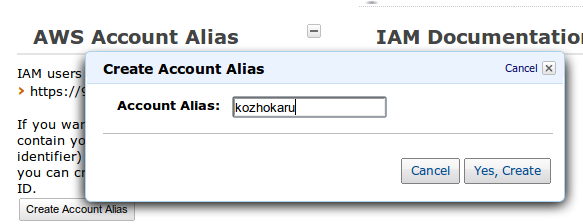
AWS has a great IAM (Identity and Access Mangement) service. First of all there we go - https://console.aws.amazon.com/iam/ . First, configure the address of your own login page to the console. Find and click the Create Accoun Alias button on the IAM main page:
')
My console is now available at: https://kozhokaru.signin.aws.amazon.com/console .
After, let's create a new group of users that can access only the EC2 service , for example. Looking for a button

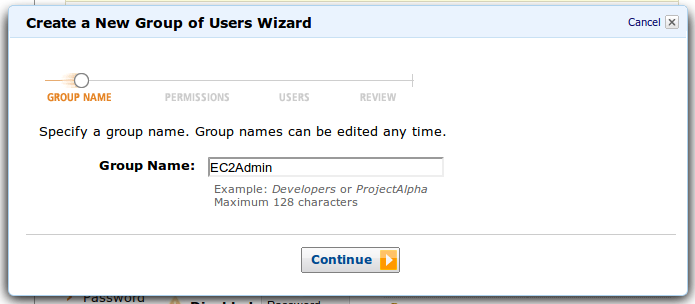
Next, create a group:
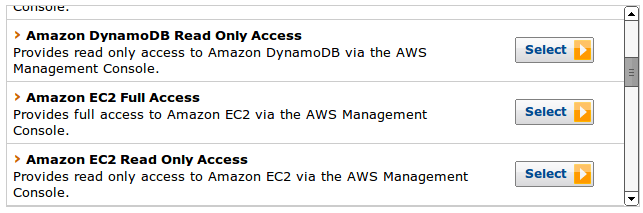
Find the right one in the default Amazon EC2 Full Access policies:
We agree with the prepared template in JSON format. By the way, for more flexible configuration of access rights, there is a Policy Generator. It will help create a policy that meets all your requirements.
Next, we can create new users for the group:
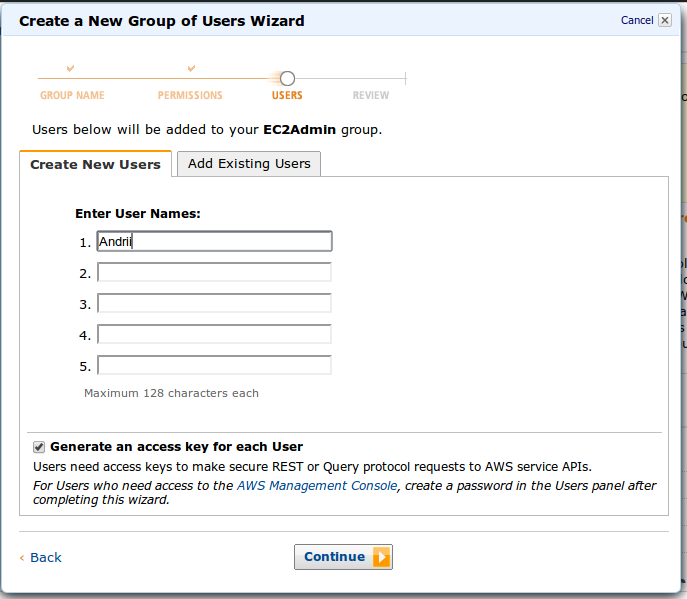
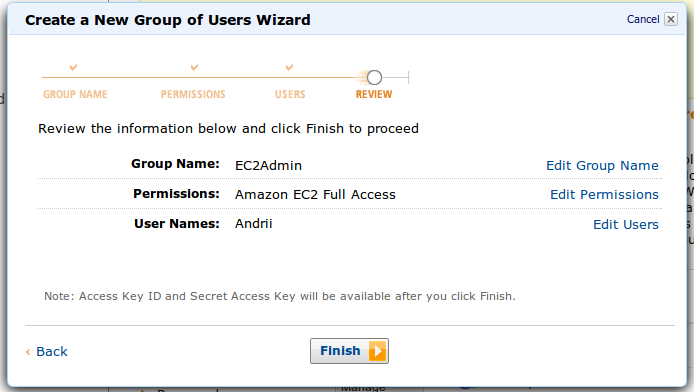
Group and user are ready. We just need to check and confirm:
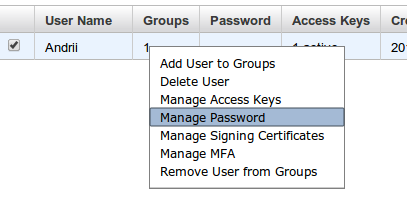
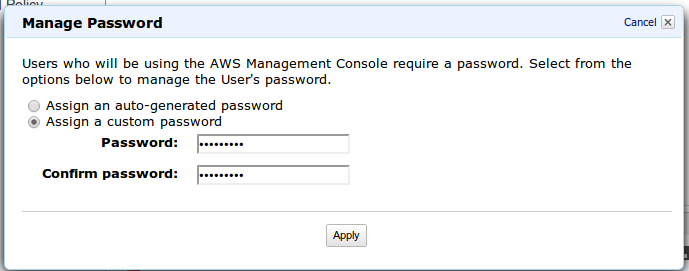
So, we just have to create a password for the user. Go to the user menu and add the password to it:
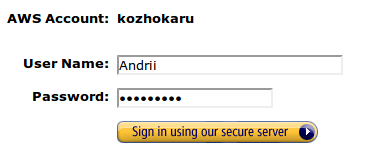
So, everything is ready. Go to the console address and enter the user details:
For this user, only EC2 service options are available. There is no access to other services or billing.
That's all, in general, describes the settings for a separate console account. In IAM, up to 80 users are available for free (by default, but the number can be increased) with different rights, keys, certificates. This is very convenient for account administrators, because almost everywhere you can differentiate access rights.
Many have AWS accounts that other people support. For example, the situation: the client wants the admin to tweak something. What to do? Give email and password? Not comme il faut ... There is a way out, and I will tell you with pictures what and how on the example of my personal account.
AWS has a great IAM (Identity and Access Mangement) service. First of all there we go - https://console.aws.amazon.com/iam/ . First, configure the address of your own login page to the console. Find and click the Create Accoun Alias button on the IAM main page:
')
My console is now available at: https://kozhokaru.signin.aws.amazon.com/console .
After, let's create a new group of users that can access only the EC2 service , for example. Looking for a button
Next, create a group:
Find the right one in the default Amazon EC2 Full Access policies:
We agree with the prepared template in JSON format. By the way, for more flexible configuration of access rights, there is a Policy Generator. It will help create a policy that meets all your requirements.
Next, we can create new users for the group:
Group and user are ready. We just need to check and confirm:
So, we just have to create a password for the user. Go to the user menu and add the password to it:
So, everything is ready. Go to the console address and enter the user details:
For this user, only EC2 service options are available. There is no access to other services or billing.
That's all, in general, describes the settings for a separate console account. In IAM, up to 80 users are available for free (by default, but the number can be increased) with different rights, keys, certificates. This is very convenient for account administrators, because almost everywhere you can differentiate access rights.
Source: https://habr.com/ru/post/161741/
All Articles