Find out the login-password installed on the PPPoE router
What should I do if I need to know the login-password installed on PPPoE in the router? The question was asked in habrahabr.ru/qa/28217 and I decided to experiment out of natural curiosity. Suppose we do not have access to the admin panel. The model of the router is not so important (in my case, the D-Link DIR-300 was taken for tests)
Solution under the cut
I solved this problem with the help of the excellent router Mikrotik RB951-2n (although you can do it on any router of this company). Connect to the console and execute the command -
')
This command enables the PPPoE server on the fifth port of the router.
Next, we do an advanced log output on PPPoE
Now we connect the patch cord with the WAN port of the router from which you want to pull out the password and the fifth port of the micro-camera and go to the log. We look at the password in clear text :)

PS: After all, do not forget to remove logging and PPPoE server
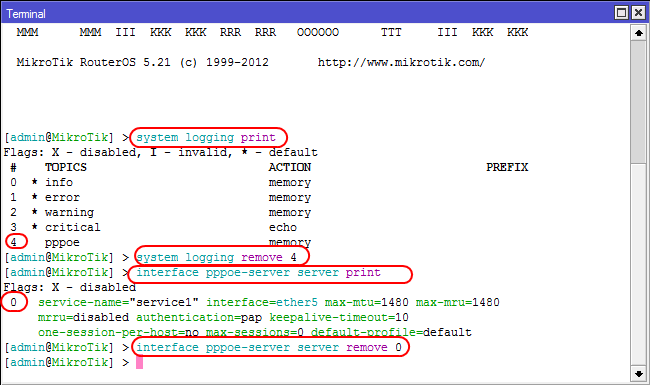
PS2: In principle, you can do the same thing without a microtic by installing a PPPoE server on a computer, but it was easier for me :) But this method seems easier and faster to me, the only drawback is having a microtic.
PS3: This method will not work if the authorization type is CHAP or MSCHAP. But on tested routers (Dlink DIR-300, Dlink DIR-320, Linksys WRT54gl, Tplink TL-WR941ND), with the default PPPoE settings, the password quietly pulls out.
Solution under the cut
I solved this problem with the help of the excellent router Mikrotik RB951-2n (although you can do it on any router of this company). Connect to the console and execute the command -
')
interface pppoe-server server add authentication=pap disabled=no interface=ether5 service-name=service1This command enables the PPPoE server on the fifth port of the router.
Next, we do an advanced log output on PPPoE
system logging add topics=pppoeNow we connect the patch cord with the WAN port of the router from which you want to pull out the password and the fifth port of the micro-camera and go to the log. We look at the password in clear text :)
PS: After all, do not forget to remove logging and PPPoE server
PS2: In principle, you can do the same thing without a microtic by installing a PPPoE server on a computer, but it was easier for me :) But this method seems easier and faster to me, the only drawback is having a microtic.
PS3: This method will not work if the authorization type is CHAP or MSCHAP. But on tested routers (Dlink DIR-300, Dlink DIR-320, Linksys WRT54gl, Tplink TL-WR941ND), with the default PPPoE settings, the password quietly pulls out.
Source: https://habr.com/ru/post/158781/
All Articles