Code Signing certificates or developer certificates. Views, how to choose
 Last time we looked at digital SSL certificates , this time we will consider another version of digital certificates.
Code Signing certificates is a certificate that is signed by software or scripts, which confirms the author of the program and guarantees that the code has not been changed after the digital signature has been applied. They are also called developer certificates.
So the developer certificates provide us with several options. First, it is a digital signature mechanism that confirms that the program you are using is really released by a company, that is, it guarantees the authenticity of the source. And secondly, it guarantees the integrity of the content, that is, that since the moment of signing the software product has not been damaged or changed.
In all modern versions of Windows, starting with Windows XP SP2, you will receive a warning when installing software without such a digital signature. The same way applies to the installation of drivers that do not have a corresponding digital signature.
')
If the digital signature is not found, Windows will warn you that it is not recommended to run this program as “Unknown Publisher”.
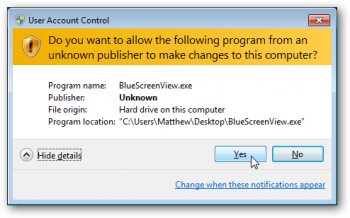
If the program has a digital signature, then the window will look different and you can also view information about the certificate.

What are the types of Code signing certificates, and how do they differ?
First of all, we consider certificates for certification centers that issue them.
Best of all, the difference between certificates from different certificate authorities is shown by a summary table.
The columns indicate the names of certification authorities, and in the lines the type of certificate or technology / platform for which it is used.
| Platform \ Certification Authority | Symantec | Thawte | Comodo | Digicert | Globalsign | Trustwave | Startcom |
|---|---|---|---|---|---|---|---|
| Microsoft Authenticode Signing | + | + | + | + | + | + | + |
| Code Signing for Apple | + | + | + | + | + | + | |
| Microsoft Vba Signing | + | + | + | + | + | + | + |
| Java Code Signing | + | + | + | + | + | + | + |
| Adobe Air Signing | + | + | + | + | + | + | + |
| Kernel Mode Signing | + | + | + | + | |||
| Android | + | ||||||
| Windows phone | + | ||||||
| Qualcomm BREW | + | ||||||
| Cost, from | $ 500 | 250 $ | $ 90 | 220 $ | 220 $ | 330 $ | $ 200 |
It should be clarified that not all certification centers provide complete information about the platforms on which their certificates operate, so only those platforms that support them are explicitly stated by the certification center are noted as a plus.
Microsoft Authenticode
To sign 32 and 64 bit files (.exe, .cab, .dll, .ocx, .msi, .xpi and .xap files). Also allows you to sign code for Microsoft® Office, Microsoft VBA, Netscape Object Signing and Marimba Channel Signing.
Supports Silverlight 4 Applications
Code Signing for Apple
Allows developers to sign programs for Mac OS, as well as software updates.
Microsoft Office Vba Signing
Signs VBA objects, scripts, and macros for Microsoft Office .doc, .xls, and .ppt files
For Microsoft Office and add-ons that use VBA
Java Code Signing
To sign java applets. Allows you to sign .jar files and Java applications for desktop and mobile devices.
Java Runtime Environment (JRE) recognized
Adobe Air Signing
To sign .air files
Required for all AIR-based applications.
Kernel Mode Signing
Kernel-Mode developer certificates allow you to sign, so-called kernel-mode applications and device drivers. The 64 bit version of Windows Vista and Windows 7 require that all kernel-mode applications be signed with a certificate and a trusted certificate authority.
Android
To sign and optimize .apk files for the Android platform
Microsoft Windows Phone
To digitally sign applications for Windows Phone and Xbox 360. Required for Microsoft App Hub service
Qualcomm BREW
For those who develop applications for the BREW platform (Binary Runtime Environment for Wireless)
How Code Signing Certificate Works:
The process of signing code.
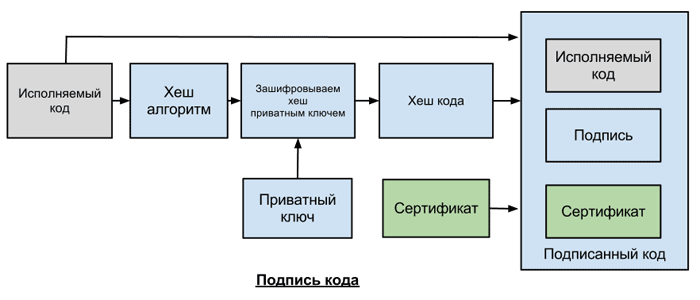
- Publisher (developer) requests a Code Signing certificate from a certification authority
- Using SIGNCODE.EXE or another publisher code signing utility, creates a hash of the code using MD5 or SHA algorithms.
- Encodes hash using private key
- Creates a package that includes: code, encrypted hash and publisher certificate
The process of verifying signed code.

- The user downloads or installs the signed software and the user’s platform or system verifies the certificate of the publisher that is signed by the root key of the certification authority.
- The system runs the code using the same hash creation algorithm as the publisher and creates a new hash
- Using the publisher's public key, which is contained in the certificate, the system decrypts the encrypted hash
- And compares 2 hashes
Certification Authority
When a developer requests a digital certificate, the certificate authority identifies it and issues a certificate associated with the root certificate authority certificate. Platforms and devices contain the root certificate of the corresponding certificate authority. That is, if the platform or device trusts any certification authority, it will also trust your certificate signed by this certification authority.
If the hashes do not match, you will get an error when launching such software - this may mean that the software has been modified by a virus or an intruder.
When the software decrypts a digital signature, it also checks the root certificate in the system, the source of verified information. In the case of using a self-signed certificate, you will get the error: “the publisher could not be verified.” Therefore, it is important to use the certificates of the certification authority whose root certificates are already installed in the system of the intended user of the program.
I will not talk about the organization verification process itself, since it is the same as for SSL certificates with the organization’s validation, which we already mentioned in the last article .
A few words about the timestamp.
Timestamp or timestamp is used to indicate the time when the digital signature was made. If such a label is present, the application that checks the signature will check if the certificate associated with the signature was valid at the time of signing. If there is no such label, and the term of the certificate has already expired, the signature will be considered invalid.
Example:
Certificate is valid from: 01.01. 2008
Certificate is valid until: 12/31/2010
Signed: 04.07.2009
Signed checked: 04/30/2012
With a timestamp, the signature will be verified, because at the time of signing the certificate was valid. Without such a label, the certificate will not pass verification, because at the time of verification the certificate has already expired.
That is, such a label allows you to use a signed code, even after the expiration date of the certificate.
Summarize
To select a certificate, you first need to select a certification authority that issues certificates for the platform you need, and then the choice essentially comes down to selection by price and by the level of certification authority, often customers choose those certification authorities they have previously worked with.
Some tips.
- It is desirable to draw up an application for a certificate from the same machine with which you will later perform the software signature.
- Most certificate authorities recommend generating a certificate application through Internet explorer, although we also had no problems generating applications through other browsers.
I will be happy to answer questions on developer certificates, within my competence, since I am not a developer myself.
I will also be happy with additions and clarifications from those who use such certificates.
UPD: added important information about the timestamp (timestamp), thanks to TolTol and crea7or
Source: https://habr.com/ru/post/152867/
All Articles