Smile to login!
My acquaintance with computers, both due to age and due to the difficult situation of the 90s, began with OS DOS on p1 90-120mHz, with as many as 4 megabytes of RAM. A little later, I saw the fabulous world of the GUI in the face of Windows. Well, a little later a password appeared on the computer, because my parents once believed that the computer had a bad influence on me, although I didn’t play on it, but mostly I drew and learned to type texts faster than 10-12 characters per minute. In general, I think everyone here remembers the login screen in Windows 95:
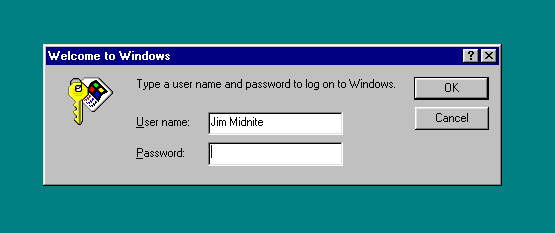
Perhaps the most fun was the fact that you could click "cancel" and the system worked as if nothing had happened. True, this business was quickly corrected - a password appeared at the stage of the BIOS, which you would not get around so easily, but I still didn’t know about the battery for resetting — there was practically no computer literature at home, and the Internet was even worse.
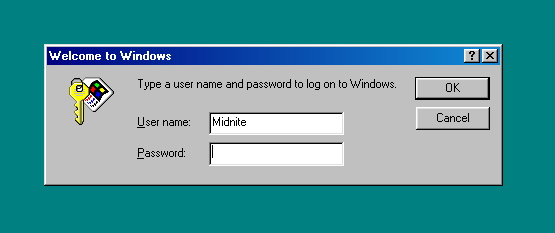
A little later, a new operating system appeared, but radically the 98th "Windows" did not change anything, except that a gradient appeared at the window title:
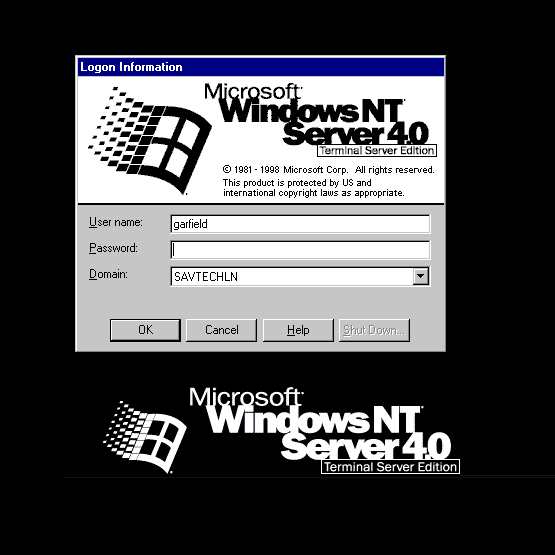
In Windows NT, popular network functions appeared, its window looked like this:
')
The first innovation appeared - support for the entrance to the domain. The "cancel" button no longer helped just use a computer. The same thing happened with Windows 2000:

In general, as you may have guessed, the topic affects the login methods.
Significantly different Login screen in Windows XP - this system contained the first hints of User Friendly-building interface.
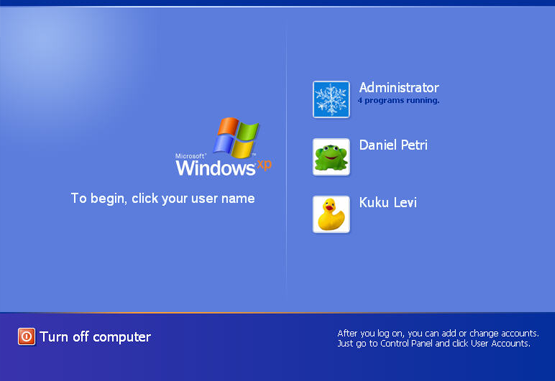
There were “avatars” of users, all users were represented by a single sheet, there was no need to enter a user name for home use, which was undoubtedly a sufficiently large step forward to speed up the login. Nobody prevented corporate users from returning to the usual login to the system via ctrl + alt + del and the “simple” design of the system.
A few years later, Windows Vista, so much unloved by many, came out - its window was practically no different from that in XP - except that the “portraits” were now hung in a row, not vertically. Yes, and "Sevenechny" input did not bring any innovations, it was just repainted in new colors of the system. There was a stagnation in the “sphere” of the entry to the system. Login, password, domain.
However, back in the days of XP SP2, some laptops had an alternative way to log in - a fingerprint scanner that worked with varying success. Perhaps it was the first biometric method of authorization on a computer that I met, a meeting with him took place “on the territory” of ASUS N-series, the digital index of which was lost on the backs of memory after years. Now this element is almost nowhere to be found, apparently, fashion has passed. But three or four years ago, all self-respecting manufacturers had models with a similar "sophistication."
Authorization systems through face recognition with a webcam have now started to meet. There is such a system in ASUS - Smart LogOn is called. Anyone can download it from the official site, it works with any compatible hardware, recognizes faces in the light of the monitor in the night and generally behaves decently.
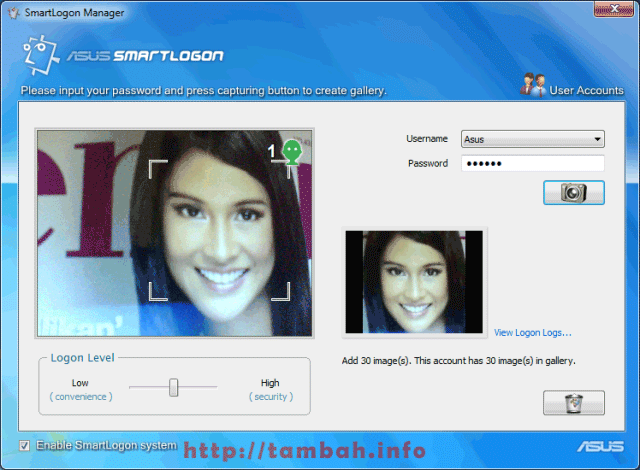
Perhaps the main drawback of such a program is that it is relatively easy to cheat: just slip a more or less recent photo and you are logged in.
However, this works if the facial expression in the photo matches the one you showed the camera during the training. The trick is to “teach” the program with a facial expression that is not in your photos on Facebook (where you can easily get and print your photo), or from family photo albums (if you are afraid that your younger brother will have access to your laptop while you are visiting with your parents).
For example, if you make such a face:

... then Smart LogOn will not exactly confuse you with your usual photo printed from a social network. And those who want to open your laptop will have to look for another method to get into your system. Another plus in this method is that it can be combined with facial gymnastics. In the end, we “log in” at least 5 times a day, which means that involuntarily we will have to perform these exercises, which in ordinary life we will do “breaks”. By the way, “Save the youth of the face and your data” - it seems to me a great idea for a startup! :)
Of course, for fingerprint scanners, more tricks were needed - not so long ago there was an excellent article for them , and, as I recall, “unpretentious” scanners cost by using scotch tape, a bag with water and all sorts of other different “folk” methods; and complex and expensive models will not be built into a laptop. And if we consider that the fingerprint itself is a fairly good identity identifier (and most importantly, unique), the problem here is clearly not in the finger, but in the scanner.
What else is in the biometric authorization market? Authorization on the retina? So far - expensive and very cumbersome. DNA Authorization? Even more expensive, slow, cumbersome and not very reliable, getting the DNA itself is not so difficult, just a piece of flesh / skin / nail or a pair of hair, there is a problem with “slipping” the desired sample to the scanner. But the iris scanner is a very promising way of protection, but it’s definitely not worth waiting for in laptops. And if someone wants to steal your data, they will rather disassemble a laptop than pick it up (pick it up) to pick out someone else’s eye.
Logging in via a webcam can be improved, but this will require either a sensor the size of a Kinect to get an idea of whether the photo is in front of us or a living person, or recording with facial animation. That is, it will not be enough to show a photo, it will also be necessary to make it smile, wink or show language, so that the software compares the emotion with the recorded sample. Until then, such systems can speed up logging into the system when hands are busy or there is no need to store confidential data, but does not serve as a reliable system protection against hacking.
What authorization methods do you use?
Perhaps the most fun was the fact that you could click "cancel" and the system worked as if nothing had happened. True, this business was quickly corrected - a password appeared at the stage of the BIOS, which you would not get around so easily, but I still didn’t know about the battery for resetting — there was practically no computer literature at home, and the Internet was even worse.
A little later, a new operating system appeared, but radically the 98th "Windows" did not change anything, except that a gradient appeared at the window title:
In Windows NT, popular network functions appeared, its window looked like this:
')
The first innovation appeared - support for the entrance to the domain. The "cancel" button no longer helped just use a computer. The same thing happened with Windows 2000:
In general, as you may have guessed, the topic affects the login methods.
Significantly different Login screen in Windows XP - this system contained the first hints of User Friendly-building interface.
There were “avatars” of users, all users were represented by a single sheet, there was no need to enter a user name for home use, which was undoubtedly a sufficiently large step forward to speed up the login. Nobody prevented corporate users from returning to the usual login to the system via ctrl + alt + del and the “simple” design of the system.
A few years later, Windows Vista, so much unloved by many, came out - its window was practically no different from that in XP - except that the “portraits” were now hung in a row, not vertically. Yes, and "Sevenechny" input did not bring any innovations, it was just repainted in new colors of the system. There was a stagnation in the “sphere” of the entry to the system. Login, password, domain.
However, back in the days of XP SP2, some laptops had an alternative way to log in - a fingerprint scanner that worked with varying success. Perhaps it was the first biometric method of authorization on a computer that I met, a meeting with him took place “on the territory” of ASUS N-series, the digital index of which was lost on the backs of memory after years. Now this element is almost nowhere to be found, apparently, fashion has passed. But three or four years ago, all self-respecting manufacturers had models with a similar "sophistication."
Authorization systems through face recognition with a webcam have now started to meet. There is such a system in ASUS - Smart LogOn is called. Anyone can download it from the official site, it works with any compatible hardware, recognizes faces in the light of the monitor in the night and generally behaves decently.
Perhaps the main drawback of such a program is that it is relatively easy to cheat: just slip a more or less recent photo and you are logged in.
However, this works if the facial expression in the photo matches the one you showed the camera during the training. The trick is to “teach” the program with a facial expression that is not in your photos on Facebook (where you can easily get and print your photo), or from family photo albums (if you are afraid that your younger brother will have access to your laptop while you are visiting with your parents).
For example, if you make such a face:
... then Smart LogOn will not exactly confuse you with your usual photo printed from a social network. And those who want to open your laptop will have to look for another method to get into your system. Another plus in this method is that it can be combined with facial gymnastics. In the end, we “log in” at least 5 times a day, which means that involuntarily we will have to perform these exercises, which in ordinary life we will do “breaks”. By the way, “Save the youth of the face and your data” - it seems to me a great idea for a startup! :)
Of course, for fingerprint scanners, more tricks were needed - not so long ago there was an excellent article for them , and, as I recall, “unpretentious” scanners cost by using scotch tape, a bag with water and all sorts of other different “folk” methods; and complex and expensive models will not be built into a laptop. And if we consider that the fingerprint itself is a fairly good identity identifier (and most importantly, unique), the problem here is clearly not in the finger, but in the scanner.
What else is in the biometric authorization market? Authorization on the retina? So far - expensive and very cumbersome. DNA Authorization? Even more expensive, slow, cumbersome and not very reliable, getting the DNA itself is not so difficult, just a piece of flesh / skin / nail or a pair of hair, there is a problem with “slipping” the desired sample to the scanner. But the iris scanner is a very promising way of protection, but it’s definitely not worth waiting for in laptops. And if someone wants to steal your data, they will rather disassemble a laptop than pick it up (pick it up) to pick out someone else’s eye.
Logging in via a webcam can be improved, but this will require either a sensor the size of a Kinect to get an idea of whether the photo is in front of us or a living person, or recording with facial animation. That is, it will not be enough to show a photo, it will also be necessary to make it smile, wink or show language, so that the software compares the emotion with the recorded sample. Until then, such systems can speed up logging into the system when hands are busy or there is no need to store confidential data, but does not serve as a reliable system protection against hacking.
What authorization methods do you use?
Source: https://habr.com/ru/post/150038/
All Articles