Writing Intellij IDEA plugin: Register file type
A recent article on Habré reminded me of how much time I spent trying to write my own plugin for Intellij IDEA. Although there is official documentation on creating plugins, it is unexpectedly not enough.
In this article I will discuss how to register your file type with Intellij IDEA. This may be necessary if you are writing your own language plugin or want to launch an external editor for files. As an example, take the Apache JMeter files (installation of the JMeter itself is not required).
So, open an existing project with a plug-in module or create a new one. How to do this can be found in the above article and in the official tutorial .
We need a 16x16 pixel icon. Save it to the

')
Each type of file in IntelliJ is represented as an implementation of the
The purpose of the methods can be read in JavaDoc'ah to the interface , I will state only a few points.
The next step is to register the file type in the system. To do this, we need a heir to the
It remains to register
Done!
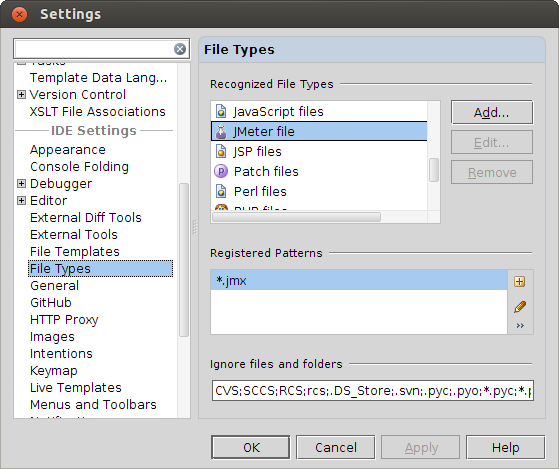
Let's see what happened. Launch the plugin, this will launch a new instance of Intellij IDEA. Open File> Settings> File Types and see how our file type is registered:
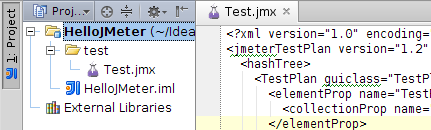
Create a new project and add a JMeter file to it. In the project tree, we see that the file has an icon, and the file itself opens in the editor as plain text.
Since JMeter files are plain XML, let's add syntax highlighting. This is done in one line in plugins.xml:
... or almost the same. Here:
There are several ready-made syntax highlighting implementations: HTML, Java, Regexp, etc. You can create your own
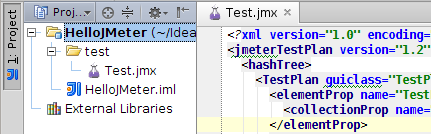
Run and see the result:
Syntax highlighting for language plugins is slightly different. I will not stop in detail. I will list only the classes that you should pay attention to:
So, we managed to register a new file type in Intellij IDEA with an icon and syntax highlighting. More information on plugin development can be found in the official documentation , Intellij IDEA source code or on the forum . The full code for the post can be found on GitHub .
In this article I will discuss how to register your file type with Intellij IDEA. This may be necessary if you are writing your own language plugin or want to launch an external editor for files. As an example, take the Apache JMeter files (installation of the JMeter itself is not required).
So, open an existing project with a plug-in module or create a new one. How to do this can be found in the above article and in the official tutorial .
New file type
We need a 16x16 pixel icon. Save it to the
/resources/icons folder and mark the folder as Source Root. You can put the icon directly in src .')
Each type of file in IntelliJ is represented as an implementation of the
com.intellij.openapi.fileTypes.FileType interface. Create your own implementation: public class JMeterFileType implements FileType { public static final JMeterFileType INSTANCE = new JMeterFileType(); @NotNull @Override public String getName() { return "JMeter"; } @NotNull @Override public String getDescription() { return "JMeter file"; } @NotNull @Override public String getDefaultExtension() { return "jmx"; } @Override public boolean isBinary() { return false; } @Override public boolean isReadOnly() { return false; } @Override public Icon getIcon() { return IconLoader.getIcon("/icons/beaker.png"); } @Override public String getCharset(@NotNull VirtualFile file, byte[] bytes) { return CharsetToolkit.UTF8; } } The purpose of the methods can be read in JavaDoc'ah to the interface , I will state only a few points.
- Singletons in Intellij IDEA code are used everywhere. Usually I try to avoid them, but here I follow the general style, creating an
INSTANCEfield, which we will need soon. - If
isReadOnlyreturns true, then the file type can be changed in the File> Settings> File Types settings. isBinaryaffects whether a file will open in a text editor. JMeter files are Java objects serialized to XML using XStream. Hands such files to write makes no sense, but you can track changes in the version control system.
File Type Registration
The next step is to register the file type in the system. To do this, we need a heir to the
com.intellij.openapi.fileTypes.FileTypeFactory class: public class JMeterFileTypeFactory extends FileTypeFactory { @Override public void createFileTypes(@NotNull FileTypeConsumer consumer) { consumer.consume(JMeterFileType.INSTANCE); } } It remains to register
JMeterFileTypeFactory in plugin.xml <idea-plugin version="2"> ... <extensions defaultExtensionNs="com.intellij"> ... <fileTypeFactory implementation="idea.plugin.jmeter.JMeterFileTypeFactory"/> </extensions> </idea-plugin> Done!
Let's see what happened. Launch the plugin, this will launch a new instance of Intellij IDEA. Open File> Settings> File Types and see how our file type is registered:
Create a new project and add a JMeter file to it. In the project tree, we see that the file has an icon, and the file itself opens in the editor as plain text.
Syntax highlighting
Since JMeter files are plain XML, let's add syntax highlighting. This is done in one line in plugins.xml:
<idea-plugin version="2"> ... <extensions defaultExtensionNs="com.intellij"> ... <syntaxHighlighter key="JMeter" implementationClass="com.intellij.ide.highlighter.XmlFileHighlighter"/> </extensions> </idea-plugin> ... or almost the same. Here:
keyis the value returned byJMeterFileType.getName().implementationClassis the implementation ofSyntaxHighlighter.
There are several ready-made syntax highlighting implementations: HTML, Java, Regexp, etc. You can create your own
SyntaxHighlighter . But this is beyond the scope of the article.Run and see the result:
Syntax highlighting for language plugins is slightly different. I will not stop in detail. I will list only the classes that you should pay attention to:
- com.intellij.lang.Language
- com.intellij.openapi.fileTypes.LanguageFileType
- com.intellij.openapi.fileTypes.SyntaxHighlighterFactory (or LanguageFileTypeHighlighterProvider)
Total
So, we managed to register a new file type in Intellij IDEA with an icon and syntax highlighting. More information on plugin development can be found in the official documentation , Intellij IDEA source code or on the forum . The full code for the post can be found on GitHub .
Source: https://habr.com/ru/post/149100/
All Articles