Reassigning Hot Keys in the GNOME Environment
GNOME is developing in leaps and bounds. Each version adds so much of everything new that we often forget about the functions that appeared a long time ago.
For example, not everyone knows about the remarkable function of reassigning hotkeys. Surely, at least once it was that I liked to control this or that program from the keyboard, but I had to get used to new key combinations. For example, in different Jabber clients, the function “show / hide people offline” is invoked by default with different keyboard shortcuts.
Today I will tell you how to deal with this problem in a very simple way.
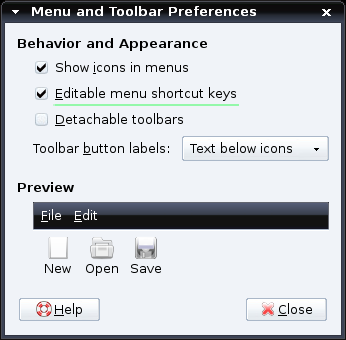
First of all, open System → Preferences → Menus & Toolbars (or just run - Alt + F2 - gnome-ui-properties). Next, tick the item “Editable menu shortcut keys” and close this window. That's all. :)
')
Another way convenient for those who do not use GNOME itself, but uses GTK applications: add the line "gtk-can-change-accels = 1" to the file ~ / .gtkrc-2.0 (save dgorchak 'u).
Now you can change the shortcut keys for certain menu items. Open, say, the Epiphany browser. It seemed to me a convenient option when the Alt + X and Alt + C keys switch to the tab to the left and to the right, respectively. So, open the Tabs menu, hover the mouse over the “Previous Tab” item and press Alt + X. You can do the same with the “Next Tab” item and with any other. True, the item must be active - that is, to assign a new shortcut key to go to the previous tab, the previous tab must exist at that moment. :)
Unfortunately, this does not work with all programs and, in particular, does not work with OpenOffice 2.2 and Firefox 2.0.6 - this is due to the special GTK implementation in these programs. However, in almost all other programs on GTK, everything works fine.
For example, not everyone knows about the remarkable function of reassigning hotkeys. Surely, at least once it was that I liked to control this or that program from the keyboard, but I had to get used to new key combinations. For example, in different Jabber clients, the function “show / hide people offline” is invoked by default with different keyboard shortcuts.
Today I will tell you how to deal with this problem in a very simple way.
First of all, open System → Preferences → Menus & Toolbars (or just run - Alt + F2 - gnome-ui-properties). Next, tick the item “Editable menu shortcut keys” and close this window. That's all. :)
')
Another way convenient for those who do not use GNOME itself, but uses GTK applications: add the line "gtk-can-change-accels = 1" to the file ~ / .gtkrc-2.0 (save dgorchak 'u).
Now you can change the shortcut keys for certain menu items. Open, say, the Epiphany browser. It seemed to me a convenient option when the Alt + X and Alt + C keys switch to the tab to the left and to the right, respectively. So, open the Tabs menu, hover the mouse over the “Previous Tab” item and press Alt + X. You can do the same with the “Next Tab” item and with any other. True, the item must be active - that is, to assign a new shortcut key to go to the previous tab, the previous tab must exist at that moment. :)
Unfortunately, this does not work with all programs and, in particular, does not work with OpenOffice 2.2 and Firefox 2.0.6 - this is due to the special GTK implementation in these programs. However, in almost all other programs on GTK, everything works fine.
Source: https://habr.com/ru/post/14215/
All Articles