Loginza - authorization through Vkontakte, Facebook, etc. OpenID servers
Instead of intro
About Loginza service today is not so much
information, and which is available - mainly from the developers themselves and quite dry. it
even strange. I want to talk about my own development experience.
I had to face the solution of the authorization problem on the developed
website via Facebook and VKontakte. Not long googling, stumbled upon Loginzu. Peered and
decided to try.
The documentation, although present, is, in my opinion, rather poor. Few examples. There are ready
authorization modules for promoted engines. In this post I would like to briefly
tell the algorithm that I applied in my project.
Preparatory stage
The entire preparatory stage comes down to viewing the demos (to represent the final view) and
registration in Loginze. Registration is simple, I registered through my Yandex account, on
Mail instantly received a letter with registration confirmation and a link to the activation.
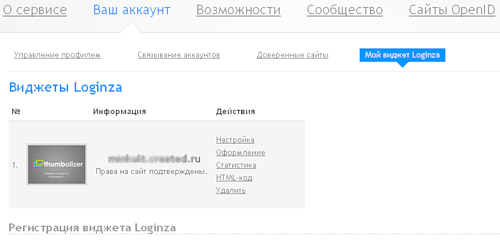
In the interface of the personal account Loginzy you need to register the site. Then take
confirm the rights by posting the file to the site. As in Yandex webmaster (by the way, who does not know -
Yandex bought Loginz).
')
After the rights are confirmed, you can get the ID of the widget, and the secret key of the widget.
They will be needed to develop an authorization script. Also, in the settings you need
tick "safe mode". "Dangerous mode", apparently was in the past, about
Security a few words at the end of the post.
The final preparatory step is getting the widget's HTML code. This can be done all on
same management page "My Widgets".
Base development
My implementation will not claim perfection, but it will fully show
the essence of what is happening.
It should be understood that authorization "through LoginZu" is just an interlayer between
user of soc. network and site. Successful authorization through Loginzu still does not give
authorization on the site. Usually, for authorization on the site, the user must enter
correct login and password, after which he gets access. In our case, successful authorization
through Loginzu, this is a kind of login and password entry, but not yet authorization.
So, we have two tables in the database:
1. users (fields: user_id, nickname, password, email)
2. loginza (fields: id, identity, provider, nickname, email, status, user_id)
The first table stores the users of the site, authorization on the site occurs exactly according to the data in
this table. C fields of this table, I think, everything is clear.
The second table also stores users. But these are users who successfully logged in through
Loginzu.
identity - passes Loginza. Something like a unique key from the provider.
provider - passes Loginza. This is the service through which the user logged in (VKontakte, Facebook,
Yandex, etc.)
nickname, email - betrays Loginza. Nickname (mail) who returned the authorization provider. Can
be anything Or not at all.
status - new user / old user
user_id - user id in the users table
This is the minimum set of tables.
Authorization script itself
Login page
The HTML code you received at the first stage is a login form. Placed on page
authorization.
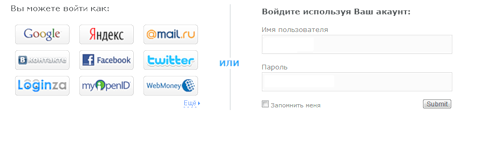
In the resulting code, you must specify the address to which the user will go if successful
authorization. This script will receive the data on authorization!
loginza.ru/api/widget?overlay=loginza&token_url= Your site / auth.php
You need to specify the full URL with http: // or https: //, pre-encoded PHP
the urlencode () function.
The script receive the response and registration and authorization of the user
This script should recognize the response from logins and guide the user further.
The contents of the script is something like this:
$loginzaid='ID'; //ID
.
$loginzakey='HASH'; //
.

$token=$_POST['token']; // .
$sig=md5($token.$loginzakey); // .
$kk="http://loginza.ru/api/authinfo?token=".$token."&id=".$loginzaid."&sig=".$sig.""; //
url
$b=file_get_contents($kk); //
$authresult=json_decode($b,true); // PHP
In the array $ authresult - data about the authorized user.
In this example, we will somewhat simplify the task and assume that nickname and email are passed
the authorization provider and the user with such data in our users table are not yet
exists. In practice, this should be checked, and if there is no data or they duplicate
existing login in the user base - request a clarification from the user. But it is different
story.
So, we continue.
New user
Check if there are entries in the loginza table with the received provider parameters and
identity
$res=mysql_query("SELECT * FROM $tbl_l WHERE identity='$authresult[identity]' AND
provider='$authresult[provider]'");
If there is no such record, then we put the user in the loginza table
if(mysql_num_rows($res)==0)
{
mysql_query("INSERT INTO loginza (
`identity`,
`provider`,
`nickname`,
`email`,
`status`,
`soc_user_id`
)
VALUES
(
'$authresult[identity]',
'$authresult[provider]',
'$authresult[nickname]',
'$authresult[email]',
0,
0
)
") ;

}
Now for sure this user is there.
We read about the user with such identity and provider (ugly, but for simplicity
narration).
$res=mysql_query("SELECT * FROM $tbl_l WHERE identity='$authresult[identity]' AND
provider='$authresult[provider]'");
$loginza=mysql_fetch_assoc($res);
If this is his first entry and acc. it is not yet registered in the users table - register it
there, and then update the loginza table:
if($loginza['status']==0)
{
$pwd=md5(' '); // ( ) MD5-
mysql_query("INSERT INTO users (nickname, password, email) VALUES ('$loginza[nickname]',
'$pwd', '$loginza[email]' )"); //
$iid=mysql_insert_id(); // ID . .
// loginza
mysql_query("UPDATE loginza SET status=1, user_id=$iid WHERE id=$loginza[id]"); //
=1 users
}
Everything! Now we have a link between the authorization of this user and Loginz.
It remains only to authorize this user on the table users and put it on the site.
if($loginza['status']==1)
{
Someauthorization($iid); //,
}
Existing user. Re-entry.
What will happen if this user logs in again (next time)? Back to the moment
when we assigned a check to the first user login:
if($loginza['status']==0)
And so on.
If the user has already logged in successfully to the site, his status in the loginza table is one.
We need to find out the user_id of this loginza entry and send it for authorization! And it's all!
if($loginza['status']==1)
{
Someauthorization($loginza['user_id']); //,
}
A few words about security
In my opinion, Loginza provides sufficient security, all critical
shoals that were - sort of covered up. Personally, I do not see a potential vulnerability.
As for the code given by me - this is just an example, an illustration, and not a ready-made code. Not
It is worth using the code given by me in the form in which it is.
Source: https://habr.com/ru/post/125116/
All Articles